On this page
- What can an AI assistant do at a small hotel front desk today?
- Three places the assistant works in Hotelier Tools
- How approval cards keep the AI from making a costly mistake
- Real requests, and what happens next
- What should an AI assistant never do on its own?
- Roles, privacy and cost
- How to try it safely
- Summary
Yes, an AI assistant can already take real work off a small hotel's front desk: answering "who arrives tomorrow and who still owes money?", drafting guest replies, and preparing booking changes or invoices. The safe way to use one is simple: it can read freely, but every change waits for a person to approve it, and refunds, price pushes and replies to Booking.com guests are never left to the AI alone.
This guide shows what that looks like in practice with Hotelier Tools on top of Little Hotelier, including real requests and exactly what happens after you press Enter.
What can an AI assistant do at a small hotel front desk today?
Think of three kinds of work, each with a different level of trust.
| Kind of work | Examples | Who decides |
|---|---|---|
| Look up | Tomorrow's arrivals, unpaid balances, unassigned rooms, whether a stay can be invoiced, tonight's rates | The assistant answers. Nothing changes. |
| Draft | A reply to a WhatsApp or email question, a note for the night porter | You read it and send it, or edit it first. |
| Change | Update a guest's phone, enroll a stay for the invoice at checkout, apply a price | The assistant prepares a card. You press Approve or Reject. |
Little Hotelier already gives you a lot at the desk. Its own Guest Engagement Messaging Hub brings email, SMS, WhatsApp and Airbnb conversations into one inbox, with templates and scheduled messages. What an assistant adds is the ability to ask in plain words and get an answer built from your live bookings, instead of clicking through the calendar and reservation screens.
Three places the assistant works in Hotelier Tools
Hotelier Tools uses the same set of tools in three places. All of them follow the same rule: reads run, changes wait for a person.
The assistant chat in the dashboard (beta)
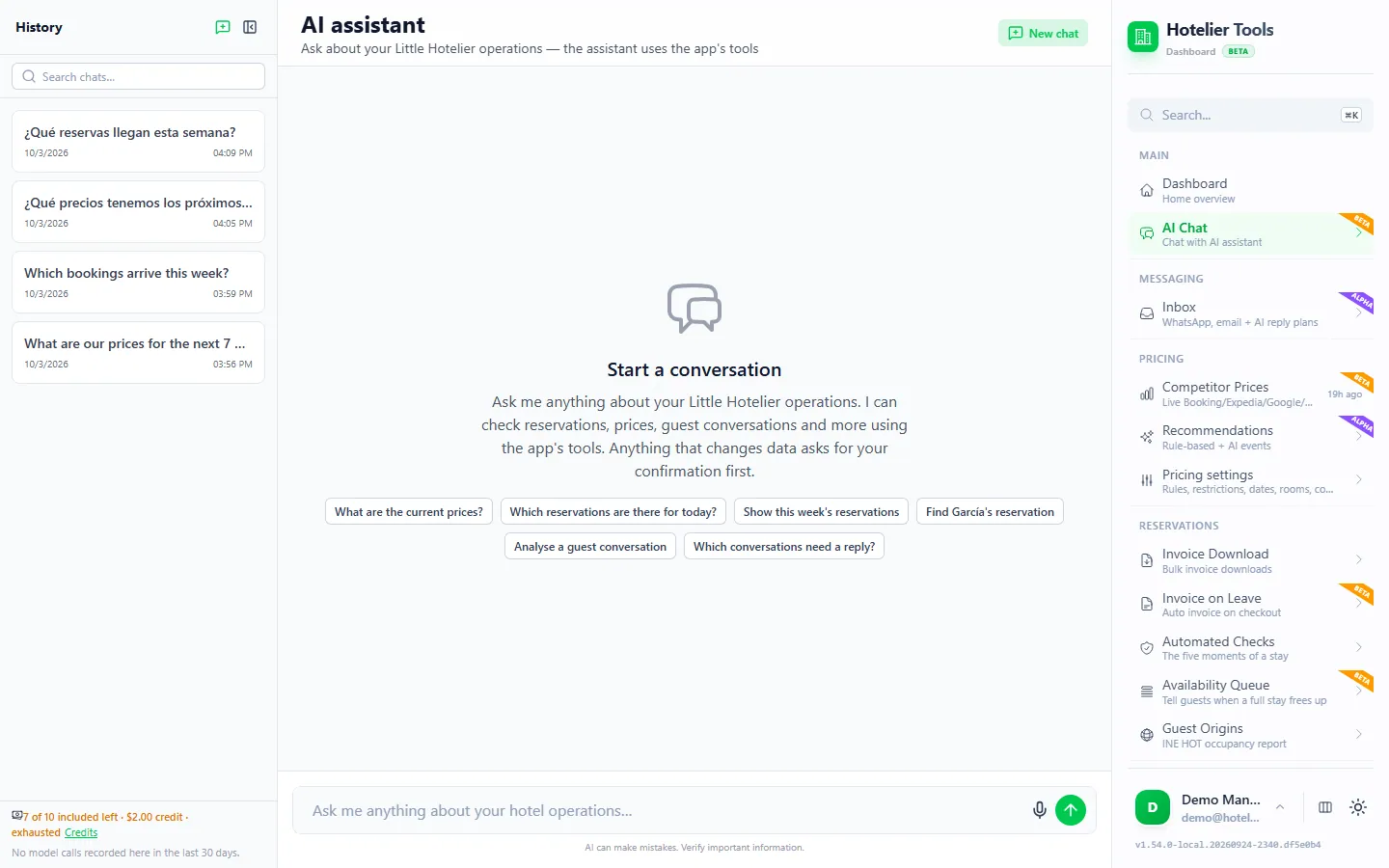
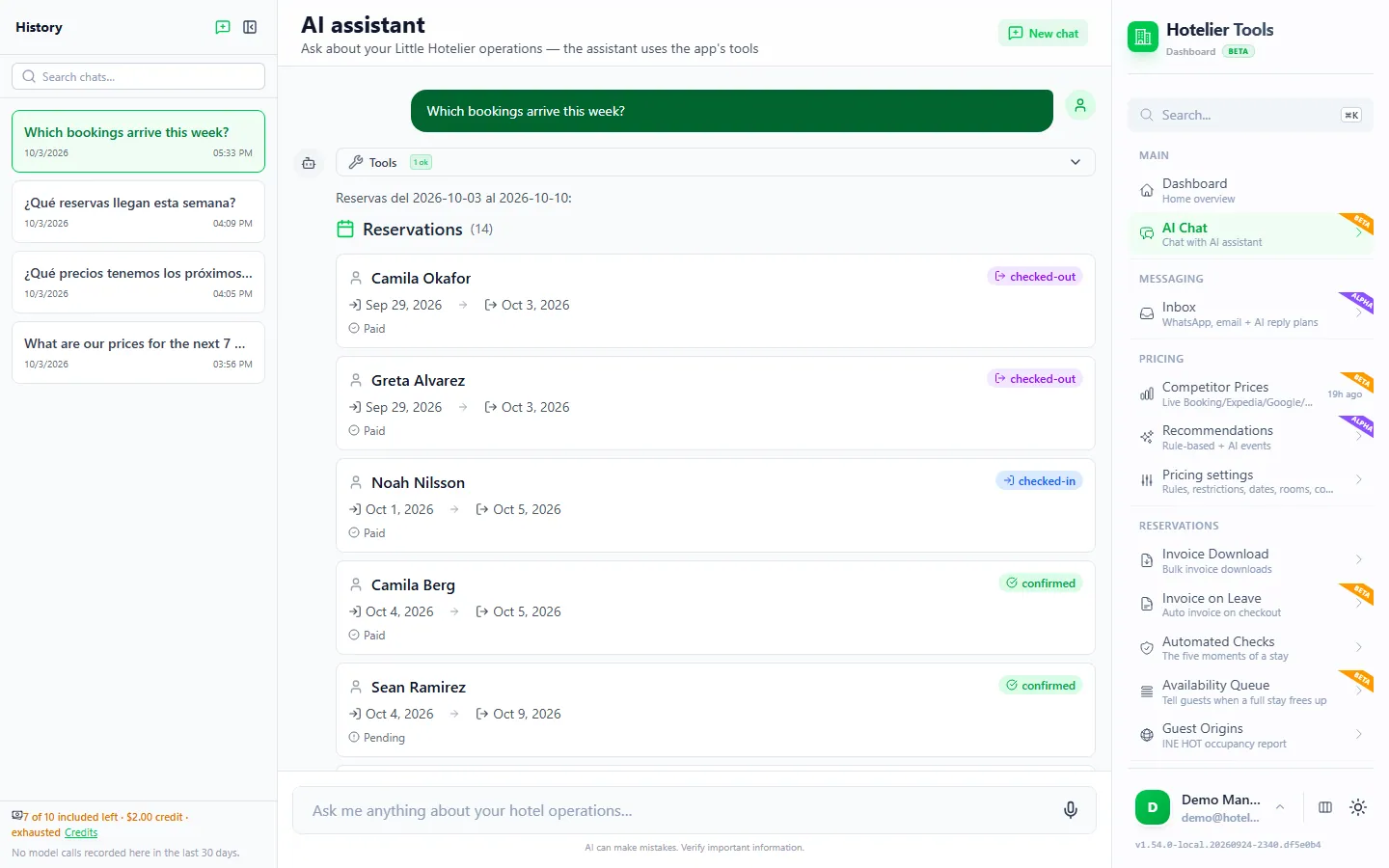
Open AI Chat (/chat) and type a question about bookings, guests, prices, invoices, checks or the waitlist. The empty chat says it plainly: "Anything that changes data asks for your confirmation first."
Answers come back as text and as cards: a reservation summary, a proposed change with an evidence table, an invoice-at-checkout enroll card, a price-recommendations table, or pricing-rule sliders. Every past conversation is kept in Chat History (/chat/history).
There is also a microphone button. It uses your browser's built-in speech recognition, which is set to Spanish (es-ES) for now, so voice suits Spanish speakers. Everyone else types.
The staff assistant over WhatsApp or email (alpha)
On Staff assistant (/staff) you register an employee with a name, their WhatsApp number and/or email, and a role: Read only or Can request changes.
When that person writes to your hotel's connected WhatsApp number or mailbox, the AI answers them as staff, on the same channel, using your Little Hotelier data. Their messages never mix with the guest inbox.
- An employee with Read only can ask questions only.
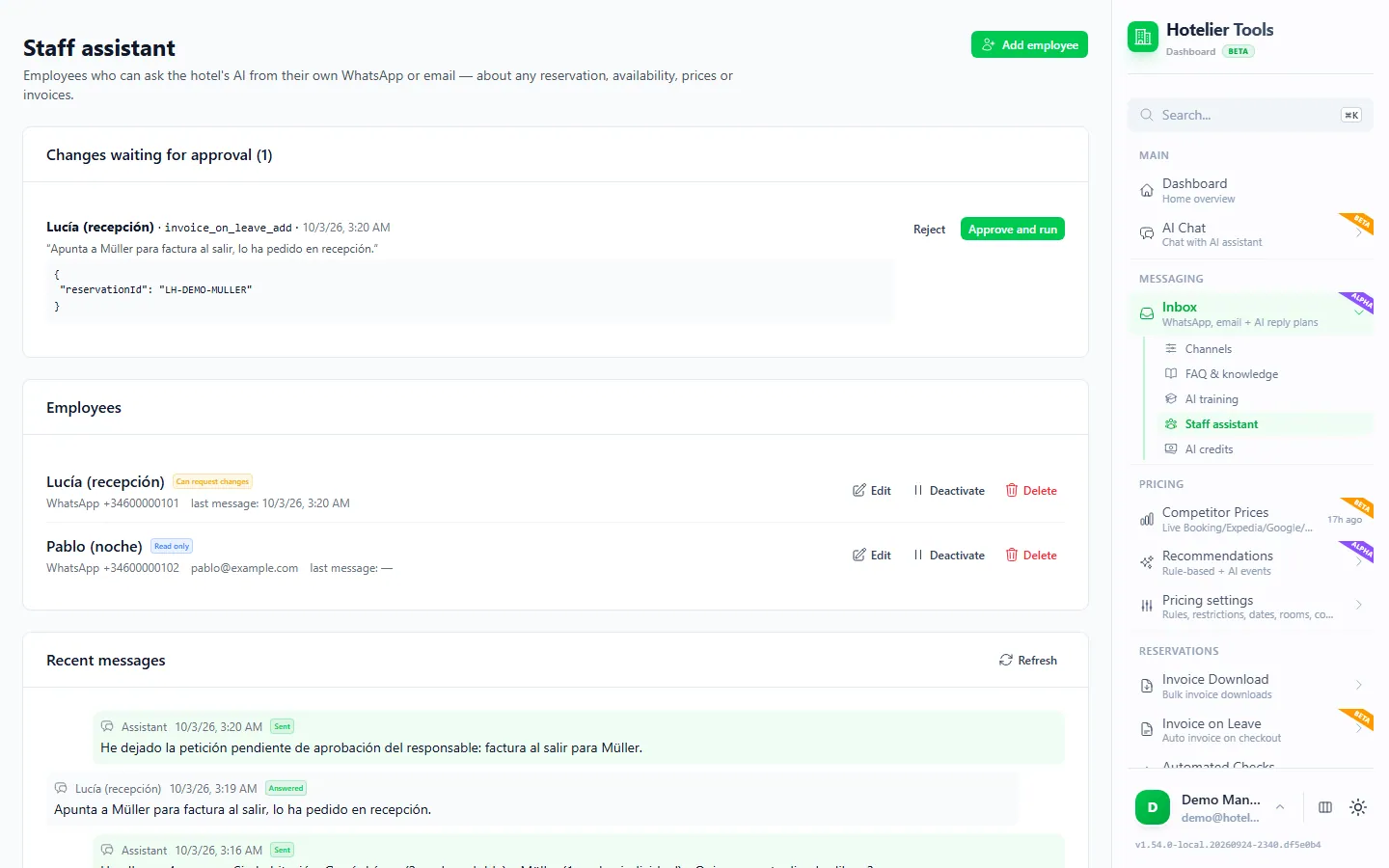
- An employee with Can request changes can ask for changes, but each one becomes a request that the owner approves on
/staff. - Identity is the sender itself: the registered phone number or an email that passes DKIM/DMARC checks.
- Messages older than 30 minutes are not answered, so a late reply never acts on stale information.
WhatsApp here works through a WhatsApp Web session (WAHA), not the official WhatsApp Business API. See WhatsApp with Little Hotelier for the options.
Draft replies in the guest inbox (alpha)
The guest inbox (/messaging) collects WhatsApp, email and Booking.com messages. For each connected account you choose a reply mode on /messaging/channels:
| Mode | What happens |
|---|---|
| Off | Messages are shown. Nothing is analyzed or sent. |
| Draft (default) | The AI prepares a reply and a plan. Nothing happens until you approve it. |
| Auto | The AI sends its reply after a delay, but it can never change a reservation. |
| Autonomous | The AI also carries out allowed reservation changes with no approval step. Review it several times a day. |
Start with Draft and stay there until you trust the answers. The guest-facing AI has no tools at all: it can only return a plan from a short list (send a message, flag for staff, add a reservation note, set an arrival time).
How approval cards keep the AI from making a costly mistake
An AI can misread a message or pick the wrong booking. Approval cards are there so a wrong guess never reaches Little Hotelier.
- Every write needs a card. If the system cannot tell whether a tool reads or writes, it treats it as a write.
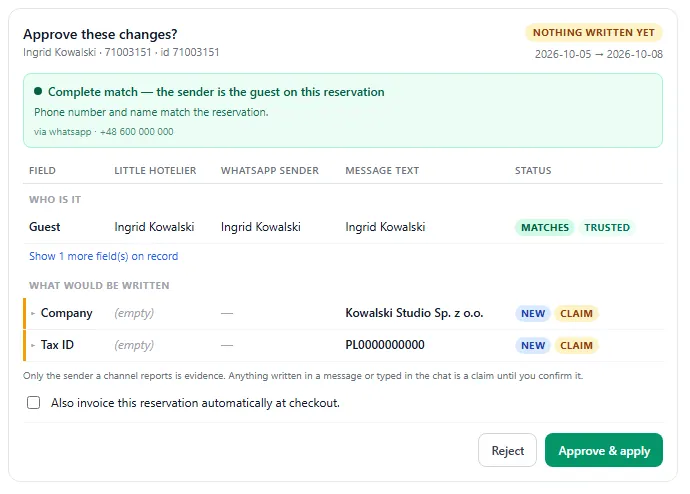
- The card shows the exact change. For a reservation, you see an evidence table: the value in Little Hotelier, what the sender gave, and what the message text says.
- You confirm the source. Reservation changes typed in chat include a checkbox ("this is the right reservation and I trust the source"), because a chat message is a claim, not proof of who someone is.
- Approve runs exactly that call. Pressing Approve runs the stored change on the server. The AI does not get a second chance to rewrite it.
- Each approval is single-use. It is tied to that tool, those values, that conversation and that person, and it expires after 24 hours.
- Refunds are separate. A refund is an irreversible action that always sits behind its own card.
Real requests, and what happens next
These are the kinds of things a receptionist types on a normal morning. The booking references are made up.
Who arrives tomorrow, and does any of them still have an unpaid balance?
The assistant reads tomorrow's check-ins and their payments and lists them, with a reservation summary card per guest. Nothing changes, so there is no card to approve.
The guest on booking BDC-1234567890 emailed a new mobile number: +34 600 000 000. Please update it.
The assistant finds the reservation and prepares a proposed change card: the old phone, the new phone, and where the new value came from. You tick the trust checkbox and press Approve. Only then is Little Hotelier updated.
The guest in BDC-1234567890 wants an invoice. Send it automatically when they check out.
You get the invoice-at-checkout enroll card. After you approve it, the stay is marked for the daily invoicing task, and Little Hotelier emails the invoice from your own template after checkout. Details are in sending the invoice at checkout.
What should a double room cost next Saturday, and why?
You get the price-recommendations table with the reasons behind each figure: competitors, demand, limits. Reading it changes nothing. Applying a price is a write, so it waits for your approval.
Refund the 40 € deposit on BDC-1234567890.
The refund appears as its own card. Nothing is refunded until you approve it. Outside the dashboard, through external AI assistants, refunds are blocked completely.
And from the staff assistant on WhatsApp:
Is room 5 free tonight? If so, move the Martin booking arriving today into it.
The first half is answered straight away. The move is a change, so it becomes a pending request on /staff for the owner to approve.
What should an AI assistant never do on its own?
Whatever tool you use, keep these with a person. Here is how Hotelier Tools enforces each one.
- Move money. Refunds always need their own card. External AI apps connected over MCP cannot refund at all.
- Change a booking because a message says so. The guest AI only sees a reservation when the sender is verified: a phone matching the booking on 8 or more final digits, the exact email, or a Booking.com thread. If two guests match, no booking is attached.
- Reply to Booking.com guests by itself. Automated AI sending to Booking.com is never allowed.
- Make things up. The guest AI answers only from your FAQ, house notes and property card. If you have not said whether there is parking, the answer is "to confirm", never "yes".
- Mention other guests. A reply guard blocks booking references that do not belong to the guest in the conversation.
- Push prices without limits. The AI is not inside the nightly price calculation. Autopilot is off by default and, when on, moves a night by at most ±20% by default and never below your floor price.
- File official returns or email guests from outside. Submitting the INE survey, emailing an invoice or messaging waitlisted guests is blocked for external AI apps. In the dashboard chat, each sits behind a card.
Unattended replies also have volume caps: 4 per hour, 12 per day, and 3 in a row with no answer from the guest.
Roles, privacy and cost
Roles. Requests from the staff assistant are approved by the owner on /staff. Team accounts with roles are listed as "soon" on the assistant page; they are designed so that, for example, a front-desk login can see prices but not change them, and cannot run a refund even with a card.
Privacy. Little Hotelier, Booking.com and mailbox logins are stored encrypted (AES-256-GCM). Guest messages and booking details are processed by an AI provider when the assistant reads them. The data processing agreement and privacy notice explain what is processed.
Cost. Hotelier Tools is free for every hotel until billing starts on 10 January 2027. Hotels that start in 2026 then pay 50 € per month throughout 2027, with every feature included. Each assistant answer and guest-message analysis uses AI credits; your allowance, balance and spending are on AI credits (/messaging/credits).
How to try it safely
- Open the public demo below. It uses an invented hotel, and nothing reaches real systems.
- Ask for tomorrow's arrivals, then ask for a change and look at the card you get.
- In your own dashboard, connect Little Hotelier on Credentials, fill the property card on
/settings/property(it reads your address, policies and rooms from Little Hotelier), and add your FAQ on/messaging/faq. - Leave the guest inbox on Draft for the first weeks and correct anything the AI misreads on
/messaging/training.
Try it in the live demo
Open the same screen in the Hotelier Tools demo, filled with invented data. No sign-up, nothing to install.
Summary
- An AI assistant is safe at the front desk when it reads freely and asks before every change.
- In Hotelier Tools that works in the dashboard chat, over WhatsApp or email for staff, and as draft replies in the guest inbox.
- Refunds, Booking.com replies, price limits and official returns stay with people.
- Want the same answers inside Claude or ChatGPT? Read what an MCP server is and then connect Claude to Little Hotelier.
Frequently asked questions
Can an AI assistant replace a hotel receptionist?
No. It takes lookups and first drafts off the desk: who arrives, who owes money, what to reply. Decisions about money, bookings and difficult guests stay with a person, who approves each change.
Can the AI cancel a booking or issue a refund on its own?
Not in the dashboard chat. Every change shows an approve or reject card first, and refunds are a separate irreversible action that always needs a card. The guest-facing AI cannot cancel, change dates or touch payments at all.
Does the voice assistant understand English?
Not yet. The microphone button uses your browser's built-in speech recognition set to Spanish (es-ES), and your browser must support it. You can always type in any language.
Will the AI reply to my Booking.com guests automatically?
No. Booking.com messages and guest questions arrive in the same inbox, but automated AI sending to Booking.com is never allowed. A person decides.
How much does the AI assistant cost?
Hotelier Tools is free for every hotel until billing starts on 10 January 2027. Hotels that start in 2026 then pay 50 € per month throughout 2027. Assistant answers use AI credits, which you can check on the AI credits page.
Is Hotelier Tools part of Little Hotelier?
No. Hotelier Tools is independent and is not affiliated with or endorsed by SiteMinder or Little Hotelier. It connects with your property's own Little Hotelier login.