On this page
Yes, Little Hotelier connects to WhatsApp natively through Messaging hub, part of the paid Guest Engagement add-on, using the official WhatsApp Business API: replying to a guest who wrote in the last 24 hours is free, and writing first needs an approved template that Meta charges for. The other common route is the free WhatsApp Business app on a phone, which has no link to your bookings. Hotelier Tools adds a third option, WhatsApp in one inbox with email and Booking.com, through a WhatsApp Web session (WAHA) rather than the official API.
Little Hotelier and WhatsApp details below were checked against their help pages as of October 2026.
Does Little Hotelier support WhatsApp?
Yes. Messaging hub in Guest Engagement brings WhatsApp, Booking.com, Airbnb, SMS and email conversations into one inbox, with the guest's profile and reservation linked to each chat (Messaging hub FAQ). Guest Engagement is an add-on, listed for the Pro plan on Little Hotelier's pricing page.
To connect WhatsApp (Connect WhatsApp in Guest Engagement):
- Go to Guest Engagement > Communication > Settings and click Configure on WhatsApp.
- Verify your business with your Facebook profile (WhatsApp and Facebook both belong to Meta).
- Create or link your WhatsApp Business account and profile.
- Add your payment details. WhatsApp invoices you directly; Little Hotelier adds no WhatsApp fee.
WhatsApp Business app or WhatsApp Business API?
| WhatsApp Business app | WhatsApp Business Platform (API) | |
|---|---|---|
| Cost | Free to download | Per message Meta delivers; replies in the 24-hour window are free |
| Where you use it | On the phone, plus linked devices such as WhatsApp Web | Through software such as Messaging hub |
| Writing first | Anytime, to guests who agreed | Only with a template WhatsApp approved |
| Link to bookings | None | Depends on the software |
The app gives you a business profile, quick replies for frequent answers, an automatic greeting and away message, labels to sort chats, and a catalog (WhatsApp Business app features). It works well for a small B&B where one person answers.
The Platform charges "on a per-message basis for each message we deliver to users". When a guest writes, a 24-hour customer service window opens, during which your replies are free, and it resets with every guest message (WhatsApp Business Platform pricing). Outside that window you need a template, and approval can take up to 24 hours.
WhatsApp templates for confirmations and check-in instructions
In Messaging hub, create templates under Guest Engagement > Communication > Settings > WhatsApp > Templates (Create and manage WhatsApp templates):
- Template name: lowercase with underscores, like
checkin_instructions. Guests never see it. - Category: Utility for booking confirmations, check-in instructions and payment reminders. Marketing for offers and upsells, with an Unsubscribe button. A promotion sent as Utility gets rejected.
- Variables: use Add variable for the guest name, dates, property name and address.
Three you can adapt (each bracket becomes a variable):
booking_confirmation (Utility)
Hi [guest name], your stay at [property name] is confirmed: [arrival date] to [departure date]. Reply here if you have any questions.

checkin_instructions (Utility)
Hi [guest name], see you on [arrival date]! Check-in is from [check-in time] at [address]. Reply with your arrival time and we'll have everything ready.

payment_reminder (Utility)
Hi [guest name], there is a balance of [amount] for your stay on [arrival date]. You can pay securely here: [payment link]. We never ask for card details in this chat.
WhatsApp rejects templates that ask for sensitive personal information, so don't request ID or card numbers in them.
Can several staff use one WhatsApp number?
- Messaging hub: yes. The API is built for it: several users reply from one shared inbox, and the reservation sits next to each chat.
- WhatsApp Business app: the same chats appear on the phone and its linked devices, such as WhatsApp Web at the front desk. There is no assignment, and nothing links a chat to a booking. With Meta Verified, WhatsApp says you can link up to 10 devices and agents.
- Hotelier Tools: the inbox is a web page, so whoever is signed in to the dashboard sees the same conversations, with the reservation beside each one.
One change affects every option: since 28 September 2026, Booking.com no longer sends guest phone numbers to channel managers, so new Booking.com bookings reach Little Hotelier without one (Booking.com for developers). Copy the number from the Extranet (Show phone number) when you want to write to that guest on WhatsApp.
WhatsApp, email and Booking.com in one inbox with Hotelier Tools
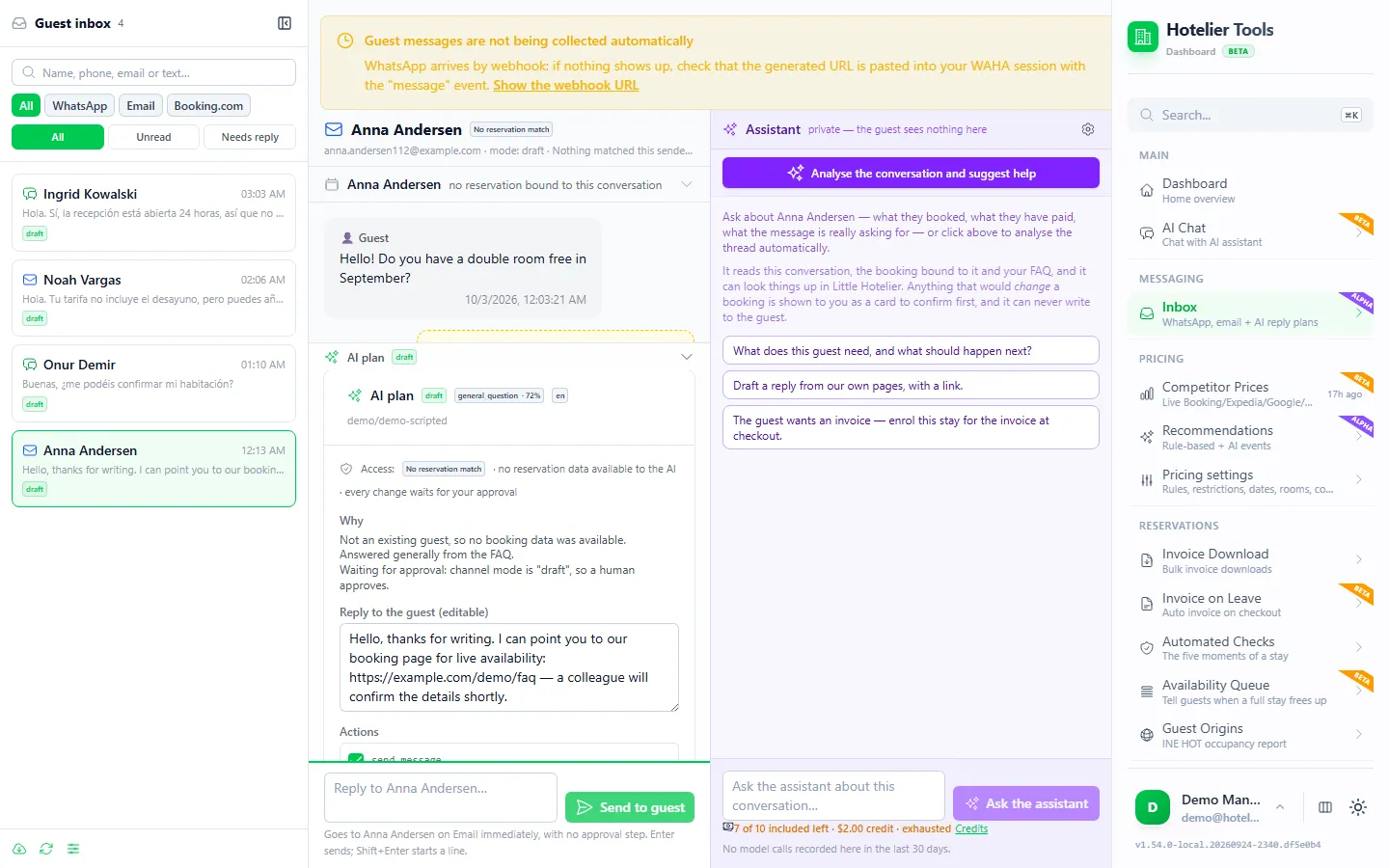
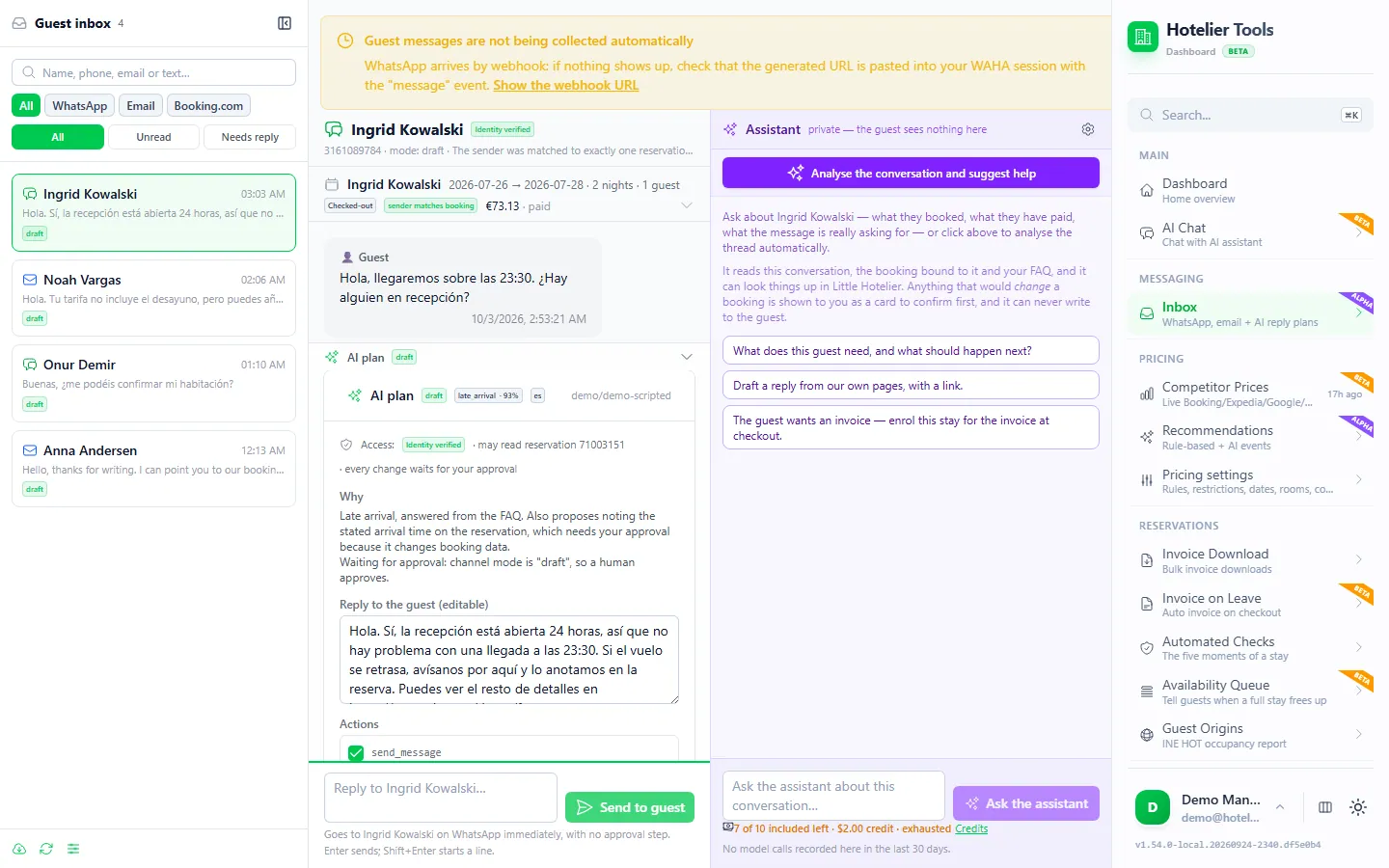
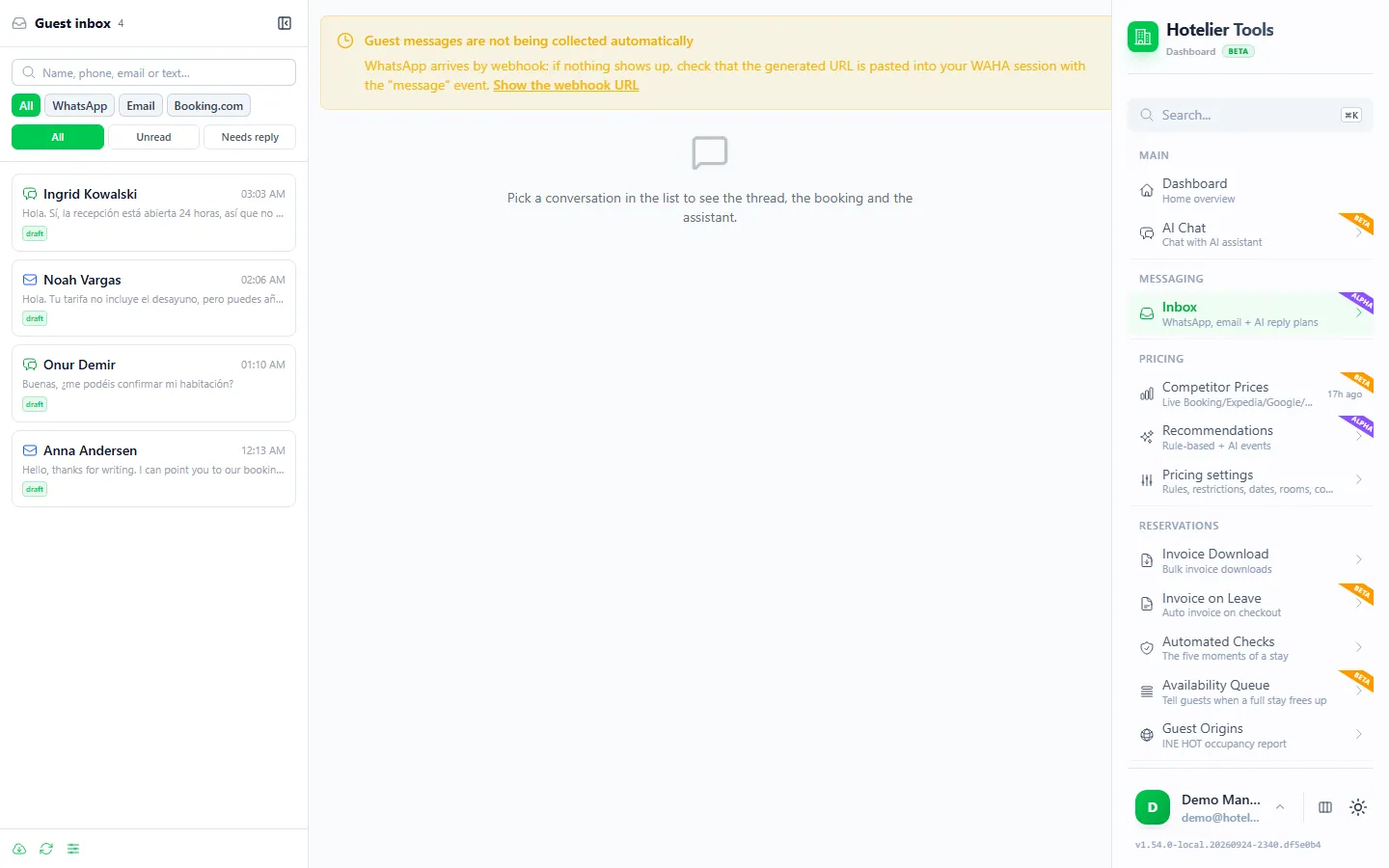
The Hotelier Tools Inbox (/messaging, alpha) shows WhatsApp, email and Booking.com messages in one list. For each conversation it shows the reservation and an AI-drafted reply that a person approves.
What "WAHA, not the official API" means for you
WhatsApp reaches Hotelier Tools through WAHA, a server that runs a WhatsApp Web session. Before you choose it:
- Your number stays on your phone. It works like WhatsApp Web open on a computer, so you keep using your WhatsApp or WhatsApp Business app as usual.
- No Meta business verification and no template approvals, because it doesn't go through the WhatsApp Business Platform.
- It isn't officially allowed. WAHA's own documentation says "WhatsApp does not allow bots or unofficial clients on their platform, so this shouldn't be considered totally safe." A number used this way could be blocked. WAHA's advice is to reply to people who write to you rather than start conversations, and never to send bulk messages (How to avoid blocking).
- You need a WAHA server. The dashboard asks for its address, a session name and an API key. Check with Hotelier Tools whether one can be provided for your property; otherwise you run your own.
- Group chats are ignored.
If you need the official API, Messaging hub is the right choice. If you mostly answer guests who message you and want WhatsApp next to email and Booking.com, the inbox fits better.
How to connect it
- Open Credentials > WhatsApp (WAHA) (
/credentials/messaging-whatsapp). Enter the WAHA base URL, the Session name and the WAHA API key, then save. - Click Copy webhook URL and paste it into your WAHA session's webhook, for the "message" event. Treat that URL as a password.
- Press Test connection.
- Open Inbox and filter by WhatsApp. Messages arrive as soon as they're sent.
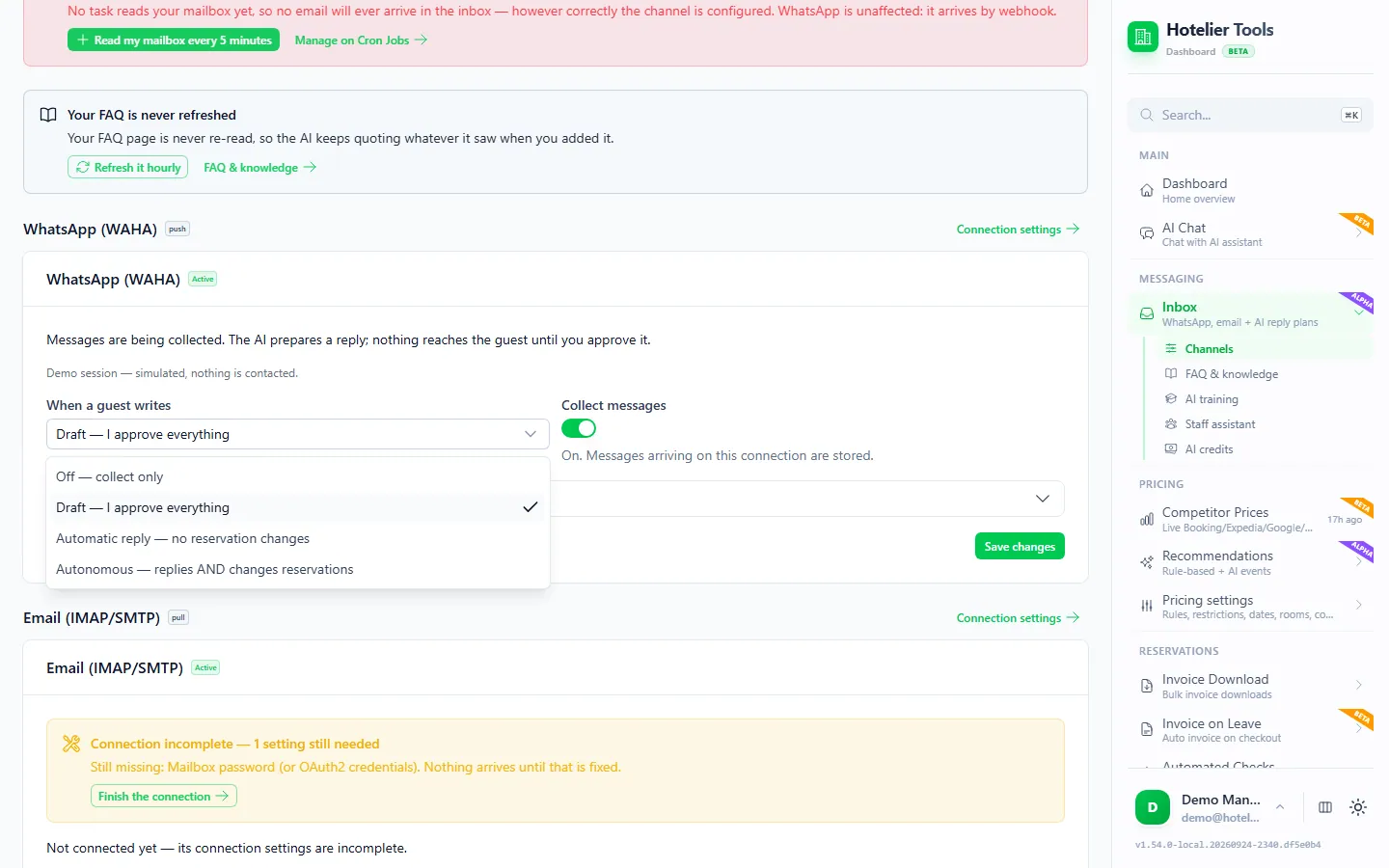
- On Channels (
/messaging/channels), choose the reply mode for this number. Draft is the default: the AI prepares a reply and nothing is sent until you approve it.
What the AI may do on WhatsApp
- It only sees a booking when the sender is verified. On WhatsApp, the number must match the reservation's phone on at least its last 8 digits. If two guests match, it sees neither. For Booking.com guests, add the phone to the Little Hotelier reservation so the chat can be matched.
- It answers from your facts. It uses your FAQ, house notes and property card (
/messaging/faq), and answers "to confirm" for anything you haven't listed. - It has no tools. It returns a plan from a closed list (send a message, flag for staff, add a reservation note, set the arrival time). It can't cancel, change dates or touch payments.
- Automatic reply has conditions. It needs a verified guest, an allowed request and enough confidence, and stops at 4 replies an hour, 12 a day, or 3 in a row without an answer from the guest.
- It waits for you first. A WhatsApp message is analyzed after 5 minutes; if someone on your team has already replied, nothing is analyzed or charged. Each analysis uses AI credits.
Your staff can also ask the AI about bookings by writing to the same connected number, through the Staff assistant (/staff, alpha). Their messages never enter the guest inbox, and any change they ask for waits for the owner's approval.
Try it in the live demo
Open the same screen in the Hotelier Tools demo, filled with invented data. No sign-up, nothing to install.
How the inbox handles Booking.com conversations is in how to manage Booking.com guest messages, and the full feature list is on the Guest inbox page. The dashboard is free for every hotel until billing starts on 10 January 2027.
Consent and privacy on WhatsApp
WhatsApp's Business Policy says you may only contact people who have given you their number and "opt-in permission ... confirming that they wish to receive subsequent messages or calls from you" (WhatsApp Business Policy). In practice:
- Ask at booking or check-in whether the guest wants updates on WhatsApp, and note it on the reservation.
- Use the number only for their stay. Marketing needs its own permission.
- Say in your privacy notice that you use WhatsApp, and stop when a guest asks.
Summary
- Messaging hub (Guest Engagement add-on) is Little Hotelier's native, official-API option: shared inbox, reservation linked, templates, Meta fees for messages you start.
- The WhatsApp Business app is free and fine for one person, but knows nothing about your bookings.
- The Hotelier Tools inbox puts WhatsApp with email and Booking.com, with AI drafts a person approves. It uses a WhatsApp Web session (WAHA), not the official API, so keep it to conversations guests start.
- Since 28 September 2026, Booking.com bookings arrive without a phone number: copy it from the Extranet when you need it.
Frequently asked questions
Does Little Hotelier have WhatsApp?
Yes, through Messaging hub in the Guest Engagement add-on. It connects to the official WhatsApp Business API, links conversations to the guest's reservation and lets several users reply from one number.
Can I keep my WhatsApp Business app number when I connect Messaging hub?
Not on both at once. A number connected to the WhatsApp Business API can't also be used in the WhatsApp Business app. You must remove it from the app first, and the app's chat history can't be restored, so Little Hotelier suggests testing with another number.
How much does WhatsApp cost for a small hotel?
The WhatsApp Business app is free. On the WhatsApp Business Platform (the API behind Messaging hub), Meta charges per delivered template message, while replies inside the 24-hour customer service window are free. Little Hotelier adds no WhatsApp fee, but Guest Engagement itself is a paid add-on.
Can I send automatic pre-arrival messages on WhatsApp?
In Messaging hub you start WhatsApp conversations with templates that WhatsApp has approved, such as check-in instructions. The free WhatsApp Business app only automates a greeting and an away message.
Is the Hotelier Tools WhatsApp connection the official WhatsApp Business API?
No. It uses WAHA, which runs a WhatsApp Web session. That means no Meta verification or template approvals, but WhatsApp doesn't allow unofficial clients, so a number used this way could be blocked. Use it mainly to answer guests who write to you.
Will the AI answer WhatsApp guests on its own?
Only if you choose Automatic reply or Autonomous for that account. The default, Draft, prepares a reply that waits for a person. Automatic replies also need a verified guest, an allowed request and enough confidence, and are capped per hour and per day.