On this page
Yes, in the EU and UK you can keep a list of guests you won't accept again, as long as you can justify it as a legitimate interest, record only objective facts, keep entries no longer than needed and let a person, not software, decide each case. Little Hotelier's help centre describes no do-not-rent flag, and its guest profiles can't hold notes. The practical setup is a short, factual list that alerts you when a listed guest books again, plus Booking.com's own block option.
Is a guest blacklist legal under GDPR?
It can be. A do-not-rent list is personal data, so every GDPR rule applies to it. The EU's former data protection advisory body, the Article 29 Working Party, called blacklists "an intrusion" and said they can only exist legally if they respect the usual principles and the rights of the people listed (Working Document on Blacklists, WP 65).
For a hotel, the legal basis that normally fits is legitimate interests (GDPR Article 6(1)(f)): protecting your staff, your property and your revenue. The UK's ICO describes it as a three-part test (ICO):
- Purpose: is there a real interest? Avoiding a repeat of unpaid stays, damage or aggression is one.
- Necessity: is the list a targeted, proportionate way to achieve it, with no less intrusive option?
- Balance: would the guest reasonably expect it, and does it avoid unjustified harm to them?
The European Data Protection Board sets out the same three conditions in its Guidelines 1/2024 on legitimate interest. Write your answers down in a short document. That record is your evidence if anyone asks.
Some countries add their own expectations. In France, the CNIL says a business must tell people that such a list exists and what it is for, warn them before adding them, and give them reasonable time to respond (CNIL).
What to record, and what never to record
Keep each entry short enough that you'd be comfortable if the guest read it. Under the GDPR's right of access, they can ask to.
| Field | Example | Why |
|---|---|---|
| Name and one strong identifier | Email or phone you already hold | So a match is reliable |
| Stay and reference | 12–14 March 2026, reservation 10234 | Links to the facts |
| What happened, in facts | "Left without paying 2 nights (€240). Three payment requests unanswered." | Objective and provable |
| Decision | Block, or warn and review | A person decided |
| Review date | March 2027 | Not kept forever |
Never record:
- Opinions and labels ("rude", "dodgy"). Describe behavior instead: "Shouted at night staff at 02:00; two guests complained in writing."
- Health, ethnic origin, religion, sexual orientation or political views. These are special categories under GDPR Article 9.
- Accusations of crimes. Criminal offense data has extra limits under Article 10, so write what you saw ("two towels and a lamp missing at check-out"), not a verdict.
- Who the guest is as a reason. A list is for what someone did, never for nationality, appearance or any other personal trait. That is discrimination.
The full text of the GDPR is on EUR-Lex.
How long to keep someone on the list
The GDPR doesn't set a number of years. It says data must be kept no longer than necessary (Article 5). Pick a review period that matches the seriousness, for example one year for a noisy stay and longer for serious damage, and remove entries that no longer justify themselves.
Mention the list in your privacy notice (Article 13). If a guest asks what you hold or objects, answer without undue delay and within one month (Article 12).
What Little Hotelier and Booking.com offer natively
In Little Hotelier
- Notes go on reservations, not guests. Guest profiles hold the name, address, phone and ID details, but the help centre says notes about guests can't be saved in profiles, only on related reservations (help centre). The reservation's Notes tab is for internal, staff-only notes (help centre).
- You can search guests on the Guests tab by name, email, phone or booking number.
- The limits: someone has to search every new booking by hand. And Little Hotelier masks guest personal information 180 days after check-out (help centre), so a note on last year's stay is hard to find by name.
A workable manual routine: write the facts in the reservation's Notes, keep a short separate list with the guest's email and phone, and check each new booking against it.
On Booking.com
Booking.com has its own block. In the extranet, go to Reservations, open the guest's booking, click Report guest misconduct, choose the scenario, add a short factual comment under Details, tick the box to block the guest from booking your property in the future, and click Submit report. Reports can be filed from check-in until seven days after check-out (Booking.com Partner Hub).
It only covers Booking.com. The same guest can still book direct or through another channel.
Can I refuse or cancel an OTA booking from a listed guest?
Not on your own, on Booking.com. Request to cancel reservation sends the guest an email asking them to confirm, and the booking stays active until they accept. You can use it up to 48 hours before check-in; after that, Booking.com asks you to send the guest to Customer Service (Booking.com Partner Hub). Invalid cards follow a separate process: see Booking.com invalid card or no-show.
In practice, that means contacting the guest early, explaining calmly and offering a free cancellation. For direct bookings, your own terms apply. Either way, an alert the night the booking arrives gives you days to act instead of minutes at the desk.
How to get an alert when a listed guest books again
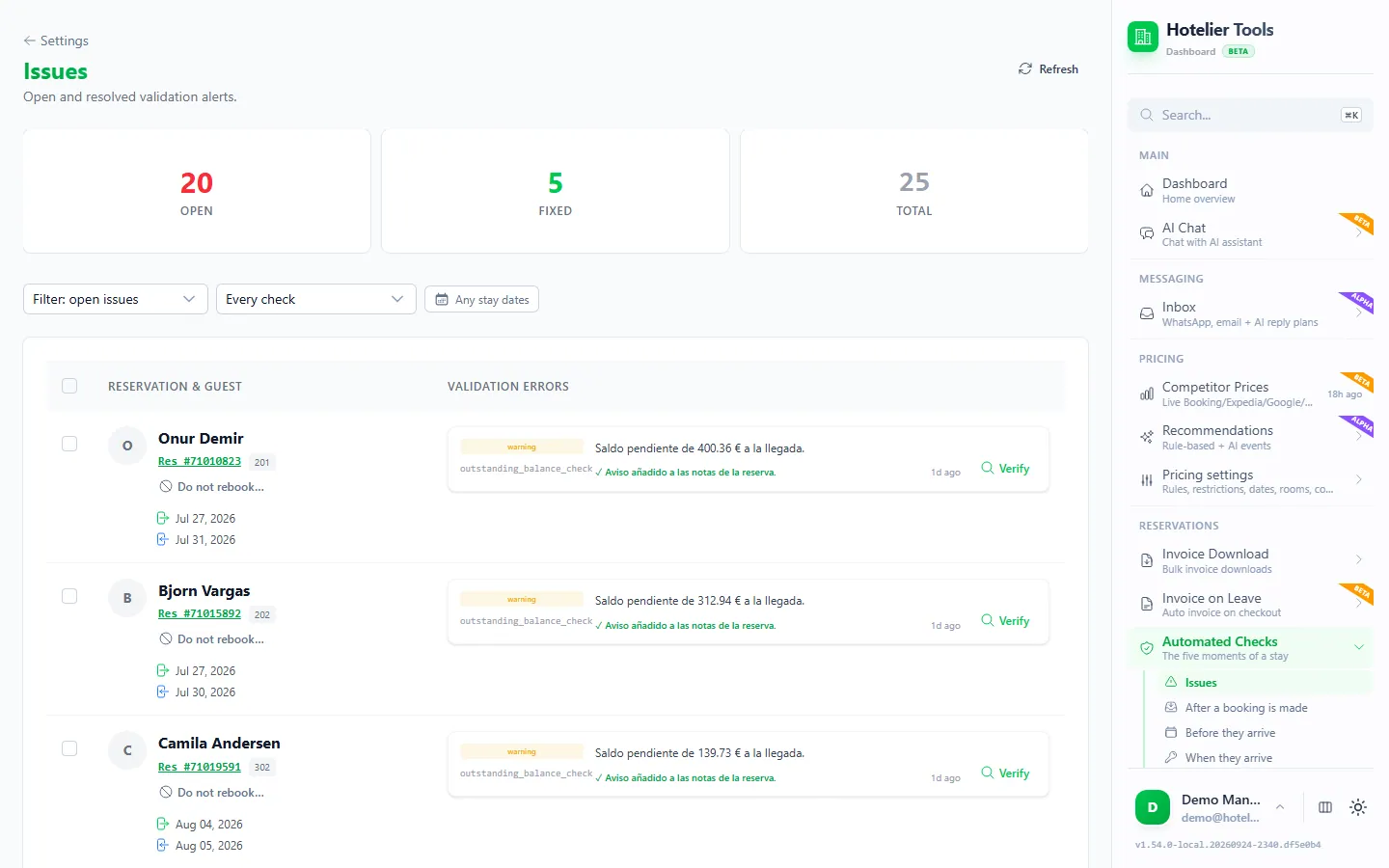
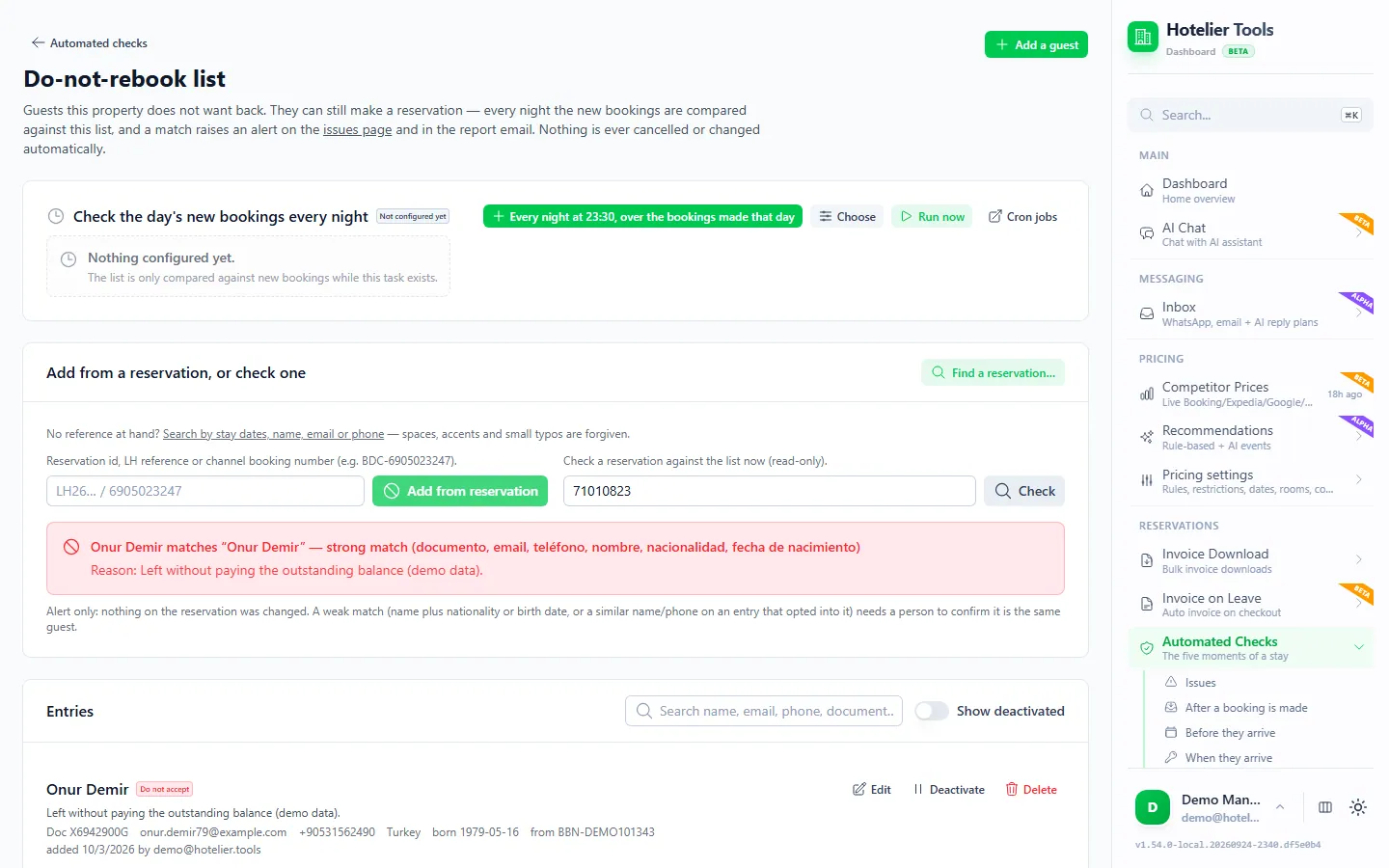
Hotelier Tools has a Do-not-rebook list (beta) at /automated-checks/watchlist. Every night, the day's new bookings and upcoming arrivals are compared with the list. A match becomes an issue and a line in the report email.
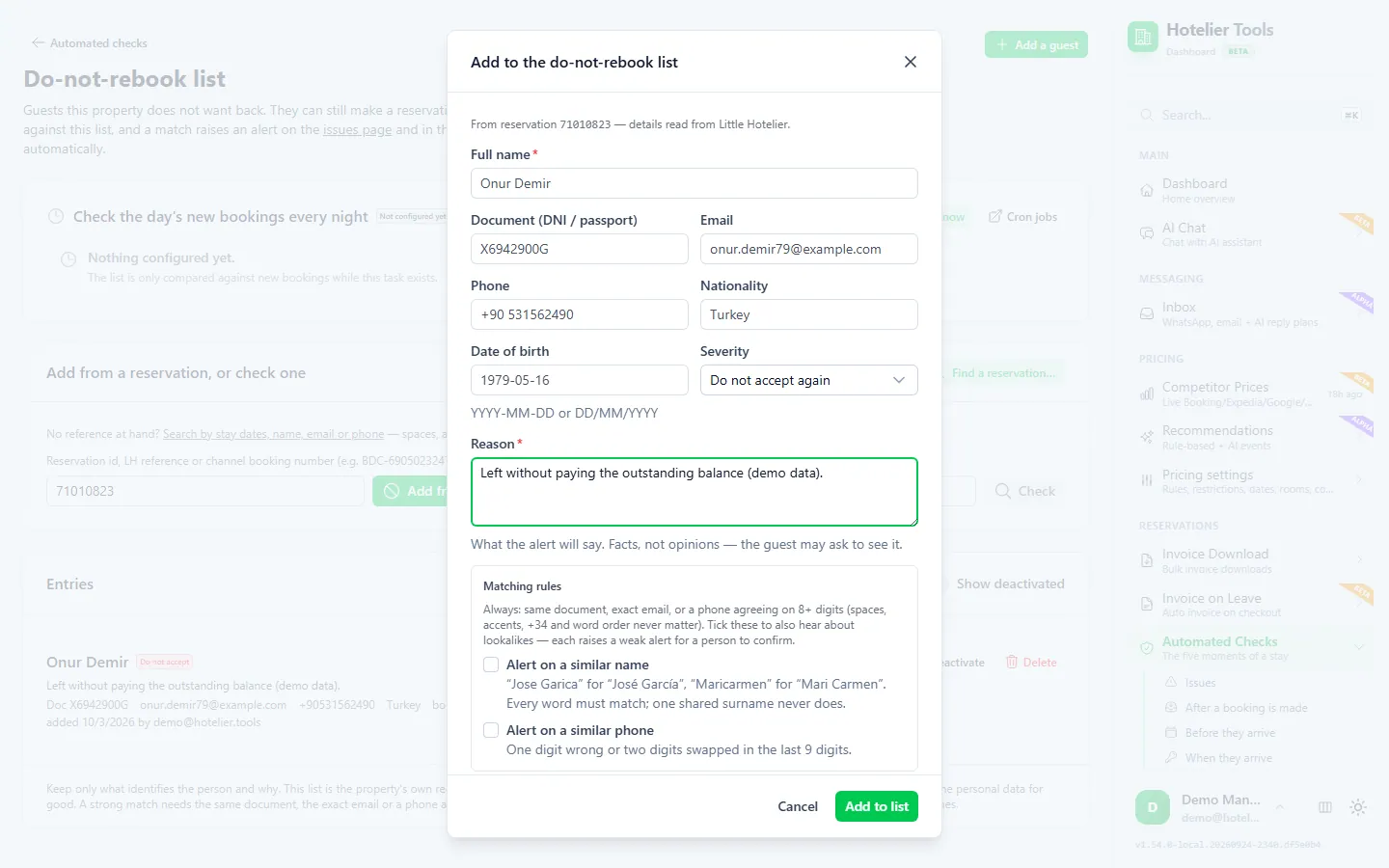
- Add a guest from a reservation. On Issues, or in the inbox's reservation panel, press Do not rebook…. Choose which guest (the booker or a companion), a severity (such as Do not accept again) and a factual reason.
- Or add one by hand. Press Add a guest, or use Find a reservation… to search by stay dates, name, email or phone.
- Create the nightly task. On the same page, press Every night at 23:30, over the bookings made that day. Without it, nothing is compared.
- Decide when a match appears. Open the issue, look at the facts and decide what to do. The software never decides for you.
- Clean up. Deactivate stops alerts and keeps the record. Delete removes the personal data for good.
How it recognizes a guest whose details changed
- Strong match: the same document number, the exact email, or a phone that matches on the last 8 digits or more.
- Weak match: the same name plus the same nationality or date of birth.
- A name alone never matches. For one entry you can opt in to "similar name" or "similar phone" (lookalike spellings, a one-digit typo). Those only ever raise a warning.
Keeping a person in the loop matters legally too: GDPR Article 22 restricts decisions made solely by automated means that significantly affect someone.
Try it in the live demo
Open the same screen in the Hotelier Tools demo, filled with invented data. No sign-up, nothing to install.
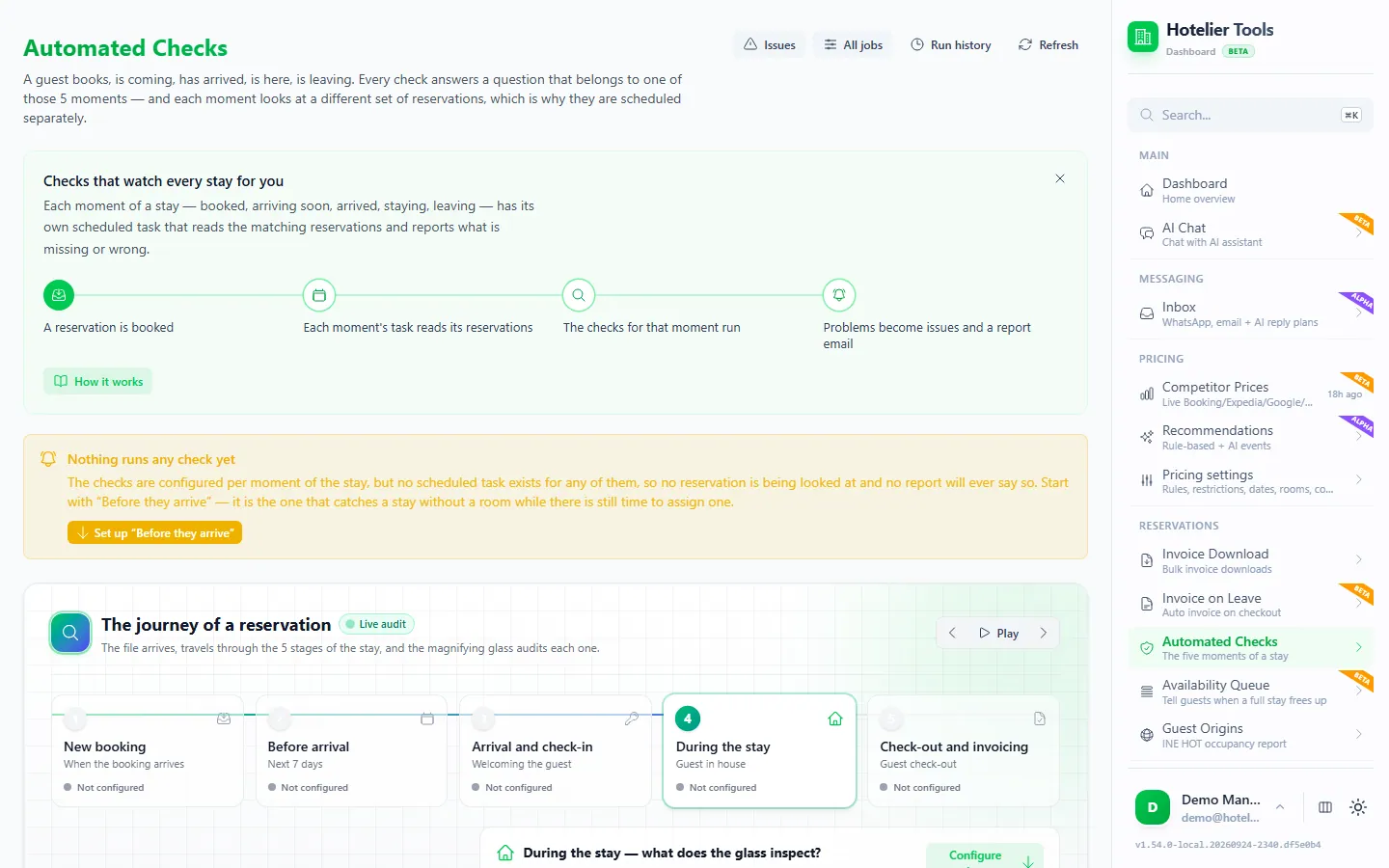
The same nightly run can check rooms, IDs and payments too. See the daily front-desk checklist and the Automated checks page.
Can hotels share a do-not-rent list?
Be very careful. A list you share with other hotels is a different processing: the other hotels never dealt with the guest, and the harm to someone wrongly listed grows with every property that sees it. The Article 29 Working Party noted that the common shared lists, such as debtor files, rely on specific national laws (WP 65, linked above). Don't share entries between businesses without legal advice.
Summary
- A do-not-rent list can be lawful under GDPR: legitimate interest, facts only, a review date, and a person who decides.
- Record what happened, with dates and amounts. Never record opinions, sensitive traits or accusations of crimes.
- Little Hotelier keeps notes on reservations only; Booking.com lets you block a guest through Report guest misconduct.
- Hotelier Tools' Do-not-rebook list compares new bookings with your list every night and alerts you. It never cancels anything.
Frequently asked questions
Is it legal for a hotel to keep a blacklist of guests?
In the EU and UK it can be, if you can justify it as a legitimate interest, record only objective facts, keep entries no longer than needed and let a person decide each case. Rules vary by country, so check with your data protection authority if in doubt.
Do I have to tell guests about my do-not-rent list?
Be transparent: mention in your privacy notice that you keep a record of guests refused after serious incidents. In France, the CNIL also says people should be warned before they are added and given time to respond.
Can a guest ask to see what I wrote about them?
Yes. Under the GDPR right of access, a guest can ask for a copy of the data you hold about them, including the reason on your list. You normally have one month to answer, which is a good reason to write only facts.
Can I block a guest on Booking.com?
Yes. In the extranet, open the reservation, click Report guest misconduct, choose the scenario and tick the box to block the guest from booking your property in the future. You can report from check-in until seven days after check-out.
Will Hotelier Tools cancel a listed guest's booking?
No. The do-not-rebook list only raises an alert on the Issues page and in the report email. It never cancels, refuses or edits a booking: a person decides.