On this page
Little Hotelier promo codes live in its booking engine. Go to Direct booking > Promotion codes (classic version: My Apps > Direct booking > Setup > Promotion Codes), create a code, set a discount, the booking dates and stay dates, and link the room rates it applies to. Share it as a link with ?promotion_code=YOURCODE. Hotelier Tools adds a page that explains each code in one sentence and warns when a code undercuts your minimum price or stacks with other discounts. You can pause a code and resume it later.
Where are promo codes in Little Hotelier?
Promo codes belong to the booking engine on your website (direct-book.com), built on TheBookingButton. They don't change your rates in the front desk or on any channel.
- Current version: Direct booking > Promotion codes (help centre).
- Classic version: My Apps > Direct booking, the Setup tab, then the Promotion Codes tile (help centre).
Labels below are from Little Hotelier's help centre as of November 2026.
How to create a promo code
- Open Promotion Codes and click Create.
- In Code, type what guests will enter. No spaces, and each code must be unique.
- In Description, write the text guests see in the booking engine.
- In Default rate discount, choose a percentage or an amount, and type it.
- Set Available From/To: the dates on which guests can book with the code.
- Set Applicable From/To: the nights guests can stay with the code.
- Optionally tick Hide Promo Code in reservation summary.
- Select the room rates the code applies to. A rate can have its own discount, which overrides the default.
- Click Save.
Source: Set up and manage promotion codes.
Two settings surprise people. By default, a valid code hides all your public rates, so the guest sees only the rates linked to the code. To change that, untick Hide public rates when a Promo Code is applied in Setup > Properties > Customisation. And the Add Promo Code field is always visible on the booking engine.
How to share a promo code as a link
Guests forget to type codes. Send a link that applies the code for them. In Promotion codes, expand the code and click Promotion code link to copy it (help centre). The format is:
- Europe, Middle East, Africa and the Americas:
https://direct-book.com/properties/yourproperty?promotion_code=YOURCODE - Asia Pacific:
https://book-directonline.com/properties/yourproperty?promotion_code=YOURCODE
A 0% code is useful too: link it to one room type's rates and the link shows that room type only (with public rates hidden).
Minimum stay, usage limits and first-time guests
Little Hotelier's own answers, as of November 2026 (help centre):
- Minimum stay: codes have none. Create a room rate with, say, a two-night minimum, link the code to it, and in the rate's Promotions tab choose "Show only when a linked promotional code is entered".
- Usage limits: there is no cap on how often a code is used. Give it an end date and change codes regularly.
- First-time guests: the booking engine can't tell whether a guest has booked before.
- Public deals: for a discount everyone sees, Little Hotelier suggests dynamic discounts or a rate multiplier for Direct booking instead of a code.
Good practice for promo codes
- Always set an end. A code without booking dates lives forever, and old codes travel on coupon sites.
- Keep booking dates and stay dates apart. "Book this week for stays in January" is two windows, not one.
- Know your floor. A 15% code on a rate already discounted can drop below what a room must earn. Check the lowest night, not the average.
- Watch stacking. The code comes off the rate the booking engine shows. If your web rates are already below your desk rates, the guest gets both discounts.
- One code, one purpose. A code per campaign or partner tells you which one brought bookings.
- Mind parity. A code anyone can find works like a public price. Closed groups (newsletter, returning guests, a local company) are safer. Check your channel contracts.
- Codes are direct only. They don't reach Booking.com or Expedia, which have their own promotions.
The faster way: every code explained, checked and paused in Hotelier Tools
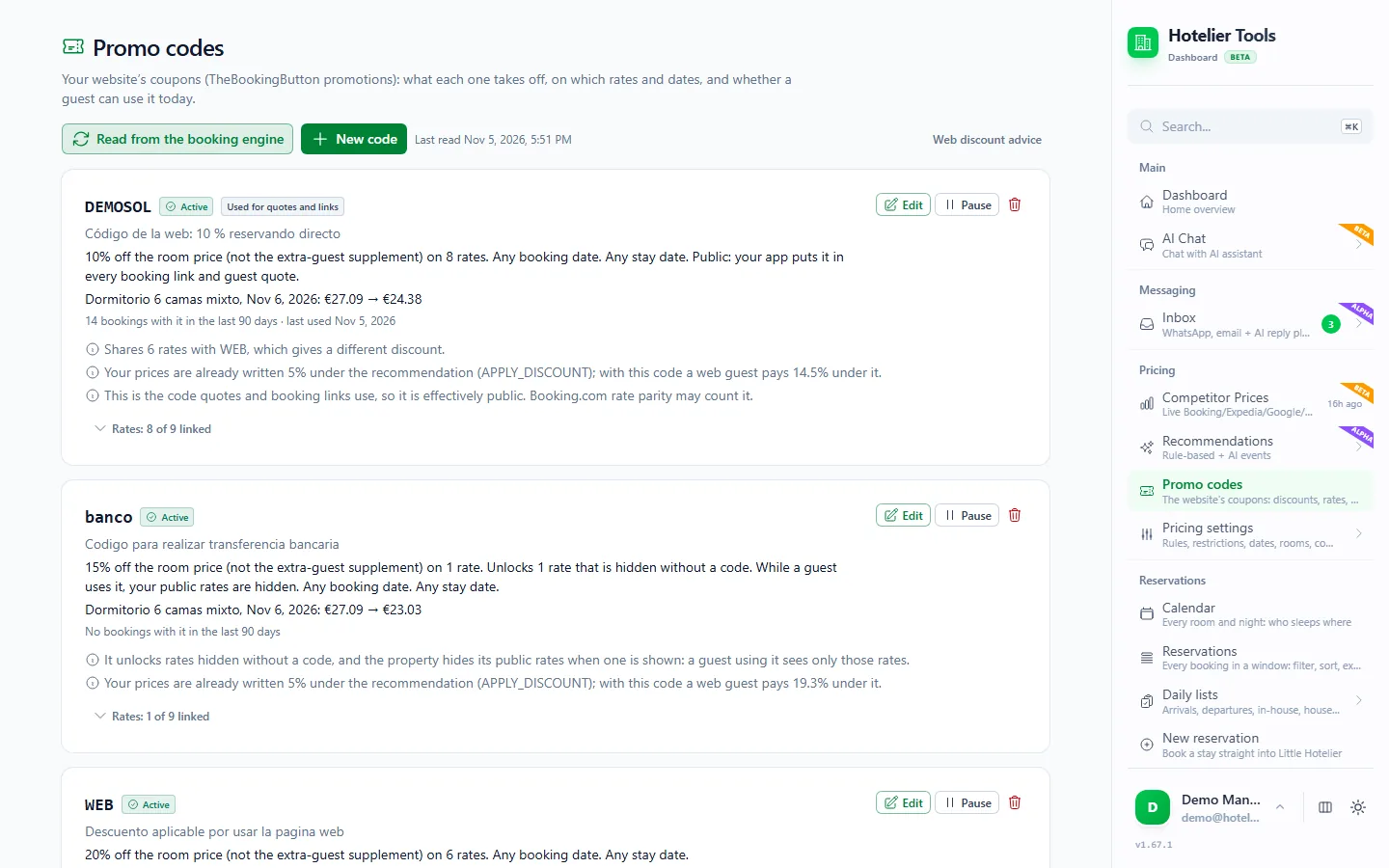
Hotelier Tools reads your booking engine's codes and shows them in plain words on Promo codes (/pricing/promo-codes), under Pricing. The page is new (October 2026). Reading codes is the tested part; creating and editing them from Hotelier Tools has not yet been checked against a live booking engine, which is why every change is read back and shown as confirmed or not.
- Open Promo codes and press Read from the booking engine. Opening the page never reads anything; the button does.
- Each code shows its status (Active, Scheduled, Paused, Expired or Does nothing), a one-line summary such as "10% off the room price (not the extra-guest supplement) on 8 rates. Any booking date. Any stay date.", an example price, and how many bookings used it in the last 90 days.
- Read the warnings under each code, then use Edit, Pause, Resume or the delete button.
Create or edit a code with a preview
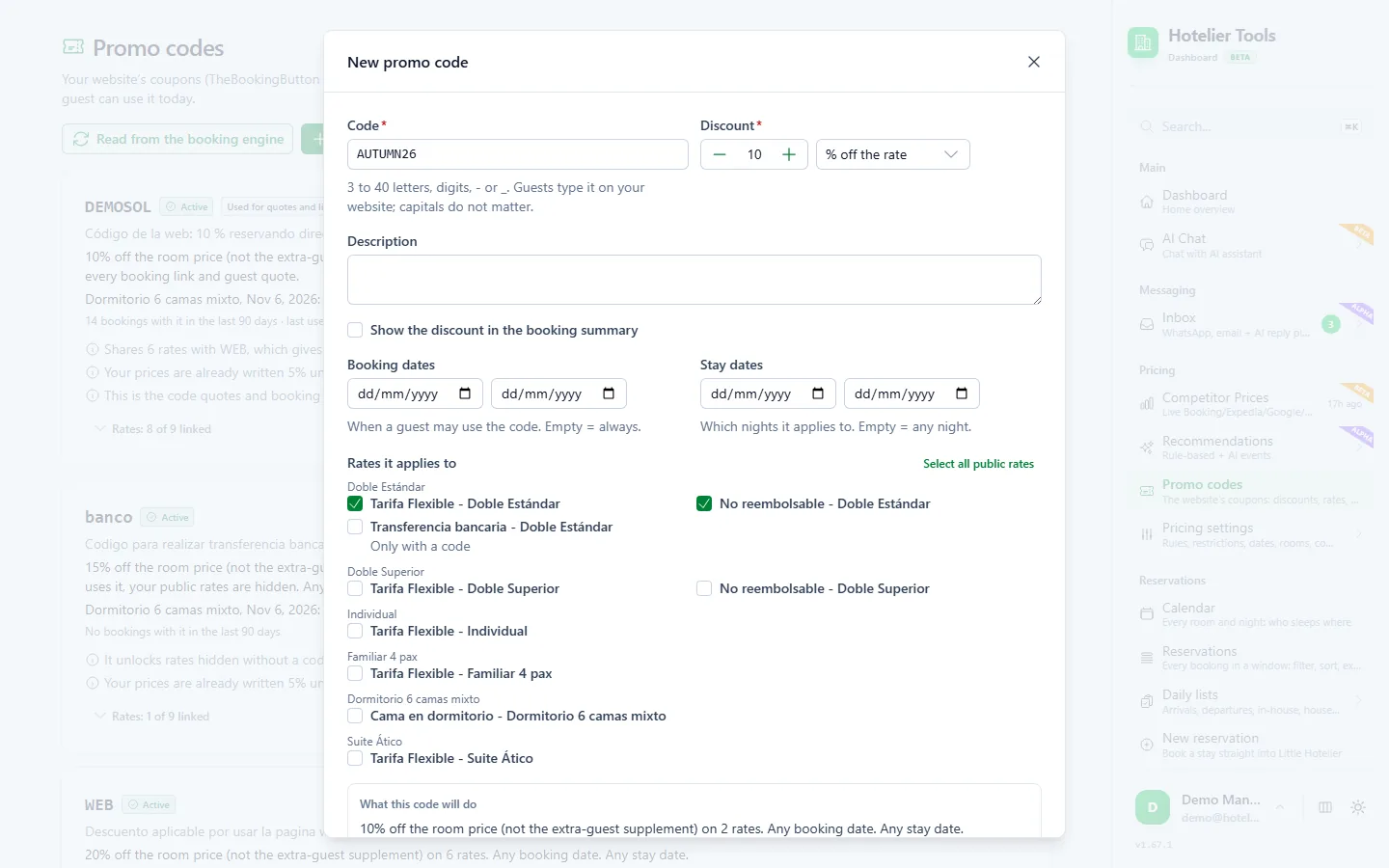
Press New code. Fill in Code (3 to 40 letters, digits, - or _; capitals don't matter), Discount (% off the rate, up to 90%, or Amount off the rate), Description, Booking dates, Stay dates and Rates it applies to (Select all public rates ticks the usual ones). What this code will do shows the result before you press Create in TheBookingButton.
Every change is checked like this:
- The code is read fresh before the change. If someone changed it in the booking engine meanwhile, you're asked to read it again.
- The change is sent once, then read back. The result is Confirmed, Differs or Unknown. An unknown result is never sent again on its own: press Read again in Recent changes.
- Creating, changing, pausing and deleting need the Publish prices permission, because a code reaches guests at once. Deleting asks you to type the code.
The warnings that save money
| Warning | What it means |
|---|---|
| Under your minimum price | With the discount, some nights in the next 90 days fall below your floor |
| Stacks with your apply discount | Your rates are already written below the recommendation; with the code, a web guest pays the sum |
| Hides your public rates | The code unlocks code-only rates, and a guest using it sees only those |
| Does nothing | No rate is linked: the code is accepted and the guest sees the normal price |
| Same code, other capitals | The booking engine doesn't tell SUMMER and summer apart |
| Public code | Your quotes and booking links use it, so Booking.com rate parity may count it |
| Changed outside this app | Someone edited it in TheBookingButton since the last read |
If Little Hotelier's own promotions screen (a separate system) has promotions, the page also tells you that your website doesn't use them.
Pause and resume
The booking engine has no on/off switch for a code. Pause sets the code's booking dates to end yesterday and stores the old dates. The discount, rates and stay dates stay as they are, and bookings already made keep their price. Resume puts the stored dates back. If a code unlocks rates that are only bookable with a code, the pause dialog warns that those rates stop being bookable.
Read every day, and ask in plain words
A scheduled task, Read the codes every day (06:40 by default, created automatically since November 2026), keeps the page and the assistants up to date. It only reads.
In the AI chat (beta), ask "Which codes are active?" or "What would happen if WEB gave 18%?": the assistant answers from the codes and previews a change without writing it. To change a code, it shows an approval card, and nothing happens until you approve. Developers get the same actions through the REST API (/api/v1/pricing/promo-codes) and MCP. Browser agents that use WebMCP can only propose: they open the filled-in form, and a person presses the button.
See what your web really sells at
Two more places use your code:
- Pricing settings > Channels & discounts (
/pricing/settings/channels), card What your web really sells at: Check the web reads your booking page for the next 30 nights, with and without your code, and compares it with the desk rate and what a Booking.com guest pays. It recommends a general web discount. - New reservation (
/reservations/new) shows what the same stay costs on your web, on your web with the code, and an estimate for Booking.com, next to the rates you book at.
Set the code your quotes and booking links use in Direct-booking promo code on the property card.
Try it in the live demo
Open the same screen in the Hotelier Tools demo, filled with invented data. No sign-up, nothing to install.
Not built yet: an email when a code changes outside Hotelier Tools (the page shows it on the next read), and limits the booking engine itself doesn't have, such as usage caps.
The dashboard is free for every hotel until billing starts on 10 January 2027. The rest of the pricing engine is on the Dynamic pricing page.
See also: dynamic pricing for small hotels on Little Hotelier, Booking.com commission, CTA, CTD, minimum stay and stop sell.
Summary
- Little Hotelier promo codes are booking engine settings: Direct booking > Promotion codes.
- Each code has a discount, booking dates, stay dates and linked rates. By default it hides your public rates.
- Share codes as links with
?promotion_code=. For a minimum stay, link the code to a code-only rate with that minimum. - Give every code an end, check it against your floor, and remember codes don't reach the OTAs.
- Hotelier Tools explains each code in one sentence, warns about floors, stacking and parity, and lets you pause and resume a code without losing its settings.
Frequently asked questions
Where are promo codes in Little Hotelier?
In the booking engine settings, not the front desk. In the current version go to Direct booking > Promotion codes. In the classic version go to My Apps > Direct booking, open the Setup tab and click the Promotion Codes tile.
Can a Little Hotelier promo code require a minimum stay?
Not on the code itself. Create a room rate with the minimum stay you want, link the code to it, and in that rate's Promotions tab choose to show it only when a linked promotional code is entered.
Can I limit how many times a promo code is used?
No. Little Hotelier's promo codes have no usage cap and can't be limited to first-time guests. Use booking dates to give each code an end, and change codes regularly.
Do Little Hotelier promo codes work on Booking.com or Expedia?
No. They only work on your own booking engine. Each channel has its own promotions, set up in its extranet. A code you publish widely may count as a public price for rate parity, so check your channel contracts.
How do I pause a promo code without deleting it?
The booking engine has no on/off switch for a code. Change its booking dates so they end yesterday. Hotelier Tools' Pause does exactly that and stores the old dates, so Resume puts the code back as it was.
Is Hotelier Tools part of Little Hotelier?
No. Hotelier Tools is independent and not affiliated with or endorsed by SiteMinder or Little Hotelier. It connects with your hotel's own Little Hotelier login and changes a code only when a person presses the button.