On this page
Dynamic pricing means changing your nightly rate with demand instead of keeping one price per season. For a small hotel on Little Hotelier, that comes down to four signals: how full you are, what comparable hotels nearby charge, what is happening in town, and how close the date is. You can do it by hand with a weekly routine, with Little Hotelier's own add-ons and partner tools, or with Hotelier Tools, which suggests a price per room and night, shows why, and writes it to Little Hotelier only when you confirm.
What is dynamic pricing for a small hotel?
A big hotel has a revenue manager and a pricing system. A 12-room hostal has you, at the desk, between check-ins. For you, dynamic pricing is a small set of decisions made the same way every week:
- Your own occupancy. Few rooms left on a night means you can charge more. Many rooms left close to the date means you may need to move.
- The market. What comparable properties nearby charge for the same night.
- Events. Fairs, concerts, conferences and public holidays that fill your town.
- Lead time and day of week. Weekends, bridge holidays and the last few days before arrival behave differently.
- Limits. A floor price you never go below and a ceiling that keeps you credible.
The goal is not the highest price. It is the best mix of price and nights sold across the season.
A simple manual method you can start this week
You can do all of this in Little Hotelier's inventory grid (Front Desk > Inventory), without any extra tool. Block 20 minutes once a week.
- Write down a floor and a ceiling per room type. The floor covers your costs plus the margin you accept. The ceiling is the most a guest would reasonably pay on your busiest night.
- Look at the next 60 to 90 days of occupancy. Mark nights that are filling faster than usual and nights that are empty.
- Check 4 to 6 real competitors on Booking.com or Google Hotels for those nights. Compare the same kind of room, with a similar review score and cancellation policy.
- List the events in your town: trade fairs, festivals, concerts, public holidays. Price those nights early, before the city fills.
- Adjust in small steps. Raise filling nights, hold or nudge down empty ones, never past your floor or ceiling.
- Use restrictions, not just prices. A minimum stay on event weekends, or closing arrivals on the busiest night so guests book the whole weekend, often does more than a price change. See CTA, CTD, minimum stay and stop sell explained.
- Keep a log of what you changed and whether the rooms sold. After a season you will know your own market better than any tool.
Which competitor prices matter?
Not every hotel in town is your competitor. Pick properties that a guest would really compare with you:
- the same area or a short walk away
- a similar category (within about one star)
- a similar review score
- the same kind of room: a double with a private bathroom is not a dorm bed
For hostels, Hostelworld prices matter as much as Booking.com. For city hotels, Google Hotels shows what guests see first when they search. Expedia and Agoda matter if guests from their markets book you.
What Little Hotelier offers natively
Little Hotelier already has several pricing tools. As of October 2026:
- Inventory grid and Bulk Update (Front Desk > Inventory): change rates and restrictions for a date range, by weekday and room rate. This is where the manual method above happens (inventory grid guide).
- Derived rates: a rate can follow another by a percentage or an amount, so you move one base rate and the others follow (overview of room rates).
- Competitor rates report (Insights): pick up to ten competitors and see their Booking.com rates for up to 30 days ahead, refreshed every 24 hours. It shows data; it doesn't set prices (competitor rates report). Availability depends on your plan.
- Dynamic Revenue Plus: Little Hotelier's revenue tool. Its product page describes pricing recommendations you can automate or apply by hand, competitor activity, holidays and local events, and daily alerts in the Little Hotelier app. It is sold as an add-on to your plan.
- Partner pricing tools: third-party revenue tools can connect too. RoomPriceGenie, for example, says its prices are pushed back into Little Hotelier automatically, including minimum stays (RoomPriceGenie integration).
Which one fits depends on how much you want to hand over. Derived rates and the competitor report suit a hands-on owner. Dynamic Revenue Plus and partner tools automate more, for a monthly fee; ask each vendor for current prices.
The faster way: recommendations with the reason, in Hotelier Tools
Hotelier Tools adds a pricing engine on top of Little Hotelier, using your own Little Hotelier login. It is built in stages, and the status is honest: competitor prices are in beta, and recommendations, rules, events and the autopilot are in alpha. Nothing changes in Little Hotelier until you confirm, unless you switch on the autopilot yourself.
Competitor prices, night by night
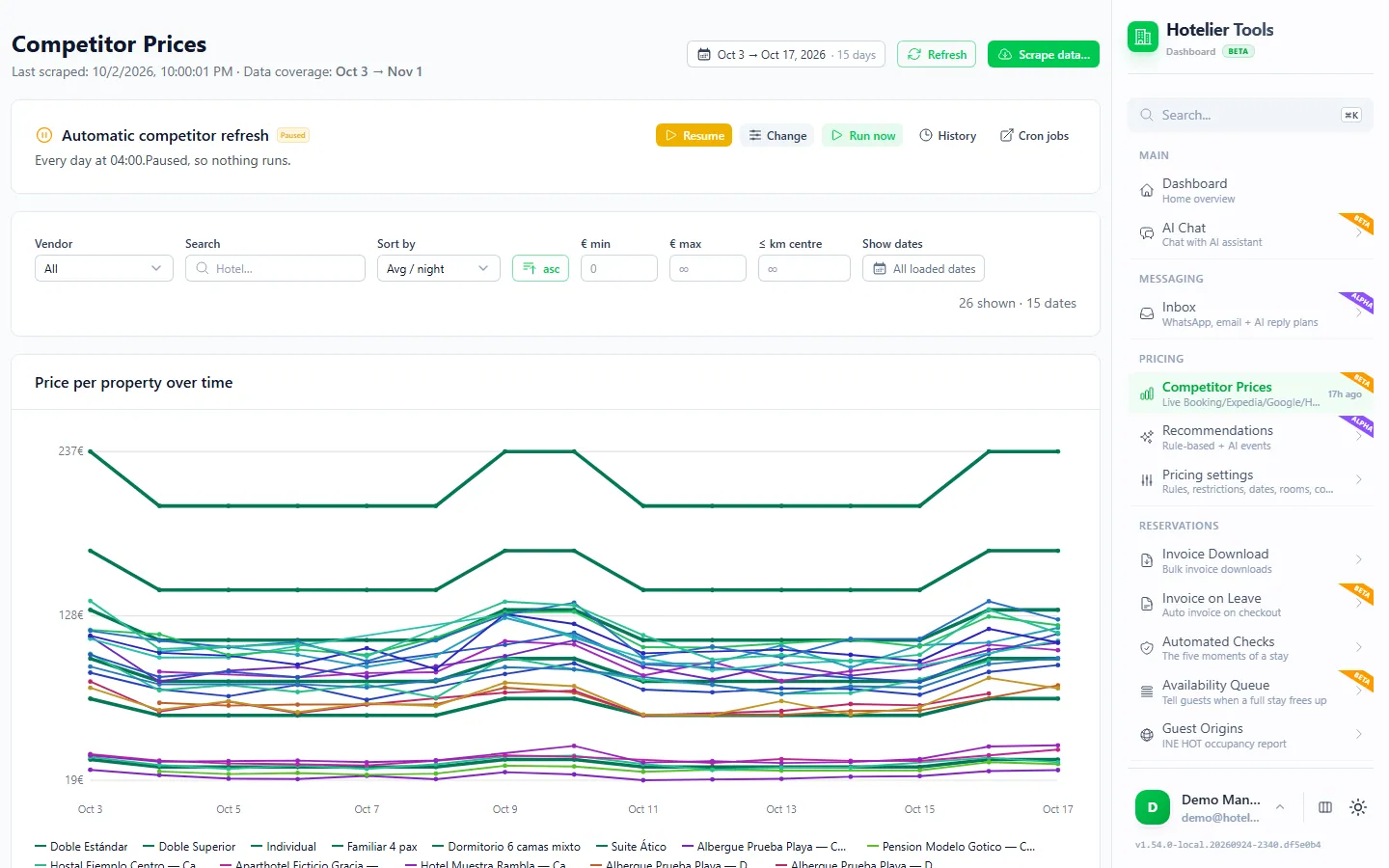
Competitor Prices (/competitor-prices) shows what nearby hotels charge each night next to your own Little Hotelier rate. It is built to read Booking.com, Expedia, Google Hotels, Hostelworld and Agoda; check which of them return prices for your town. Set your city, map pin and the rivals you really compete with in Competitors & market (/pricing/settings/market), then schedule the automatic refresh or press Run now.
Recommendations with "Why?"
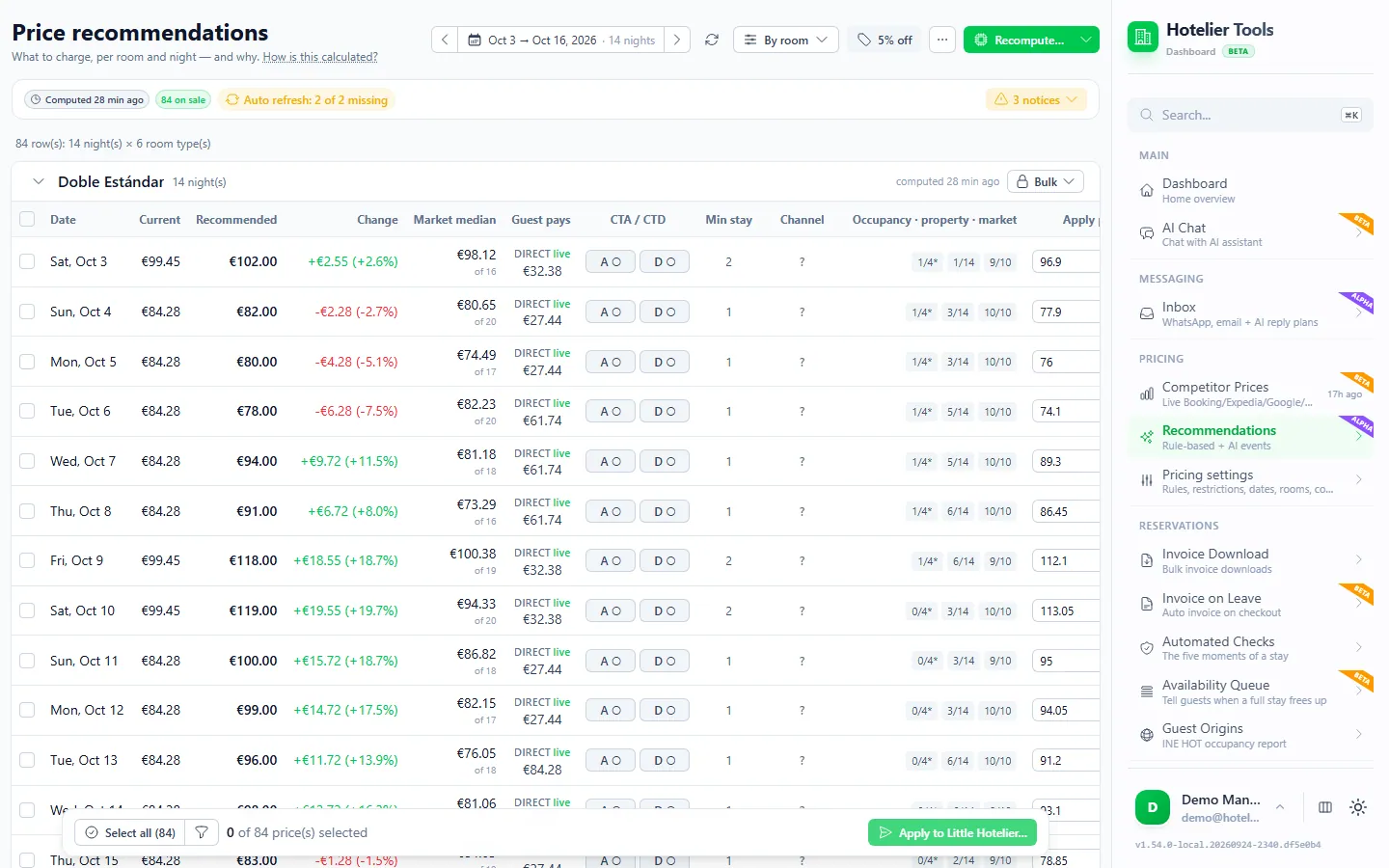
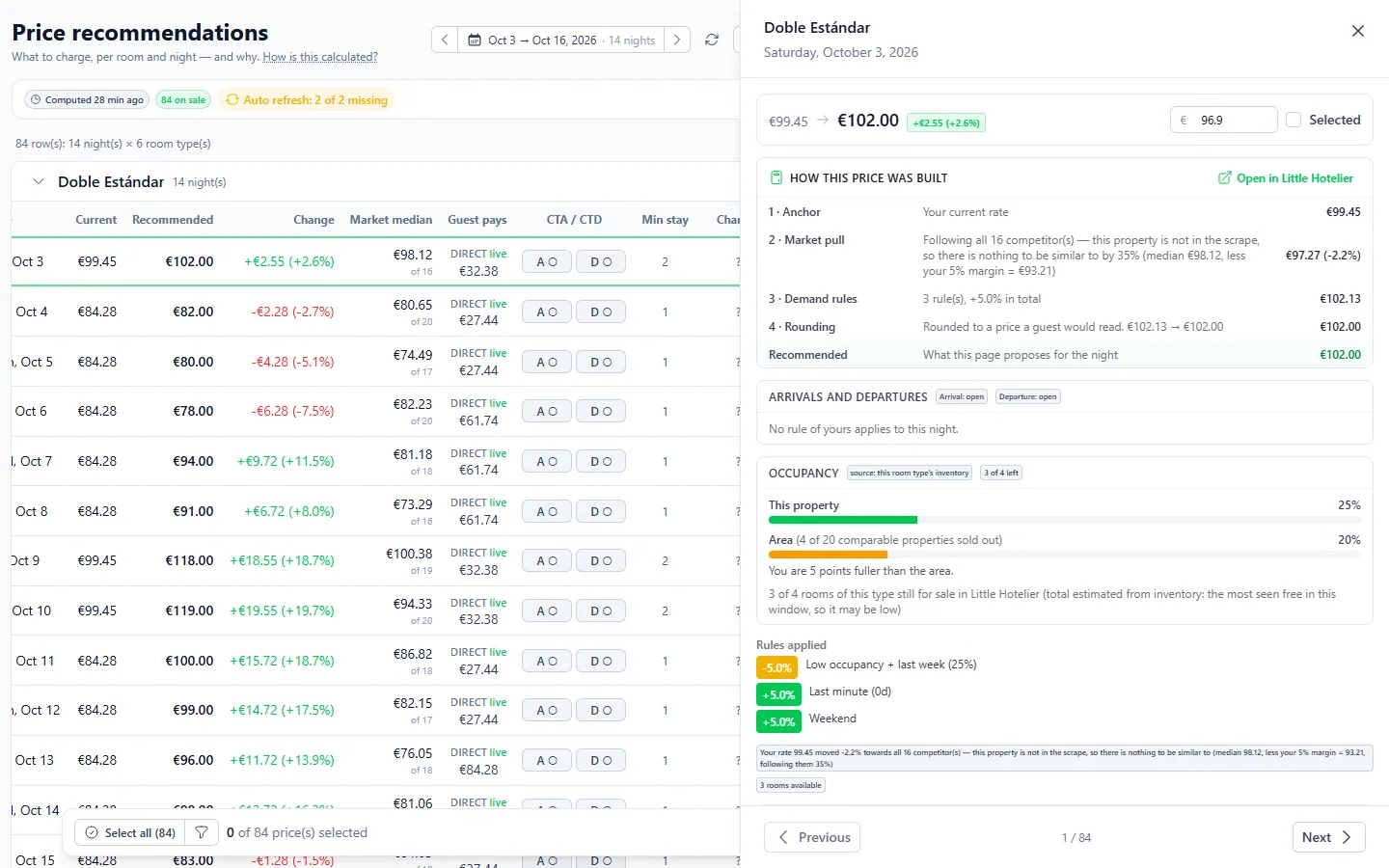
Recommendations (/price-recommendations) shows, per room and night, today's rate next to a recommended one. Press Why? on any row to see the arithmetic step by step: where it started, how much the market pulled, which demand rules added or took off, which limit capped it, and which comparable hotels were used.
How a recommended price is built:
- It starts from your own rate for that room and night, as it was before Hotelier Tools last changed it, so it never compounds its own changes.
- The market pulls it a little towards the median of comparable hotels (within about one star and a similar guest score).
- Demand adds or takes off: occupancy, scarcity (sold out +15%, two or fewer rooms left +10%), last minute, weekends, approved local events and people on your waitlist.
- Limits cap the move: your minimum price, a ceiling against the dearest comparable hotel, a floor against the cheapest, and a maximum move against today's rate.
- It is rounded to a price a guest would read.
- Date rules win: a fixed price is written as typed, a frozen night keeps its rate, bounds keep it between two figures.
Competitor prices are OTA prices, so Hotelier Tools converts them using your own measured OTA markup before comparing. To apply, tick the nights (or use Select all), press Apply to Little Hotelier… and confirm. You can ask for an email with the changes.
Rules in plain words
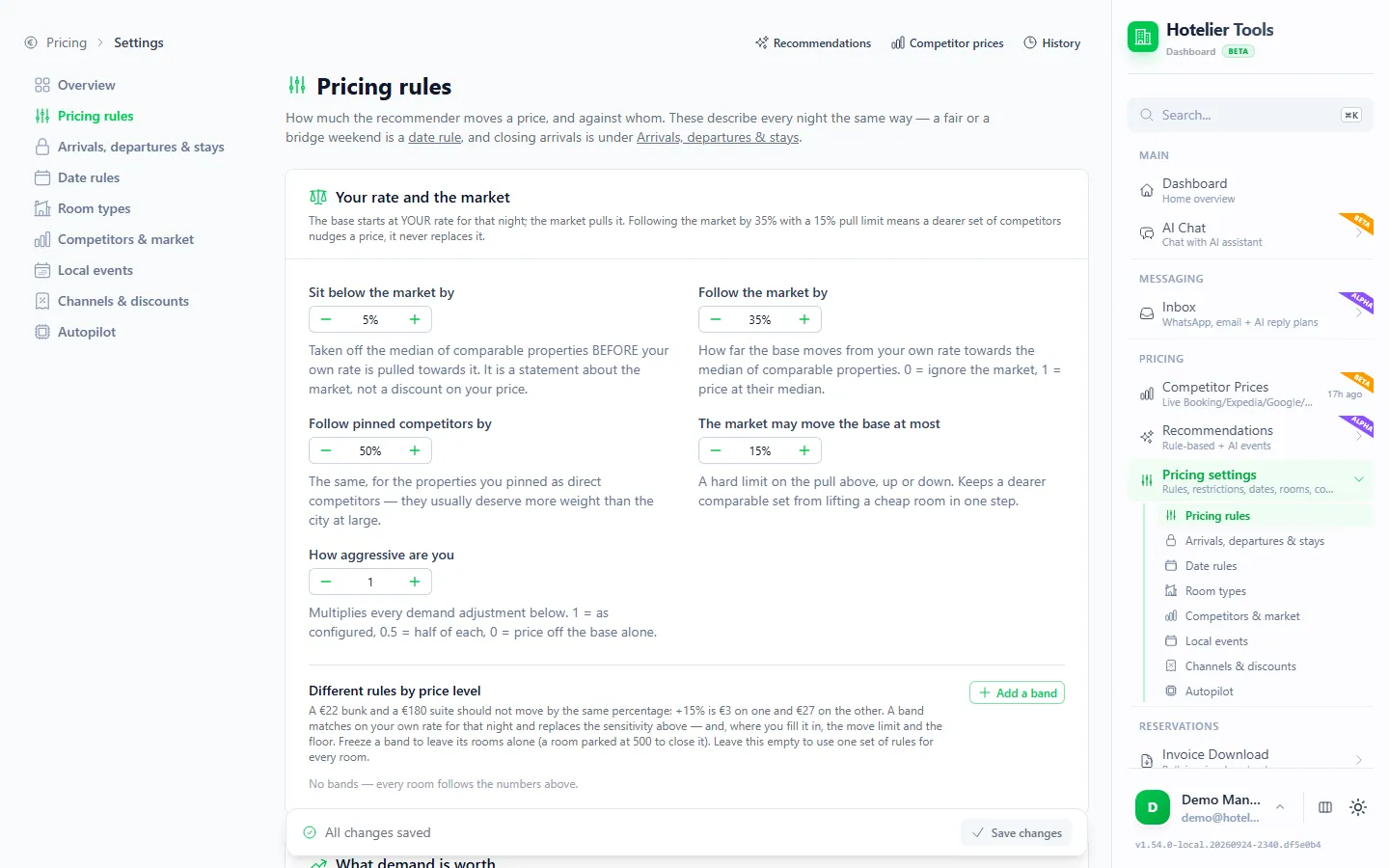
Pricing rules (/pricing/settings/rules) sets how much each signal is worth: how far to sit below the market, how strongly to follow it, what busy nights and events add, and the limits. You can also type a rule as a sentence, such as "1 € below the hotel across the street unless we are nearly full". The AI turns the sentence into a structured rule, and you approve it before it counts.
That is the only place AI touches the price logic, apart from finding events. The nightly price runs themselves are plain arithmetic: no AI model sits inside the loop.
For specific dates, Date rules (/pricing/settings/dates) lets you freeze a price, fix it, keep it between two figures, or set only a minimum stay.
Local events
Local events (/pricing/settings/events) collects fairs, concerts, conferences and public holidays near the property. An AI scan searches month by month, and you can add events by hand. You approve or reject each detected event, and a rejection is remembered. An approved event lets prices rise above the market on its nights.
Autopilot with guardrails
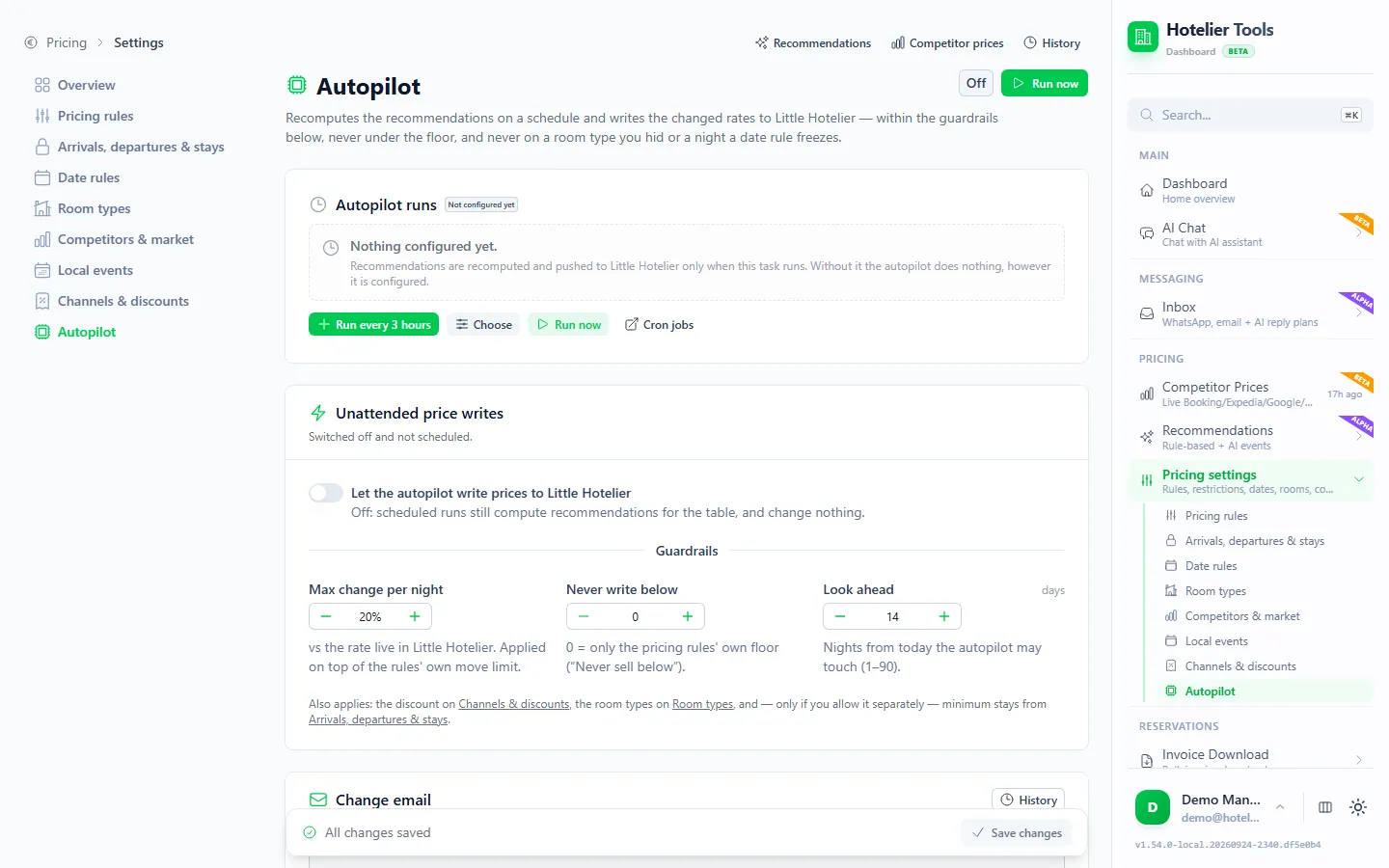
The Autopilot (/pricing/settings/autopilot) recomputes recommendations on a schedule and writes the changed rates to Little Hotelier for you. It is off by default and needs two things: the Let the autopilot write prices to Little Hotelier switch, and a scheduled task (the suggestion is every 3 hours, and it cannot run more often).
Its guardrails:
- each night moves at most ±20% against the live rate by default
- never under your floor price
- only within a horizon you choose, 1 to 90 days ahead (14 by default)
- room types you exclude are never touched
- nights you parked on a "not for sale" rate are never touched
- fixed date rules are written exactly as typed
- an email lists every change with its reason, unless you switch it off
It writes minimum stays only if you separately allow it, and it never changes channel stop sell.
The pricing log: what each change did
History & outcomes (/pricing-log) lists every rate written to Little Hotelier, by you, the autopilot or the assistant, with the rooms left then and now. After an increase it estimates extra revenue as rooms sold after the change times the difference. The page says plainly what that estimate cannot know, such as whether those rooms would have sold anyway. Treat it as a guide, not proof.
Try it in the live demo
Open the same screen in the Hotelier Tools demo, filled with invented data. No sign-up, nothing to install.
How to start without risk
- Set your minimum price per room type and your real rivals first.
- Run recommendations for the next two weeks and read the Why? on a few nights. If the reasoning looks wrong, adjust the rules, not the price.
- Apply by hand for a few weeks. Check the pricing log.
- Only then consider the autopilot, with a short horizon and the change emails on.
Summary
- Dynamic pricing for a small hotel is a few consistent decisions: occupancy, comparable competitors, events, lead time, a floor and a ceiling.
- You can run it by hand in Little Hotelier with a weekly routine, or use a native or partner tool.
- Hotelier Tools dynamic pricing shows a recommended rate per room and night with the reason, and writes nothing until you confirm. Competitor prices are beta; the rest is alpha.
- It is free for every hotel until 10 January 2027, and it is independent: not affiliated with or endorsed by SiteMinder or Little Hotelier.
- Next, learn the restrictions that work alongside prices: CTA, CTD, minimum stay and stop sell.
Frequently asked questions
Does Little Hotelier have dynamic pricing built in?
Partly. Little Hotelier lets you change rates in bulk and derive rates from a base rate, and its competitor rates report shows up to ten competitors' Booking.com prices for the next 30 days. Automated recommendations come from the Dynamic Revenue Plus add-on or from partner tools such as RoomPriceGenie.
Is dynamic pricing worth it for a hotel with 5 to 30 rooms?
Yes, if you keep it simple. Small properties gain most from a few rules applied consistently: a floor price, higher rates when few rooms are left, event nights priced early, and last-minute moves only within limits. You don't need a full revenue manager to do that.
How do I stop automatic pricing from selling too cheap?
Set a floor price per room type, cap how far a price can move in one change, and freeze or fix the dates you know best, such as a local fair. In Hotelier Tools the autopilot never goes under your floor, moves each night at most 20% by default, and leaves fixed and frozen dates alone.
Should I lower prices when I am not selling?
Check why first. If competitors are cheaper for the same quality, a small cut can help. If the whole town is quiet, a cut often just lowers revenue on rooms that would have sold anyway. Minimum stays and closed-to-arrival rules can sometimes fill gaps better than a lower price.
Is Hotelier Tools part of Little Hotelier or SiteMinder?
No. Hotelier Tools is independent and not affiliated with or endorsed by SiteMinder or Little Hotelier. It connects with your property's own Little Hotelier login and writes rates to Little Hotelier only when you, or an autopilot you switched on, apply them.