On this page
- What does "waitlisted" mean at a hotel?
- Why keep a waitlist when Booking.com shows you sold out?
- The manual method: a spreadsheet plus cancellation alerts
- Who gets offered first, and should you hold the room?
- The automatic way: let Hotelier Tools watch Little Hotelier
- Let guests join from your website: the public waitlist page
- Do waitlists work for hostels and dorm beds?
- Summary
A hotel waitlist is a list of guests who asked for dates you're full on. When a cancellation frees a room, you offer it to them first with a direct booking link, before it resells on an OTA. You can run it with a spreadsheet and your cancellation alerts, or let Hotelier Tools check Little Hotelier on a schedule and email the guest once every night of their stay is free.
What does "waitlisted" mean at a hotel?
It means you asked for dates that are full, and the hotel will contact you if a room becomes free. Nothing is reserved and nothing is paid. When the message comes, the room goes to whoever books first, so a good waitlist message includes a link to book straight away.
Why keep a waitlist when Booking.com shows you sold out?
- Cancellations resell fast. A cancelled room goes back on sale on every channel at once, and an OTA guest may book it before you remember who asked.
- It turns enquiries into direct bookings. The guest who called you books on your website, without the OTA commission (how much Booking.com takes).
- It shows demand. A list of nights people wanted and couldn't get is useful when you set next year's prices.
Little Hotelier doesn't seem to have a waitlist of its own: a search of its help centre for "waitlist" returned no articles in October 2026. So you keep one yourself, by hand or with a tool.
The manual method: a spreadsheet plus cancellation alerts
1. Set up the sheet
One row per request, with these columns:
| Column | Example |
|---|---|
| Requested on | 3 Oct |
| Name and contact | Ana, ana@example.com, +34 600 000 000 |
| Arrival and departure | 14–16 Nov |
| Rooms and type | 1 double |
| Flexible? | ±1 day |
| Agreed to be contacted | Yes, by email |
| Status | Offered 15 Oct, 10:05 |
2. Get alerted when a room frees up
- Little Hotelier mobile app: tap the settings wheel, then Notification settings, and turn on Reservations notifications (they include cancellations) as push or email (Little Hotelier help centre).
- Booking.com Pulse app: real-time alerts for new bookings and cancellations (Partner Help).
3. When a cancellation arrives
- Filter the sheet by the freed dates.
- Check in Little Hotelier that every night of the requested stay is free. A guest who wants three nights needs all three.
- Message the first match with your direct booking link and a deadline, for example "the room is yours if you book in the next two hours".
- No answer by the deadline? Move to the next person.
- Update the status. Delete rows once the dates have passed.
The weak spot is people. Someone has to see the alert, open the sheet and check every night by hand, and cancellations don't wait for office hours.
Who gets offered first, and should you hold the room?
Pick a rule and write it at the top of the sheet:
- First come, first served. Simple and easy to explain.
- Best fit first. An exact match, or the longest stay, goes first.
- Everyone at once. Message all matches; the first to book wins. Fastest, but some guests will be disappointed.
Holding the room is a promise you have to keep on every channel. If you want to hold it for an hour, enter a provisional reservation in Little Hotelier so your channel manager stops selling it, then send a payment link for that reservation. With Little Hotelier Pay, Send Payment Request does that (payment requests). If you don't hold rooms, say so clearly: "nothing is reserved until you book". Closing nights on every channel is a different tool, explained in CTA, CTD, minimum stay and stop sell.
The automatic way: let Hotelier Tools watch Little Hotelier
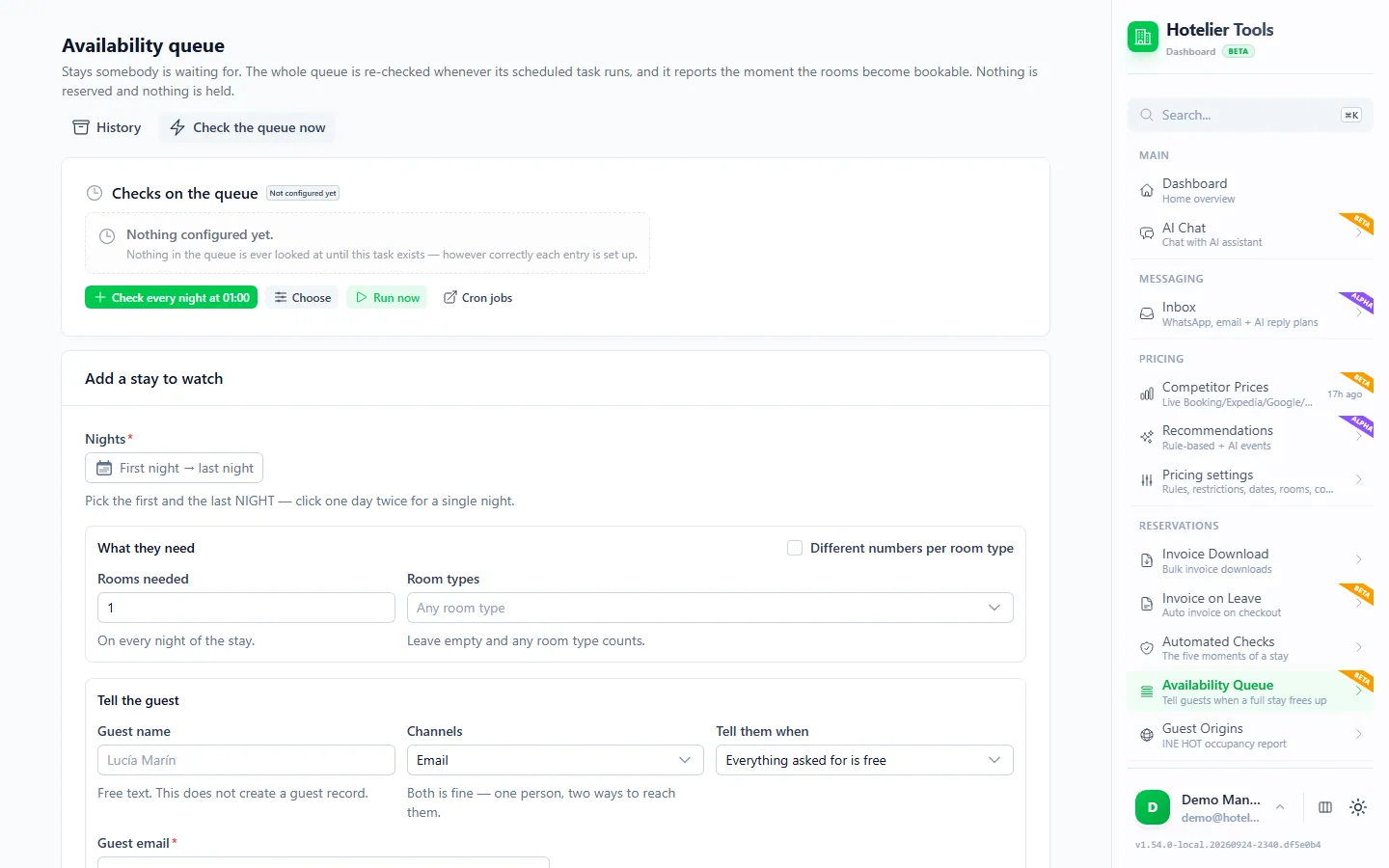
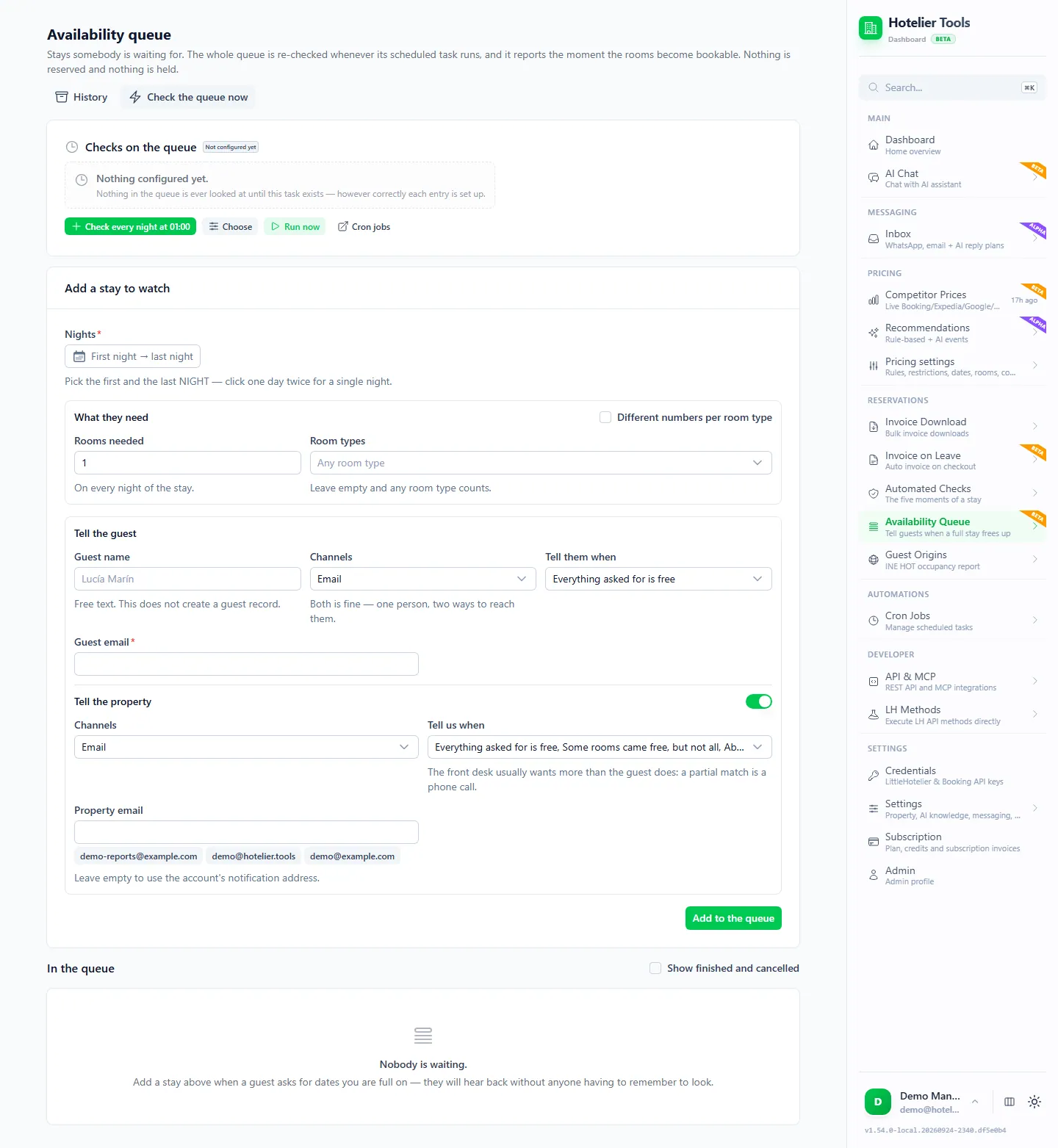
The Availability Queue in Hotelier Tools (/availability-watch, beta) keeps the list and does the checking. A scheduled task looks at the whole queue in Little Hotelier. When every requested room is bookable on every night, the guest and/or you get one message by email or WhatsApp. Nothing is reserved or held, and the message says so.
- Open Availability Queue and go to Add a stay to watch.
- Pick the first and the last night. Set Rooms needed (on every night) and Room types; leave the types empty and any room counts. For a mixed group, use Different numbers per room type.
- Under Tell the guest, add their email and/or phone. Under Tell the property, add yours, or leave the email empty to use your account's address.
- Choose when each hears from it: available (all rooms free; this closes the watch), partial (fewer rooms than asked; only the property by default) or expiring (the stay starts within 48 hours and nothing was found).
- Click Add to the queue.
- On the Checks on the queue card, press Check every night at 01:00, or Choose another schedule, from every 20 minutes to once a day. Nothing is checked until this task exists. Check the queue now runs it straight away.
What to know:
- The weakest night decides. A stay counts as free only when every night has the rooms. A night with no data counts as full, never free.
- The guest email includes a direct booking link for those dates, so the first to book gets the room.
- One message per watch. After it's sent, the entry closes. History (
/availability-watch/history) keeps the exact message each entry sent, which helps when a guest replies. - Sending can be switched off on the server. The page tells you if it is. In that state the check still runs and records the message it would have sent, without sending it.
- WhatsApp messages go out from your connected WhatsApp number (see WhatsApp with Little Hotelier).
In busy season, check more often than once a night: with a nightly check, a room freed at 9:00 waits until 01:00 to be offered, and may be gone by then.
How the waitlist affects your prices
Each party waiting for a night raises that night's price recommendation by 3%, up to 12% per night, in Hotelier Tools' dynamic pricing (alpha). A full waitlist is a demand signal, and the recommendation shows it (dynamic pricing for small hotels).
Try it in the live demo
Open the same screen in the Hotelier Tools demo, filled with invented data. No sign-up, nothing to install.
Let guests join from your website: the public waitlist page
Instead of typing every request yourself, let guests add themselves. The Public waiting-list page (/availability-watch/public) is off until you open it.
- Switch Page open on. The address uses your property's Direct Book slug from Little Hotelier.
- Under Which stays, choose Any future stay or Only stays inside these dates. Set the Longest stay (14 nights by default), Which room types and Rooms per request (2 by default, up to 10).
- Keep Ask guests to confirm their email (double opt-in) on: the guest presses a button in an email before they join. The page also caps the list at 100 people waiting and 40 signups a day. Letting guests leave a WhatsApp number is off by default.
- Optionally add an intro text, a link back to your website, and arrival and departure warnings, so guests know when they pick a day you usually close to arrivals.
- Click Copy link and put it on your website's booking page and in your "sorry, we're full" replies.
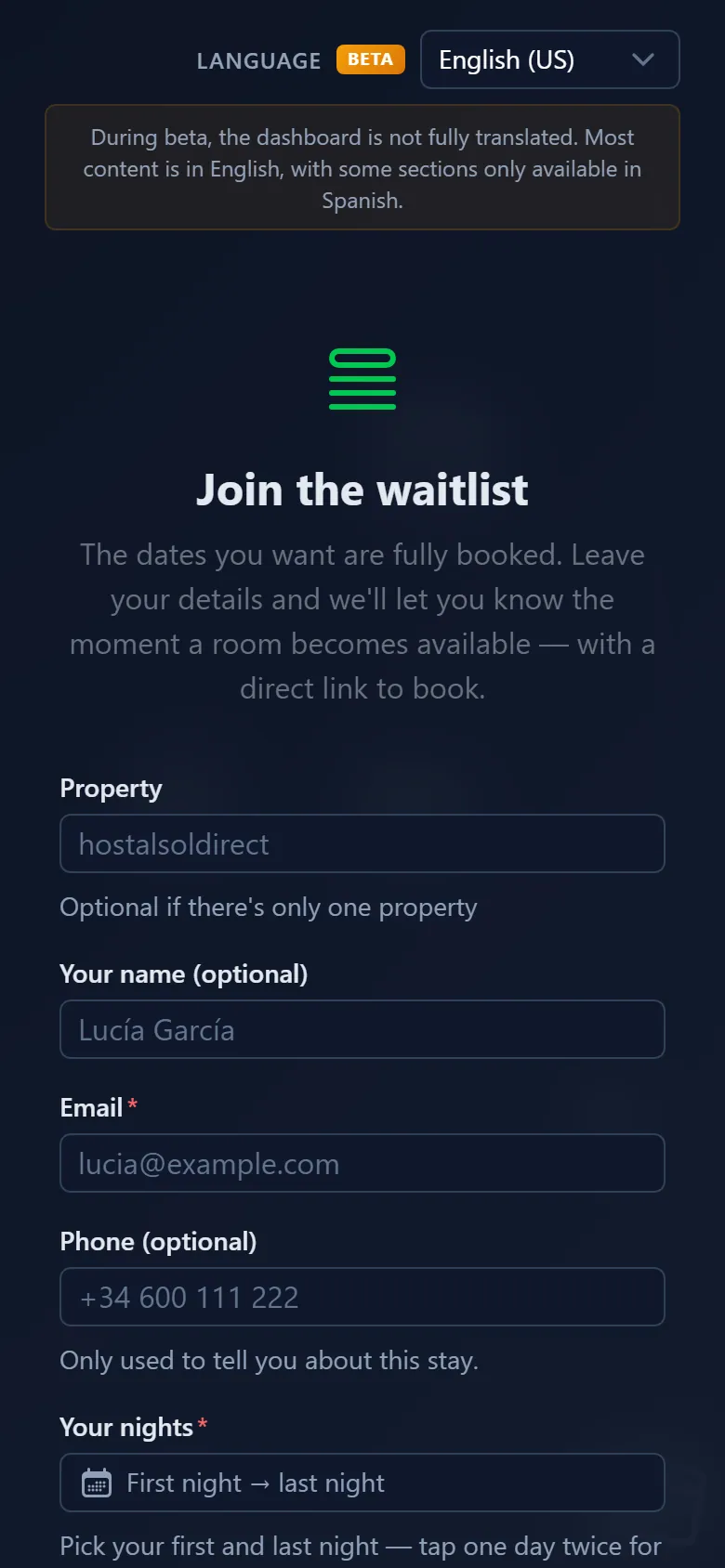
The guest picks their nights and, optionally, a room type, leaves an email (a phone is optional) and ticks the consent box. The form never touches Little Hotelier. It is protected by a browser proof-of-work check, a hidden bot trap and per-IP limits, and closed entries lose their contact details after 90 days. Your property is the data controller, and the privacy notice is built from your property card, so keep your legal name and address filled in.
Do waitlists work for hostels and dorm beds?
Yes. Pick the dorm's room type and the number of units the group needs. The watch reads availability the way Little Hotelier counts it for that room type, so if you sell the dorm by the bed, ask for beds. For a group that would split across room types, use Different numbers per room type, and keep partial alerts on for yourself: a partial match is a phone call.
Everything the waitlist does is on the Waitlist page. Hotelier Tools is free for every hotel until billing starts on 10 January 2027.
Summary
- A waitlist gives guests who asked first the first chance at a cancelled room, as a direct booking.
- By hand: a sheet, cancellation alerts in the Little Hotelier or Pulse app, and a clear rule for who goes first.
- Automatic: Hotelier Tools' Availability Queue checks every night of each stay on a schedule and sends one message with a booking link. Nothing is held.
- Add the public waitlist page to your website so guests sign up themselves, with consent and email confirmation.
Frequently asked questions
Does Little Hotelier have a waitlist?
Not that we could find: a search of the Little Hotelier help centre for 'waitlist' returned no articles in October 2026. You can keep one in a spreadsheet, or use a tool that watches availability for you.
Does joining a hotel waitlist reserve a room?
No. Being waitlisted means the hotel will contact you if a room frees up for your dates. Nothing is held, and you pay nothing until you actually book.
How quickly are waitlisted guests told about a free room?
With a spreadsheet, as soon as someone sees the cancellation alert. With Hotelier Tools' Availability Queue, on the next scheduled check: every night at 01:00 is recommended, and you can check as often as every 20 minutes.
Can guests add themselves to the waitlist?
Yes, with Hotelier Tools' public waitlist page. It is off until you switch it on, asks for consent, and by default makes guests confirm their email address before they join.
What happens if only some of the rooms free up?
Hotelier Tools can send a 'partial' alert when fewer rooms than requested are free. By default only the property gets it, so you can call the guest and find a solution.
Is a waitlist form allowed under GDPR?
It can be, if guests agree to it and you only use their details for that stay. Hotelier Tools' form requires a consent box, shows a privacy notice built from your property details, and removes contact details from closed entries after 90 days.