On this page
- How do you get paid for Expedia Collect bookings?
- How to charge the Expedia virtual card
- How to request payment from Expedia Group in Partner Central
- When does Expedia pay, and what happens if you forget?
- How to reconcile Expedia Collect payments
- The faster way: request Expedia Collect payments from Hotelier Tools (beta)
- Summary
With Expedia Collect, the guest pays Expedia when they book, and Expedia owes you the money after the stay. You get it in one of three ways: you charge the Expedia virtual card from the check-in date, you send a payment request in Partner Central (Payments > Request a payment from Expedia Group) within 365 days of check-out, or Expedia pays you through automatic payouts where they exist. If you do none of these, the money is never collected. Hotelier Tools (beta) shows every Expedia stay's payment state and can send the requests for you on a schedule.
Expedia rules below were checked against Expedia Group's Partner Central help as of November 2026.
How do you get paid for Expedia Collect bookings?
Under Expedia Collect (EC), travellers pay Expedia or one of its B2B partners upfront, and your booking notification shows the net rate: what Expedia pays you after its compensation (About Expedia Collect). After the stay you collect it one of these ways:
| How you're paid | What you do | When the money arrives | Cost |
|---|---|---|---|
| Virtual card | Charge it on your card terminal, from the check-in date | Your card processor's usual timing | No Expedia fee, only your processor's |
| Payment request (bank transfer) | Request it in Partner Central within 365 days of check-out | Typically 30 days later, plus 2 to 8 bank days | Free |
| Automatic payouts (select markets) | Nothing per stay | Last day of the month after check-out | 2% deduction |
Two other models look similar but work differently. With Hotel Collect, the guest pays you at the property, so there's nothing to ask Expedia for. Expedia Traveler Preference lets each guest pick one or the other at booking.
In some markets Expedia has replaced EC with Updated Expedia Collect (EC+). Under its net model the virtual card is loaded with the booking total minus Expedia's compensation and tax. Under the gross model it carries the full amount, and Expedia bills you separately (About virtual cards).
How to charge the Expedia virtual card
The Expedia Virtual Card (EVC), now just "virtual card" in Partner Central, is a single-use card Expedia issues for each Expedia Collect booking once you sign up for it (Charge the virtual card).
- Find the card details: in the booking notification (if you have a channel manager), on the reservation in Partner Central under Payment method, or on the Virtual cards lookup page with the reservation ID and the check-in date (Find a virtual card).
- Charge it from the check-in date, for the exact total shown, in your contracted currency.
- If it declines in the morning, try again at the end of the day. Expedia says the card may not be active yet because of time zones.
- Charge incidentals and city taxes to the guest's own card, never to the virtual card.
Mind the deadlines. The charging article says the card remains valid for 180 days after check-out, and the lookup article says it deactivates six months after check-out. Charging in a different currency? Use that day's exchange rate, or you risk a decline or chargeback.
How to request payment from Expedia Group in Partner Central
If you don't use the virtual card, each Expedia Collect stay needs a payment request (Request payment from Expedia Group):
- Select Payments in the menu.
- Under Quick tasks, select Request a payment from Expedia Group.
- Search By Date Range (at most 31 days at a time) or By Reservation ID (up to 200 IDs).
- Tick the reservations, check the booking and tax amounts, and select Create Invoice.
- Keep the Transmission Queue ID shown on the confirmation. It's the reference for that request.
If Partner Central has no details for a booking, upload a payment request file instead. If your banking details are incomplete, a pop-up on the request page says so: fix them first or the payment is delayed.
When does Expedia pay, and what happens if you forget?
Expedia sends the money according to your payment terms, typically 30 days after the request, and banks can take another 2 to 8 days. A booking invoiced for only part of its amount needs a new request for the rest. For a no-show or an early check-out, contact Expedia to request a refund instead.
If nobody requests a stay, Expedia doesn't pay it. After 365 days from check-out the option disappears from Partner Central. A busy summer with ten forgotten stays is real money left with Expedia.
Automatic payouts remove the per-stay step, but only in some markets, and they take 2% (About automatic payouts). Check under Payments > Payment Settings whether your property has them.
How to reconcile Expedia Collect payments
Each month, match three lists:
- Your check-outs: every Expedia Collect stay that ended.
- Your requests: in Partner Central, Payments > See all invoices, a date range, then the Status column. Two years of history are kept, with remittance amount and payment date (Check the status of an invoice).
- Your bank: the transfers received, with the queue IDs.
A check-out with no request is money to ask for. A request with no transfer after 40 days is worth a question to Expedia. Once a stay is paid, record the payment in your property management system, so Little Hotelier doesn't show a balance the guest doesn't owe.
The faster way: request Expedia Collect payments from Hotelier Tools (beta)
Hotelier Tools connects to your Partner Central account and does the round above for you. It reads every Expedia stay, shows where its money stands, and asks Expedia to pay, by hand or on a schedule.
1. Connect Partner Central
Open Credentials > Expedia Partner Central (/credentials/expedia-extranet). The sign-in runs in a browser on the server: Hotelier Tools types the email and password, and you only answer what Expedia asks.
- I have a login: enter the sign-in email and password. On a new device, Expedia emails a code, which you type in the Code from Expedia box. Later sign-ins reuse the saved device and normally need no code.
- I have an invitation link: a cleaner option is a separate Partner Central user for Hotelier Tools. Invite it from your account, then paste the link from Expedia's invitation email as it is. The wizard creates the password (12 to 64 characters, with upper and lower case, a number and a symbol) and the profile Expedia requires, which includes a phone.
Any step the wizard doesn't know, such as an SMS setup or a security check, shows a picture of the page: you click on it and type in the field. Keep me signed in is always ticked and the session is stored encrypted. The Keep Expedia signed in task (every 20 minutes) uses it so it doesn't idle out, and it never signs in by itself. If the session expires, a person signs in again.
2. See every stay's payment state
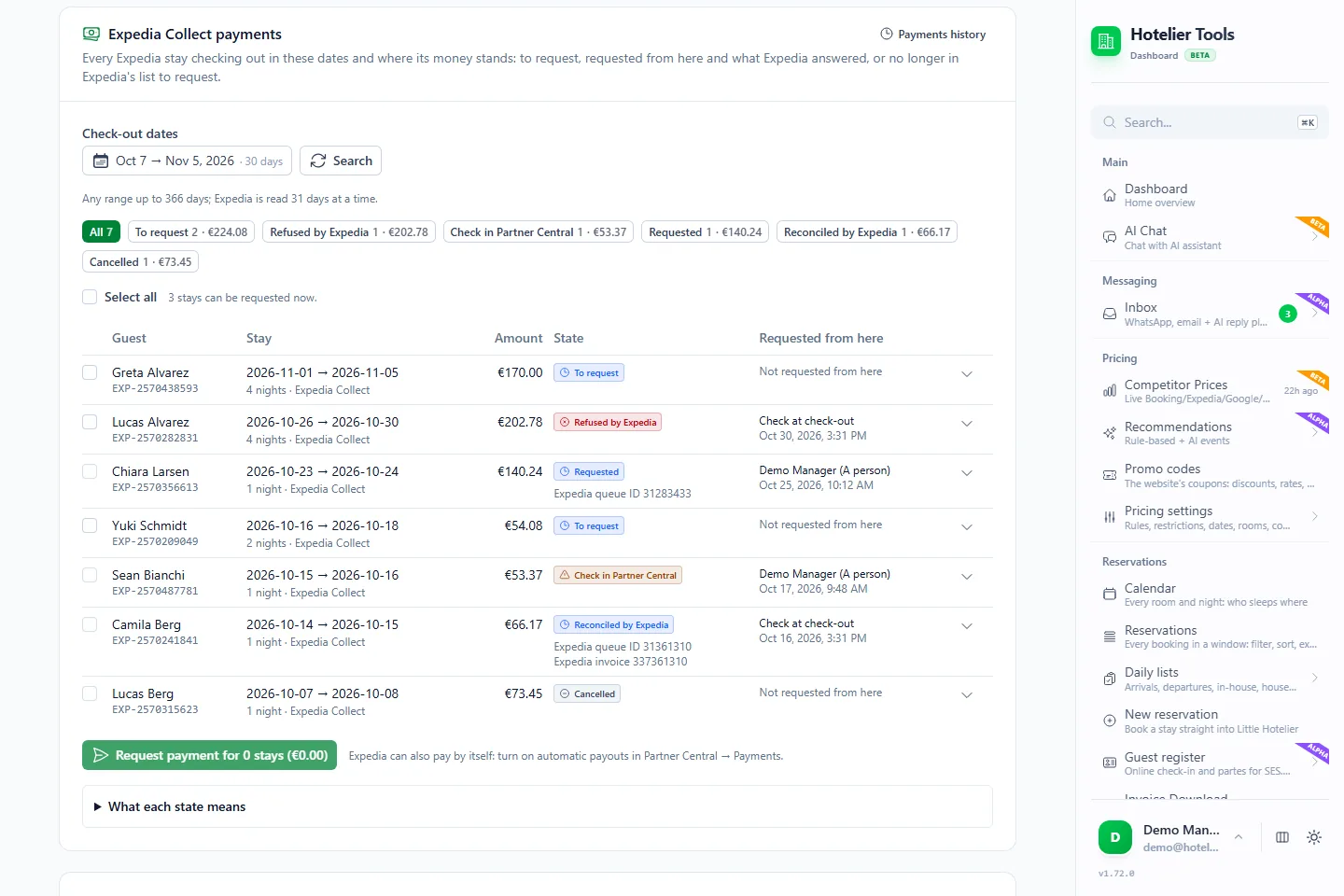
The Expedia Collect payments card on the same page lists every Expedia stay that checks out in the dates you choose. Pick Last 30 days, This month, Last month, Last 3 months, This year or Last year, or any range up to 366 days. Expedia is read 31 days at a time, as Partner Central's own form does.
Each stay gets one state, with a chip that filters the list:
| State | What it means |
|---|---|
| To request | Checked out, nothing paid, never asked: you can request it now |
| Not yet | Not checked out yet, or nothing to request |
| Requested | Asked from Hotelier Tools; Expedia took it and gave a queue ID |
| Refused by Expedia | Expedia answered with an error; a person can ask again |
| Check in Partner Central | No readable answer: look in Partner Central before asking again |
| Reconciled by Expedia | Requested from here; Expedia's statements say it accepted the amount and the payment is pending |
| Paid by Expedia | Requested from here; Expedia's statements give the date and the amount paid |
| Paid / Invoiced | Expedia's own records say an amount was paid, or the stay is invoiced |
| Not in Expedia's list | Requested in Partner Central by hand, or paid by automatic payouts |
| Virtual card | Charge the card: there's nothing to request |
| Hotel Collect | The guest pays you directly |
Tick the stays, or use the select-all box, and press Request payment for N stays. After you confirm, Hotelier Tools sends one request for all of them, the same Create Invoice request as Partner Central. Each stay is claimed first, so it is never sent twice. Details shows what Expedia says about a stay and the request's history.
3. Let it run on a schedule
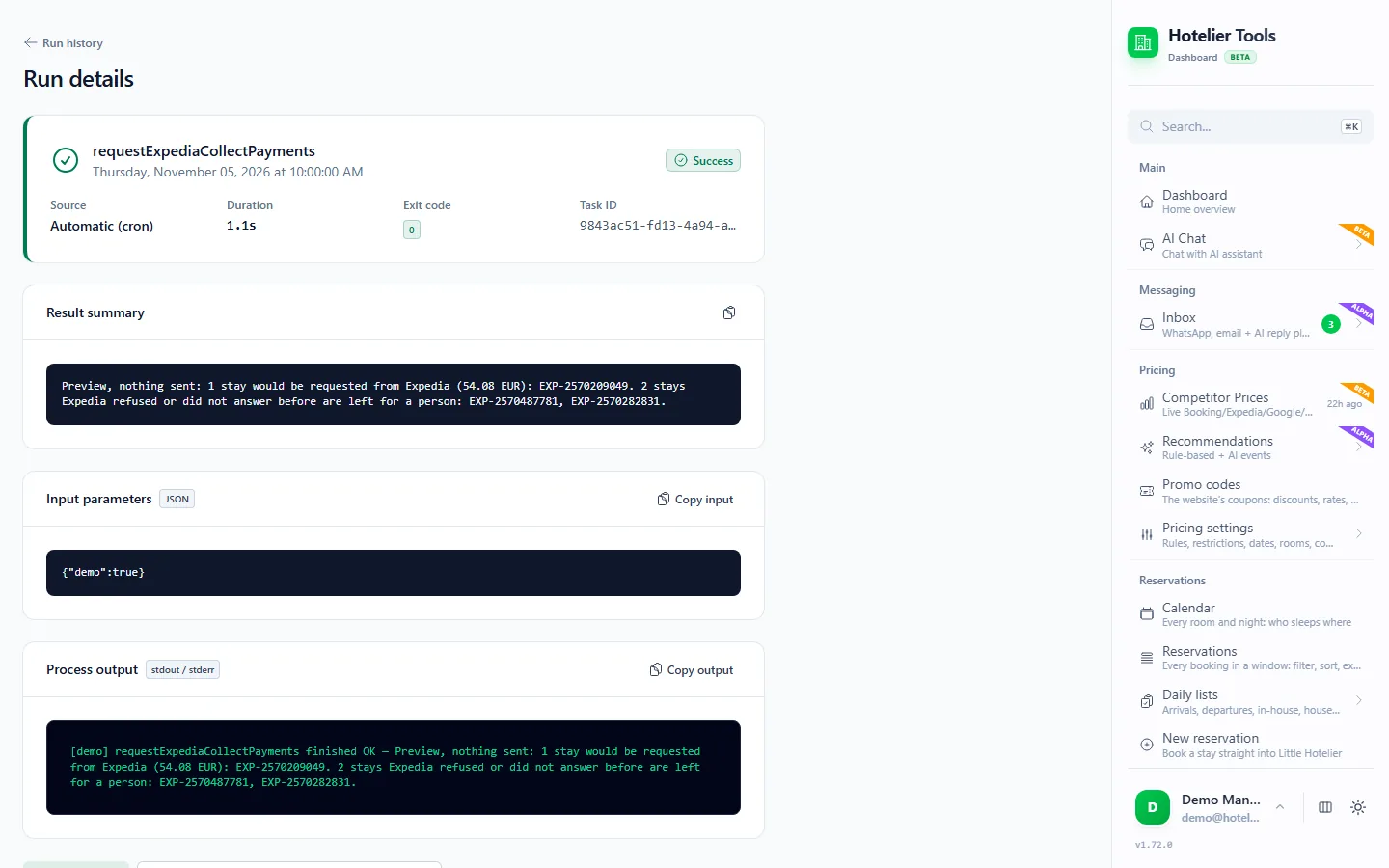
On Automatic Expedia payment requests (/credentials/expedia-extranet/automatic-requests), press Every day at 09:30 (the recommended schedule) or Choose your own time. That creates the task Request Expedia Collect payments. It starts in Preview: each run writes in its log which stays it would request and sends nothing. When the list looks right, switch What a run does to Request: ask Expedia to pay.
| Setting | Default | What it does |
|---|---|---|
| Days after check-out | 1 | Asks once the check-out is this many days old |
| Look back (days) | 30 | How far back check-outs are looked for |
| Most per stay | No limit | A stay asking for more is left for a person |
| Most stays per run | 20 | The rest wait for the next run |
What it never does: sign in to Partner Central, ask twice for a stay, ask for a stay paid by virtual card or not checked out yet, or ask again for a stay Expedia refused or didn't answer. Those are left for a person, and the run log names them.
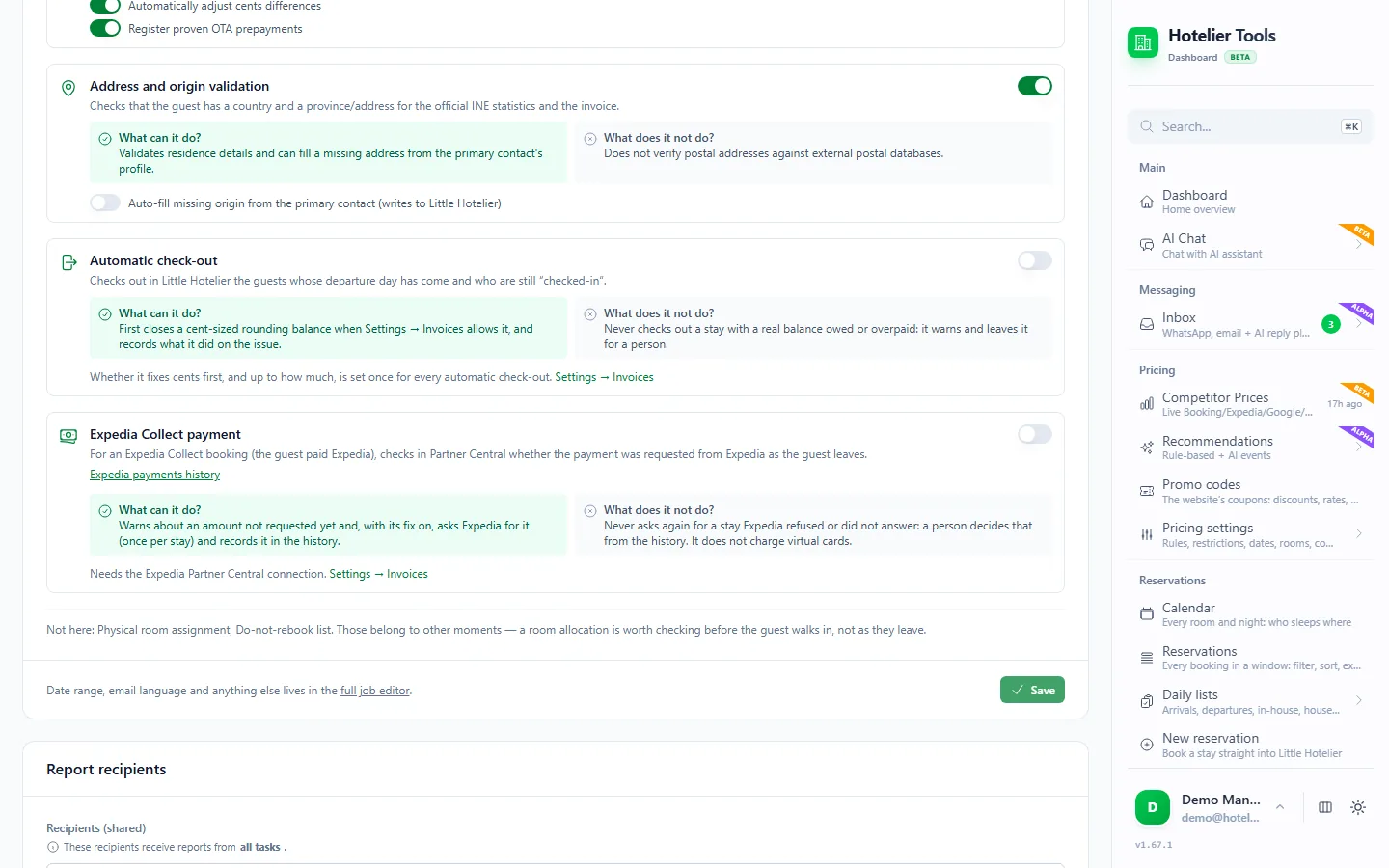
Already running the When they leave checks? Its Expedia Collect payment check warns about an amount not requested yet. With the fix Request the payment from Expedia (asks Expedia for money) switched on, it sends the request as the guest leaves. Both can be on: a stay is claimed only once.
4. Follow up on the history
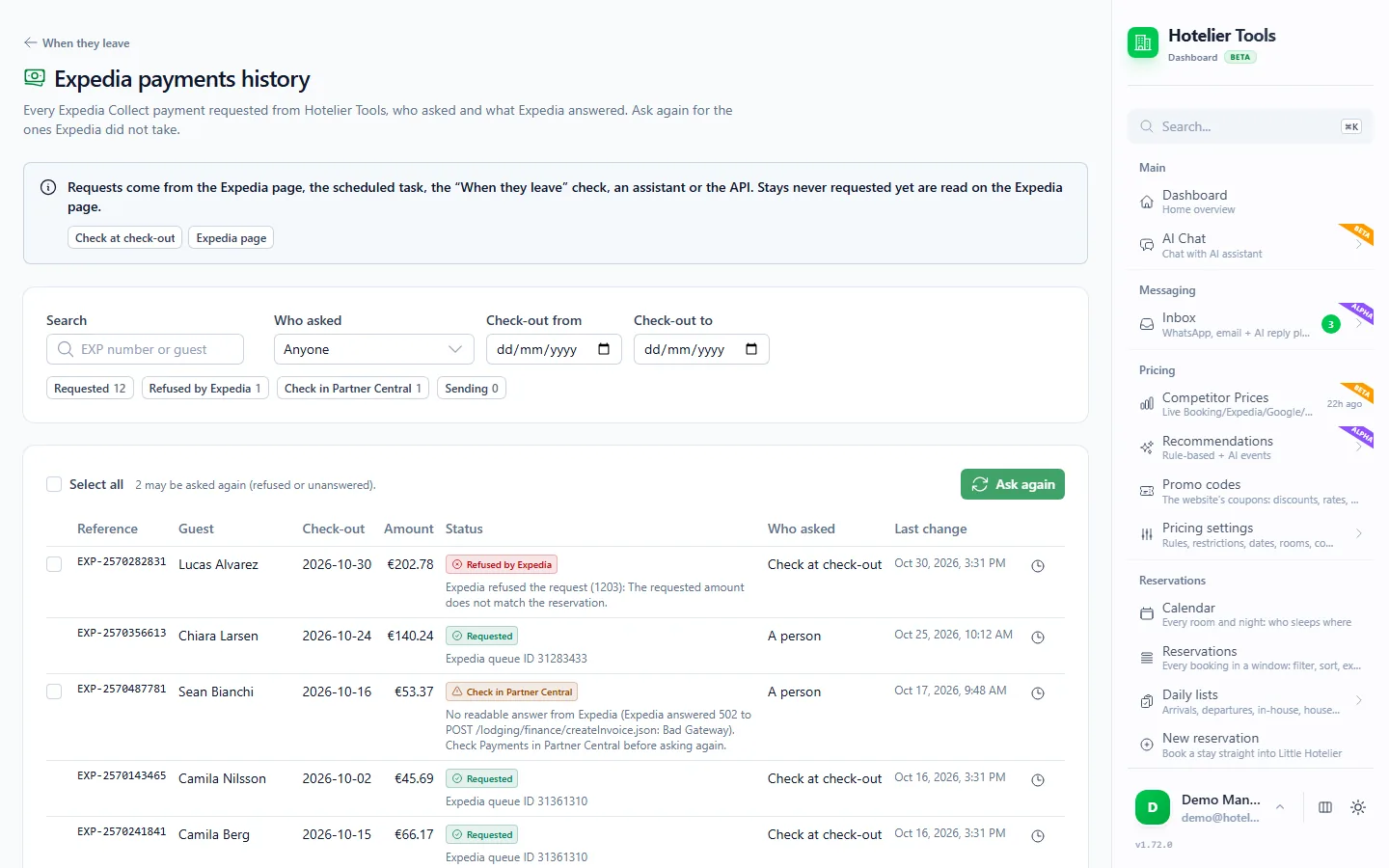
Expedia payments (/automated-checks/expedia-payments) is the ledger of every request made from Hotelier Tools: by a person, the scheduled task, the check-out check, an assistant or the API. Filter by status, Who asked and check-out dates, and open a row to see each claim and each Expedia answer. Ask again retries the stays Expedia refused. For a stay with no answer, you first tick I checked Partner Central and these stays are not there, because asking twice could mean being paid twice.
On an Expedia booking (EXP- followed by the confirmation code), the reservation's Payments section has an Expedia payment panel with Check with Expedia, and a link that opens the payments card with that stay ticked.
You can also ask the dashboard's AI assistant, or Claude and ChatGPT through the MCP server. "Which Expedia payments were refused this month?" calls list_expedia_payment_requests. "Ask Expedia again for EXP-2570237397" calls request_expedia_payments, a tool that needs your approval: in the dashboard chat it shows a card, and nothing is sent until you confirm. The same reads and requests are in the REST API.
Honest limits
- Beta, and new. The payment requests shipped in November 2026.
- Paid or not is followed only for requests made here. Since release 1.71 (November 2026), Hotelier Tools reads Partner Central's Statements and invoices page (the last 12 months) and shows a request as Reconciled by Expedia (accepted, payment pending) or Paid by Expedia (with the date and amount), also in the reservation's Expedia panel. A request not on that page yet stays Requested.
- It never charges virtual cards. Those stays show as Virtual card: charge them on your terminal.
- It uses your own Partner Central session. Expedia's partner terms restrict automated access to Partner Central. Hotelier Tools signs in as your user, never on its own, and nothing is shared between properties.
- The demo uses a simulated Partner Central. Its Expedia stays show every state, and a request you send there is accepted in memory only: nothing reaches Expedia.
Try it in the live demo
Open the same screen in the Hotelier Tools demo, filled with invented data. No sign-up, nothing to install.
Every check is on the Automated checks page. The dashboard is free for every hotel until billing starts on 10 January 2027.
See also: Expedia guest messages, OTA bookings missing in Little Hotelier, Booking.com invalid card or no-show.
Summary
- Expedia Collect means Expedia holds the guest's money until you claim it.
- Virtual card: charge it from the check-in date, for the exact amount, before it deactivates six months after check-out.
- Payment request: Payments > Request a payment from Expedia Group, within 365 days of check-out; paid typically 30 days later.
- Reconcile monthly: check-outs against See all invoices against your bank.
- Hotelier Tools (beta) shows each stay's state and can request payments on a schedule, starting in preview and never asking twice.
Frequently asked questions
How long do I have to request payment for an Expedia Collect booking?
365 days from the guest's check-out date. After that, Partner Central no longer offers the payment request for that stay, so a forgotten booking can mean money you never collect.
When can I charge the Expedia virtual card?
From the check-in date. Expedia recommends charging at check-in and again at the end of the day if it fails, because of time zones. Charge the exact amount shown; the card deactivates six months after check-out.
How long does Expedia take to pay a payment request?
Expedia submits the payment to your bank according to your payment terms, typically 30 days after the request. Banks may take another 2 to 8 days.
Do I have to request every Expedia Collect payment by hand?
Not if you use the virtual card, which you charge yourself, or automatic payouts where Expedia offers them (select markets, with a 2% deduction). Otherwise each stay needs a payment request in Partner Central, or a tool that sends it for you.
Can Hotelier Tools request Expedia Collect payments automatically?
Yes, in beta. A scheduled task asks Expedia to pay stays after check-out. It starts in preview, never asks twice for the same stay, never signs in by itself and never charges virtual cards.
Is Hotelier Tools part of Expedia or Little Hotelier?
No. Hotelier Tools is independent and not affiliated with or endorsed by Expedia Group, SiteMinder or Little Hotelier. It connects with your hotel's own Little Hotelier login and your own Partner Central login.