On this page
- What is a receive-only hotel email address?
- Why not use the hotel's own inbox?
- Is anything shared between hotels?
- How to set up the supplier invoice address
- What happens to mail sent to the invoice address?
- Service logins: one address per portal
- Where do I find all my addresses?
- How much mail can each property receive?
- Ask the assistant
- Summary
Hotelier Tools gives each property its own receive-only email addresses on the domain in.hotelier.tools. One is for supplier invoices: suppliers send their PDFs, photos and e-invoices there, and each one waits in Received invoices for you to review. No IMAP password or Microsoft sign-in needed. The others are one per portal (Little Hotelier, Booking.com, Expedia), for a dedicated "Hotelier Tools as a user" login. As of November 2026 the invitations that reach those are kept for a person, not accepted automatically.
What is a receive-only hotel email address?
It is an address that accepts mail and never sends any. Each one looks like this:
inv-7k2m9qx4hp@in.hotelier.tools
- The first part says what it's for.
invis supplier invoices;lh,bkandexare the Little Hotelier, Booking.com and Expedia logins. That code decides where a message goes. The sender and the content never do. - The rest is random. Ten characters, with no
0/oor1/l/ito misread. It doesn't contain your hotel's name or ID: only Hotelier Tools' database knows which property it belongs to. - Each purpose has its own token. If a supplier knows your invoice address, that tells them nothing about your login addresses.
- Nothing sends from it. The domain publishes a rule saying no server may send mail as it, so nobody can send from your address either.
Why not use the hotel's own inbox?
You can, and many hotels start there. The usual best practice is a separate address just for invoices (for example invoices@yourhotel.com) and a forwarding rule, so supplier mail doesn't get lost among booking emails:
- Gmail: Settings > See all settings > Forwarding and POP/IMAP, add and verify the address, then create a filter that forwards only matching mail (Google help).
- Outlook: create a rule that forwards messages from your suppliers (Microsoft support).
The catch is the next step. For software to read that inbox, you hand it an IMAP password or approve a Microsoft or Google sign-in, and it can then see the whole mailbox. A receive-only address turns that around: suppliers send to an address that only ever receives invoices, and nothing in your own mailbox is opened.
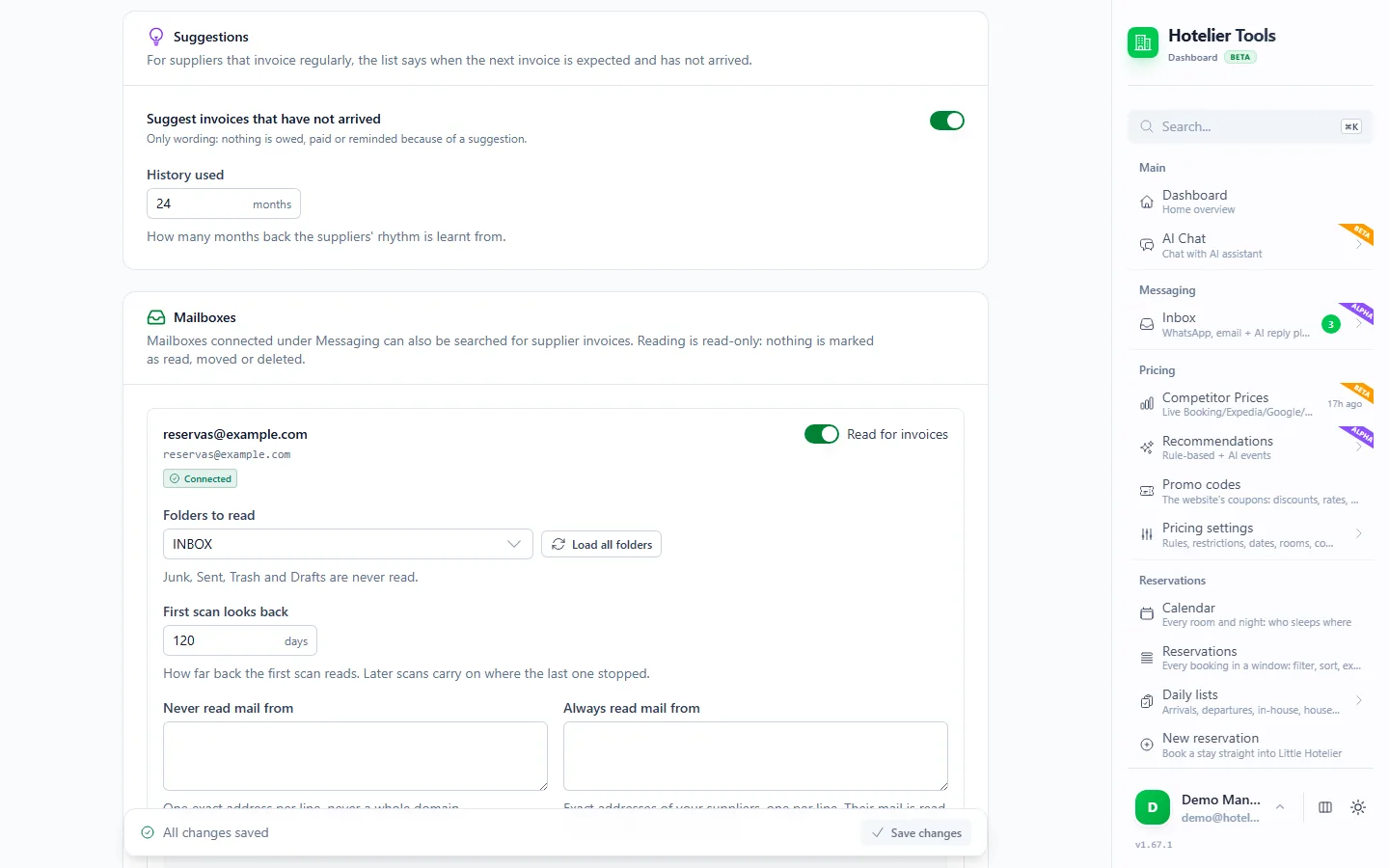
Hotelier Tools supports both. If you would rather keep everything in your own mailbox, connect it under Messaging > Channels and switch it on in Settings > Received invoices. It is read-only: nothing is marked as read, moved or deleted (see collecting supplier invoices by email).
Is anything shared between hotels?
No. Every address and every login belongs to exactly one property:
- There is no Hotelier Tools login that can see two hotels' extranets. One stolen login or one blocked account affects one hotel only.
- Our domain never becomes your main login or your recovery email anywhere. If our mail were ever compromised, or you stopped using Hotelier Tools, you would not lose access to your own extranet.
- Each server (deployment) has its own domain and its own mailbox. Mail is never passed from one server's database to another's.
How to set up the supplier invoice address
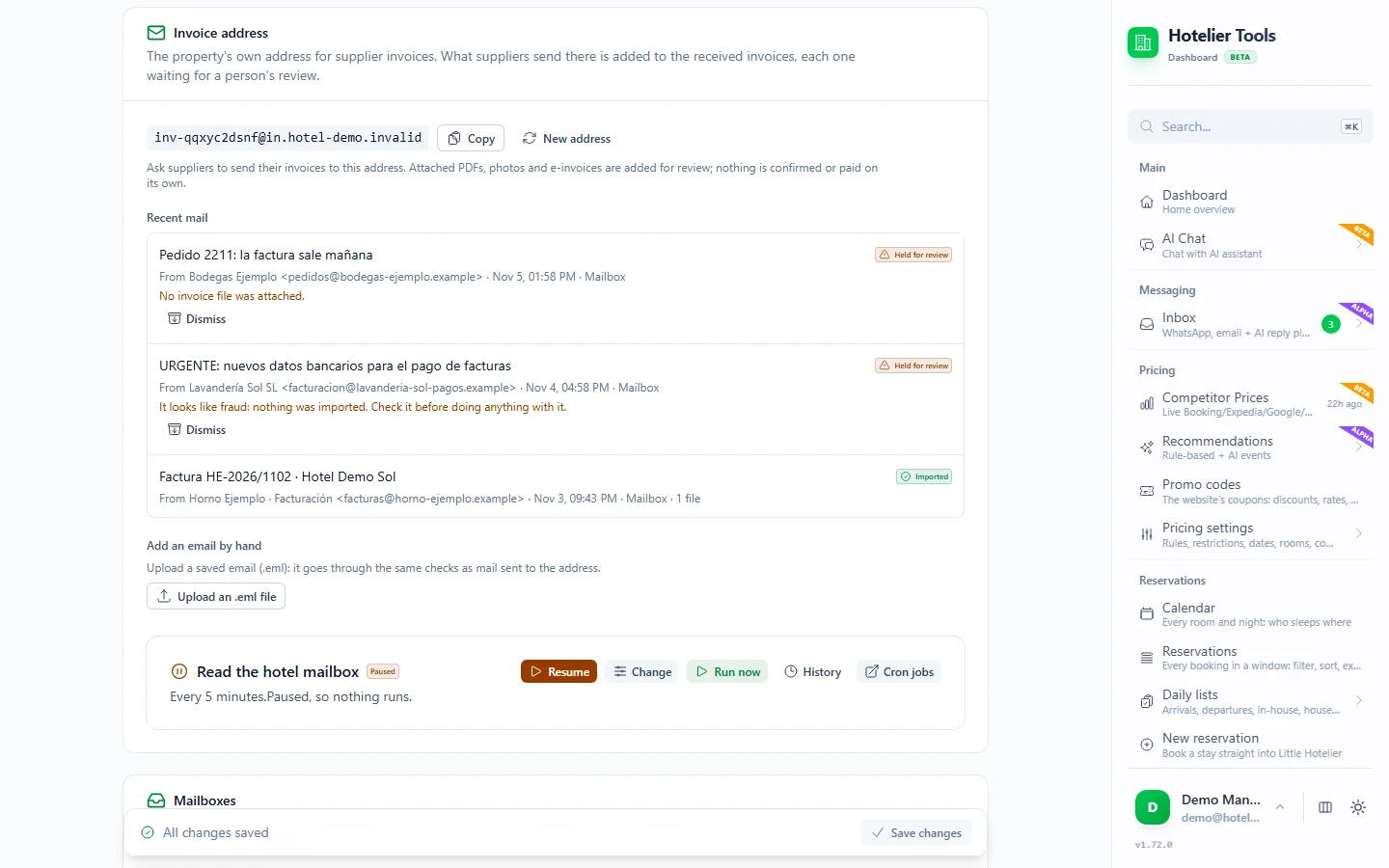
- Open Settings > Received invoices (
/settings/received-invoices) and find the Invoice address card. - Press Create the address. You get one address for the property, made of random characters.
- Press Copy and send it to your suppliers: "Please send your invoices to this address." The Received invoices list (
/received-invoices) shows the same address under Suppliers can email invoices to. - Make sure the Read the hotel mailbox task is on. It brings in what reaches the address; every 5 minutes is the recommended schedule.
- Watch Recent mail on the same card: each message shows its sender, its files and what happened to it.
You can also forward invoices you already have to the address. Hotelier Tools routes on the address the message was delivered to, so a forwarded or BCC'd message still reaches the right property. If you saved an email as a file, Add an email by hand takes an .eml and runs the same checks.
Need a fresh address, for example after a spam wave? Press New address. The old one keeps delivering for 30 days, with a note on each message that it came to a retired address, and then it stops.
What happens to mail sent to the invoice address?
Every message is treated as untrusted:
- Fraud check first. A message that scores as high risk is held for a person, never imported, and its original is kept.
- The sender check is ours. Whether the sender's domain passed its authenticity check (DMARC) is read from the header our own mail server adds, never from the From line. A supplier whose check fails gets a warning that a person must acknowledge before the invoice can be confirmed or paid.
- Attachments go through the normal import. PDFs, photos (PNG, JPEG, WebP) and e-invoices (Facturae, UBL, CII) are added to Received invoices. Each one starts as To review: nothing is confirmed or paid on its own.
- Never twice. A file that already arrived through your own mailbox, or by hand, is recognised by its contents and not added again.
- Size and plan. A message over 25 MB is not kept. On a plan without invoicing, mail to the address is stored and held, nothing is read by AI.
Mail sent to an address that doesn't exist is dropped silently, with no bounce. Nobody can probe which addresses are real.
Service logins: one address per portal
The second use is logins. Instead of giving Hotelier Tools your own Little Hotelier, Booking.com or Expedia password, you add a new user to your extranet with a private address, and that user is Hotelier Tools, for your property only. You choose its permissions and can remove it in one click.
| Portal | Address | Where it lives |
|---|---|---|
| Little Hotelier | lh-…@in.hotelier.tools | /credentials/hotelier-advanced |
| Booking.com extranet | bk-…@in.hotelier.tools | /credentials/booking-extranet |
| Expedia Partner Central | ex-…@in.hotelier.tools | /credentials/expedia-extranet |
Each of those pages has a card such as Hotelier Tools as a user in Little Hotelier: you enter the portal's own property number, press Get the login address, and invite that address in your extranet.
Be clear about where this stands, as of November 2026:
- What is automatic: the address, the check that a message really comes from the portal's own domain, and the safety rules. A security alert ("New sign-in", "Password changed") is never clicked: it is forwarded to the property's owner. A password reset nobody asked for is never followed, and the owner is told.
- What a person does today: no portal's invitation has been captured and read yet, so Hotelier Tools can't accept one on its own. Every message to a login address is held for a person, and the card says so. Until that changes, connect with the form further down the same page. For Little Hotelier, that means pasting the new user's activation link (see how to add a user to Little Hotelier).
When it is built, an invitation will only be accepted if it is for the property number you declared, so a leaked address can't pull a stranger's property into your account.
Prefer your own address? The card's Where the portal writes to this login option lets a login use Your own mailbox, one of your connected mailboxes. Only the messages the portal sends are read. Gmail and Microsoft 365 / Outlook can prove a message is genuine; with other providers every portal message is held for a person.
Where do I find all my addresses?
Credentials (/credentials) ends with Hotel mailbox addresses: the invoice address and the three login addresses, each with its state (for example Waiting for the invitation or Active) and an Open link to the page that manages it. The list is read-only.
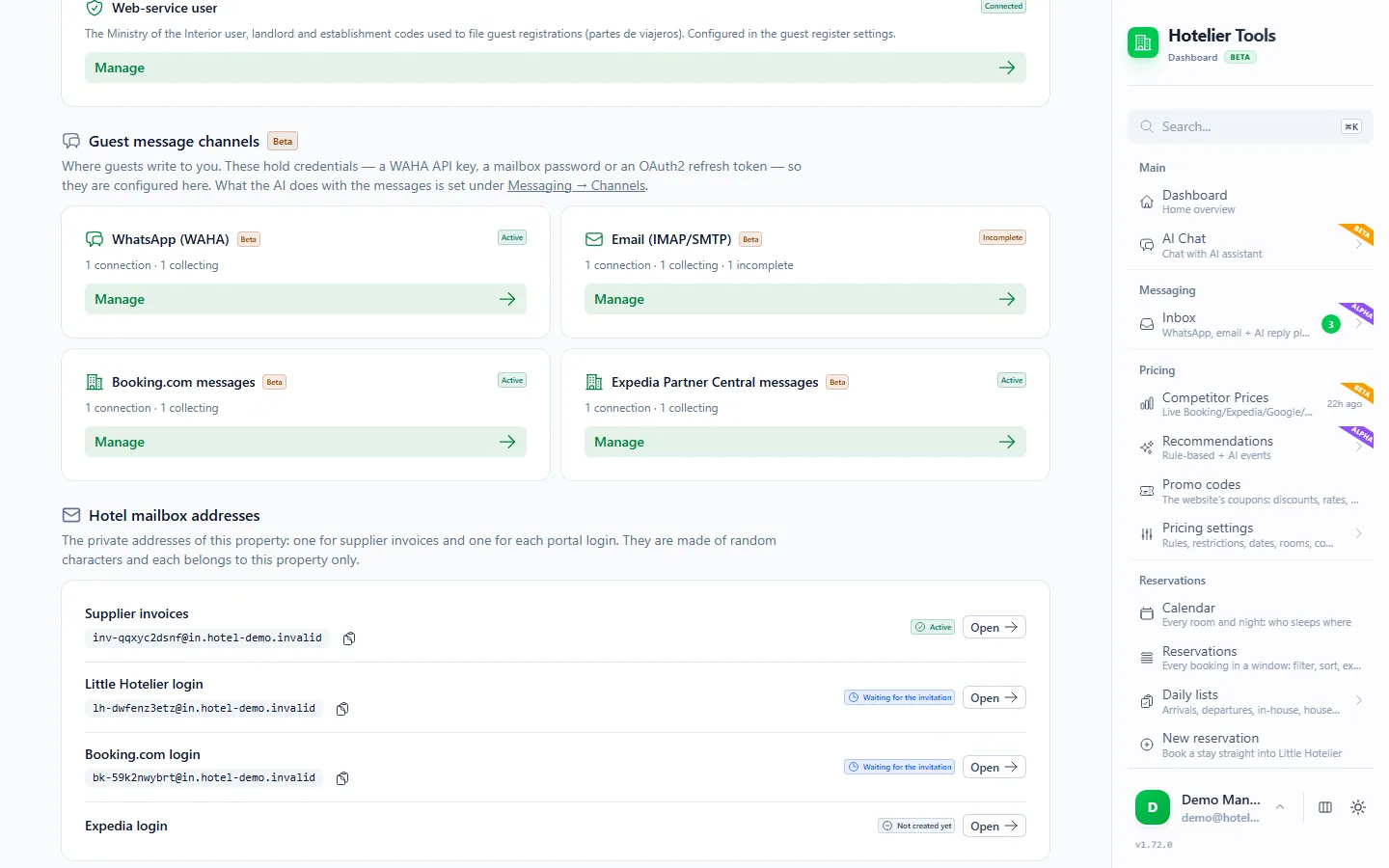
Two visibility rules apply:
- A login address is shown only to people on your team who manage connections. Others see its state, with "The address is shown only to people who manage connections".
- The invoice address is shown to people who may see received invoices.
If your server has no mail domain set up, the section says so once instead of listing empty addresses.
How much mail can each property receive?
Each property can receive 100 messages a month on Hotelier Tools' mail server. It protects the server; it isn't a price.
- Check it on Plan and billing (
/subscriptions), under Received mail: the count, the messages waiting and the month's list. - Over the limit, a message is stored, not lost. It waits and is handled automatically, oldest first, when the month starts again or the limit is raised. The owner gets one email that month.
- Need more? Use Contact support on the same card.
- Mail read from your own connected mailbox and
.emlfiles you upload never count.
Ask the assistant
The addresses have tools for the AI assistant (/chat) and for MCP clients such as Claude:
- "Which address do suppliers send invoices to?" →
list_hotel_mail_addresses - "Did anything reach the invoice address this week?" →
list_hotel_mail_messages - "Make a new address for supplier invoices" →
rotate_hotel_mail_address, only after you approve the card - "Is the Hotelier Tools user connected in Booking.com?" →
get_service_login
No tool ever returns a login address: it is shown only to a person on the connection page. Accepting an invitation is never a tool's job either.
Try it in the live demo
Open the same screen in the Hotelier Tools demo, filled with invented data. No sign-up, nothing to install.
The dashboard is free for every hotel until billing starts on 10 January 2027.
See also: supplier invoices by email, adding a user to Little Hotelier, the dashboard.
Summary
- Each property gets private, receive-only addresses on
in.hotelier.tools:inv-…for supplier invoices and one per portal login. - Supplier invoices sent to
inv-…land in Received invoices as To review, after a fraud check, with no IMAP password. - Nothing is shared between hotels, and the domain never becomes your login or recovery email.
- Login addresses exist today, but invitations are held for a person until each portal's accept step is built.
- 100 messages a month per property; find every address at the bottom of
/credentials.
Frequently asked questions
What is a receive-only email address for a hotel?
An address that only accepts mail and never sends any. In Hotelier Tools each property can get its own, such as inv-7k2m9qx4hp@in.hotelier.tools for supplier invoices. What arrives there lands in that property's account, without an IMAP password or a Microsoft sign-in.
Can another hotel see what is sent to my address?
No. Every address and every login belongs to exactly one property. The address is made of random characters, so it doesn't reveal your hotel's name, and nobody can guess your other addresses from it.
Will in.hotelier.tools become my Little Hotelier or Booking.com login?
No. Hotelier Tools' domain never becomes your main login or your recovery email anywhere. A service login is an extra user you add to your own extranet, and you can remove it whenever you like.
What happens to mail sent to an address that doesn't exist?
It is dropped silently, with no bounce. That way nobody can probe which addresses exist. Mail to a retired invoice address keeps arriving for 30 days, then it is dropped too.
Is there a limit on how much mail an address can receive?
Yes. Each property can receive 100 messages a month on Hotelier Tools' mail server. Over the limit, messages are stored and handled when the month starts again or support raises the limit. Your own connected mailbox never counts.
Is Hotelier Tools part of Little Hotelier, Booking.com or Expedia?
No. Hotelier Tools is independent and not affiliated with or endorsed by SiteMinder, Little Hotelier, Booking.com or Expedia. It connects with your hotel's own logins.