On this page
- Why your accountant wants supplier invoices organised
- How long must you keep supplier invoices?
- A naming convention that saves questions
- The faster way: Received invoices in Hotelier Tools
- How each invoice is read
- Check against the original, then confirm
- Export the quarter for your accountant
- Who can do what
- Summary
To collect supplier invoices automatically, send them all to one place and let software pull out the files: give suppliers a dedicated invoice address, or have a tool read the mailbox they already write to. In Hotelier Tools, suppliers can email a private address of your property, or your connected mailbox is scanned every day, read-only. E-invoices are read exactly, the AI reads PDFs and photos, and a person checks each invoice before it reaches the quarter you export for your accountant.
Why your accountant wants supplier invoices organised
Supplier invoices are the other half of the books. Your accountant needs them to:
- Deduct input VAT. In Spain, the VAT you paid on laundry, electricity or OTA commission is deducted in the quarterly modelo 303, and only with a valid invoice behind it.
- Keep the register of received invoices. Spanish businesses keep a "libro registro de facturas recibidas": one line per invoice with date, number, supplier tax ID, base, rate and tax.
- Record expenses for income tax, and check that what was paid matches what was billed.
The usual problem isn't the accountant's work. It's the shoebox: invoices spread across three mailboxes, a WhatsApp photo, a supplier portal, and one that never arrived.
How long must you keep supplier invoices?
It depends on the country. In the EU, Article 247 of the VAT Directive lets each member state set the period (text of Article 247). For Spain:
| Rule | Period | Source |
|---|---|---|
| Tax (received invoices and copies of issued ones) | 4 years, the Ley General Tributaria's limitation period | Agencia Tributaria |
| Invoices tied to VAT on assets with a regularisation period | That period plus the following 4 years | Same page |
| Commercial (books, correspondence, documentation) | 6 years from the last entry | Código de Comercio, art. 30 |
The Agencia Tributaria also says how: invoices are kept "with their original content, in order", on paper or electronically, as long as the method guarantees the authenticity of the origin, the integrity of the content and legibility, and the tax agency can access them without delay. In practice: keep the file the supplier sent, in order, and don't delete anything your accountant has booked. Check the period for your own country with your accountant.
A naming convention that saves questions
If you file invoices by hand, name each file the same way so a folder sorts itself:
2026-10-12_Electra-Norte_EL-20261012.pdf
2026-10-03_Booking.com_BO-20261003.pdf
Date first (year-month-day, so it sorts by date), then the supplier, then the invoice number. Keep one folder per quarter. Don't rename the supplier's number: it's how your accountant matches the invoice to the payment.
The faster way: Received invoices in Hotelier Tools
Received invoices (/received-invoices) collects what your suppliers send, reads it, and keeps it waiting for you until you confirm it. There are four ways in, and you can use all of them together:
| Way in | Best for | What you set up |
|---|---|---|
| Invoice address | Suppliers who can email anywhere | Copy your property's inv-… address and send it to them |
| Your own mailbox | Suppliers already writing to your hotel's email | Connect it under Messaging, then switch on Read for invoices |
| Drop or paste | Paper invoices, photos, downloads from portals | Nothing: drag files onto the page |
| REST API | Your own scripts | POST /api/v1/received-invoices/upload |
The same file never comes in twice: whichever way it arrives, a file that is already there is recognised by its contents.
Option 1: give suppliers your invoice address
- Open Settings > Received invoices (
/settings/received-invoices), find Invoice address and press Create the address. - Press Copy and send it to your suppliers. You can also forward invoices you already have to it.
- Keep the Read the hotel mailbox task on (every 5 minutes is recommended).
The address looks like inv-7k2m9qx4hp@in.hotelier.tools. It belongs to your property only and needs no mailbox password. How these addresses work, and what they are not, is in a hotel email address for invoices and logins.
Option 2: scan the mailbox suppliers already use
- Connect the mailbox (Google, Microsoft or any IMAP account) under Messaging > Channels.
- On Received invoices, open the Setup guide. It has four steps:
- Choose the mailboxes your suppliers write to and switch them on.
- Choose how far back to read: The past N days, months or years, or Since the start of this week, month, quarter or year. At most 5 years back.
- Read the mail you already have with Read the mail now. Long backfills stop after a while and the daily scan reads the rest.
- Read new mail every day: the scheduled scan, recommended at 06:20.
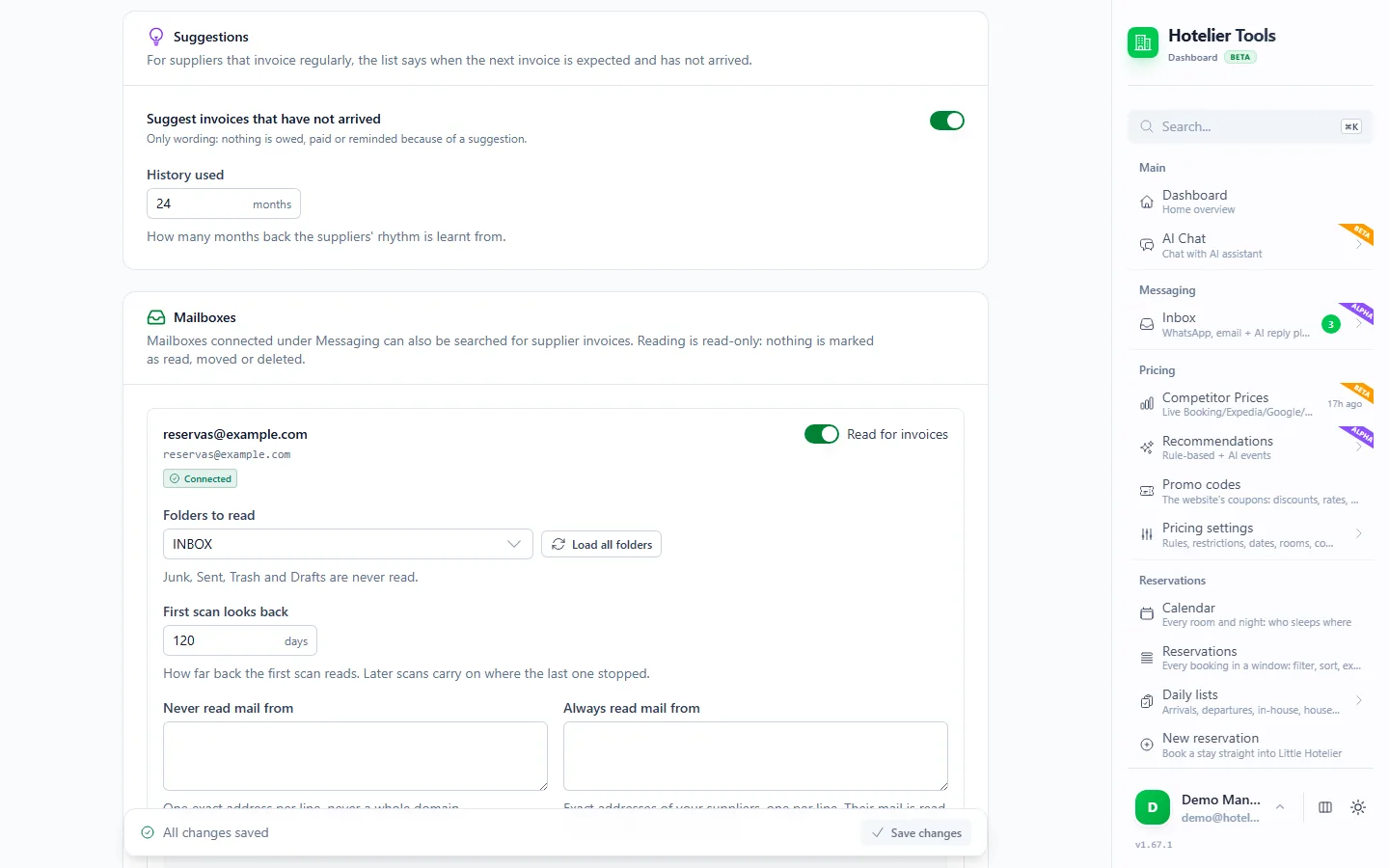
- In Settings > Received invoices, fine-tune each mailbox: Folders to read, Always read mail from (your suppliers' exact addresses) and Never read mail from.
Reading is read-only: nothing is marked as read, moved or deleted, and Junk, Sent, Trash and Drafts are never read. A message counts as an invoice when it comes from a known supplier, has an e-invoice attached, mentions an invoice word ("invoice", "factura", "fattura"…) or carries a photo.
Option 3: drop the files
Drag PDFs, photos (PNG, JPEG, WebP) and e-invoice XML files onto the page, or press Choose files. Up to 20 files at a time, 15 MB each. You can also paste a photo. iPhone HEIC photos can't be read yet: export them as JPEG first.
How each invoice is read
- E-invoices are read exactly. Facturae, UBL and CII XML files are parsed by code, with no AI and no cost. A Facturae file with several invoices becomes several rows. A signature is shown as present, not verified.
- The AI reads PDFs and photos. PDFs up to 10 MB and six pages, photos up to 5 MB. Each reading uses your monthly AI allowance, the same one as guest replies, and shows its tokens and cost on the invoice. By default the AI reads at most 40 invoices a day; you can change that.
- Email attachments wait for you by default. Read email attachments automatically is off until you switch it on, and mail with fraud warnings is never read by a machine.
Each field shows where its value came from (E-invoice, AI or You). What you correct is never overwritten by a new reading.
Check against the original, then confirm
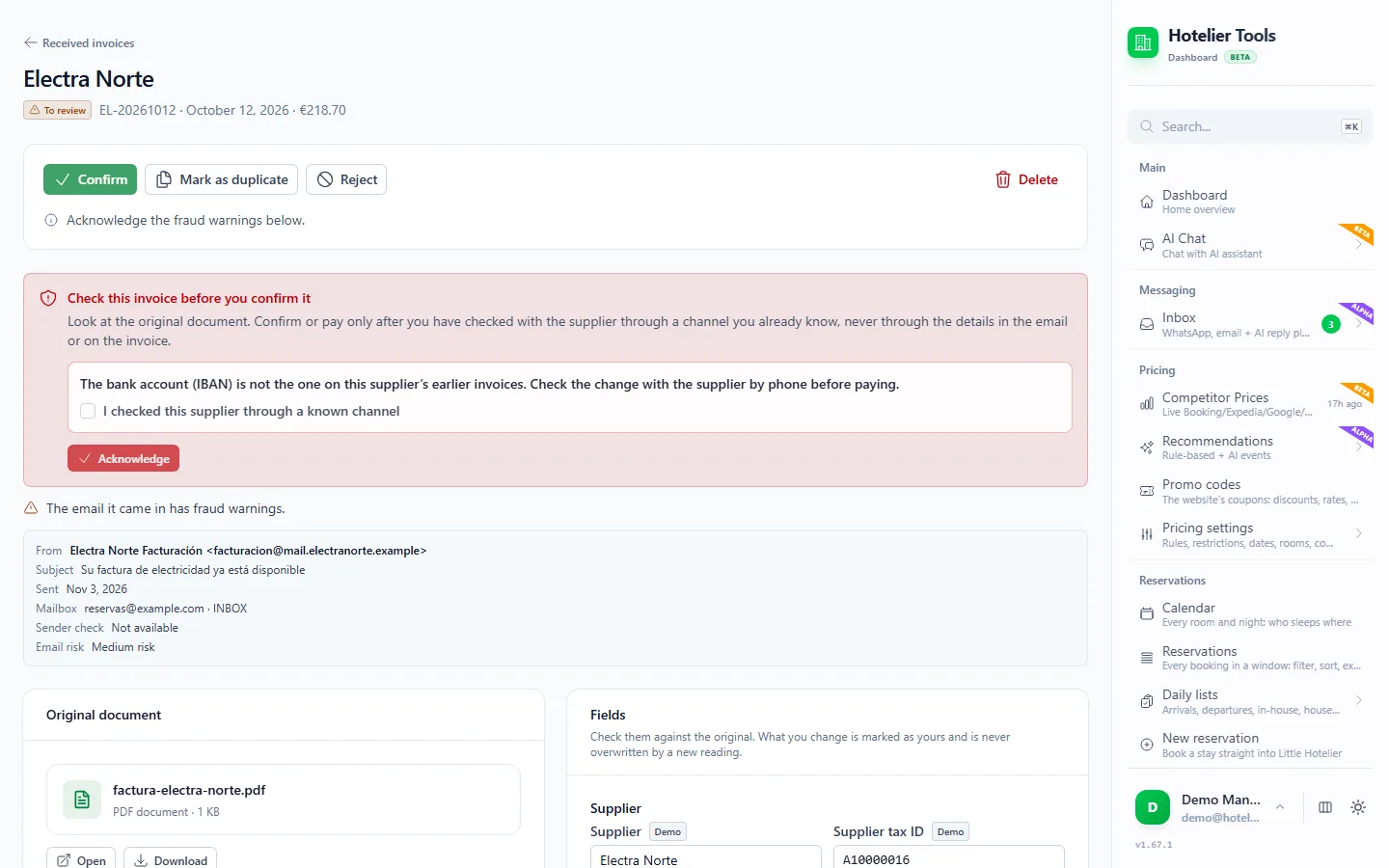
Every invoice starts as To review. Open it, compare the fields with the original next to them, and press Confirm (or Confirm and next to work through the queue). Later, Mark as paid with the date. Anything wrong? Mark as duplicate, or Reject with a reason: Not for this property, Not an invoice, Spam or fraud or Other. A rejected file is never brought back by the mailbox scan.
The warnings that stop a bad payment
The most common supplier fraud is simple: an invoice that looks right, with a new bank account. Hotelier Tools compares each invoice with the supplier's history and the email it came in:
- The bank account (IBAN) is not the one on this supplier's earlier invoices. Only the last four digits are stored.
- The sender's address failed its authenticity check (DMARC). The invoice page shows a Sender check line (Passed, Failed or Not available), read from the mail server's own header, never from the From line.
- The email it came in has fraud warnings, the invoice is addressed to another company's tax ID, the issuer is your own property, or the PDF contains scripts.
Any of these blocks Confirm and Mark as paid until a person ticks I checked this supplier through a known channel and presses Acknowledge. Call the supplier on a number you already have, never one from the email. No API key or AI tool can acknowledge for you.
Softer warnings don't block, but they show: the amounts don't add up, the tax ID fails its check digit, the supplier usually writes from another domain.
Duplicates
An invoice is flagged as a possible duplicate when another one has the same supplier tax ID and invoice number, or the same supplier and total with an issue date within three days. You decide: Mark as duplicate and pick the original, and it stays in the list, left out of the totals.
What you can never do
Delete a confirmed or paid invoice. It is kept on record (four years in Spain) and can only be rejected, which leaves it out of the totals and the export.
Export the quarter for your accountant
- On Received invoices, the list is grouped by natural quarters (Q1 = January to March, as in the modelo 303) by default. You can group by month, year, supplier or category, and set the month your fiscal year starts in.
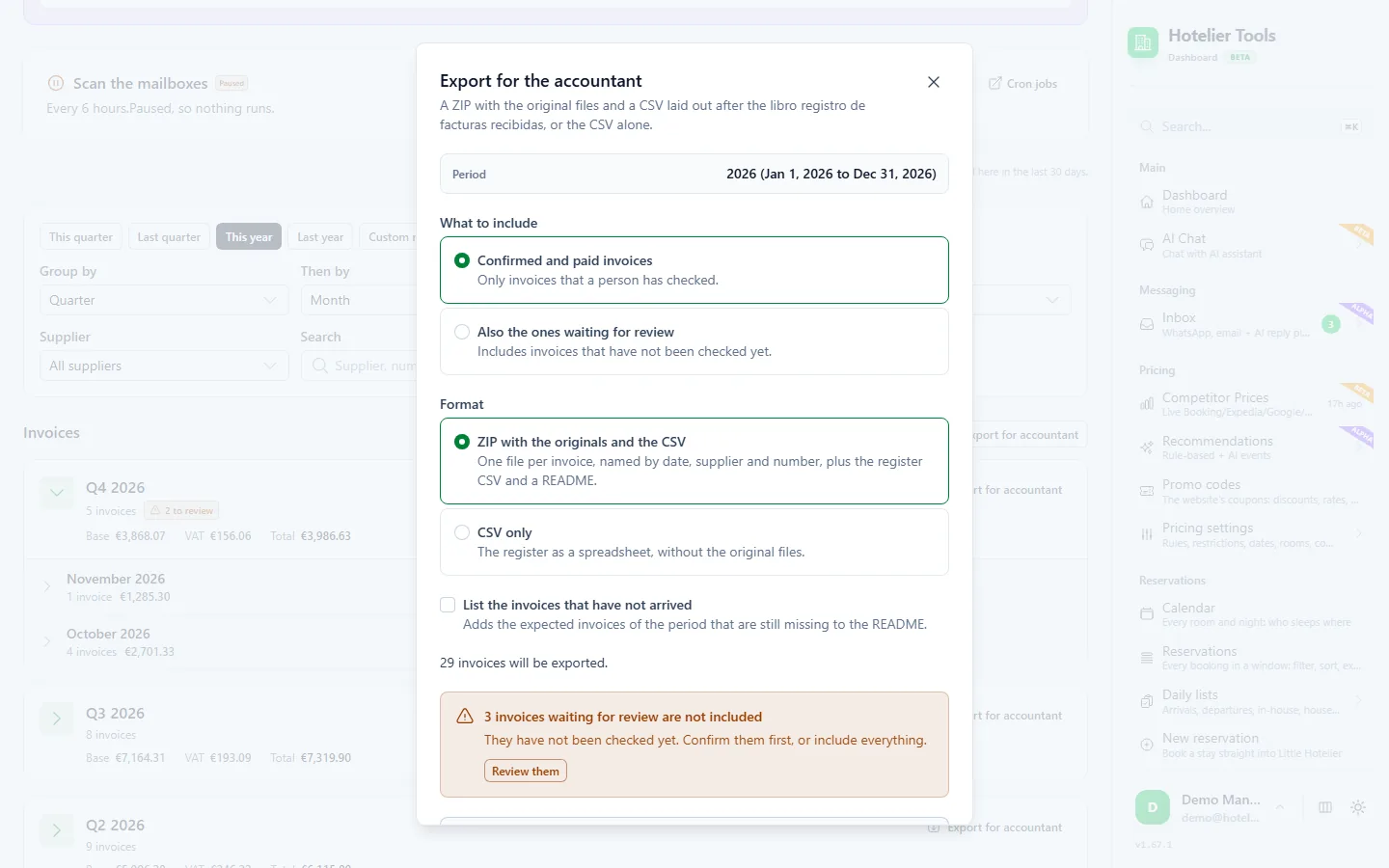
- Press Export for accountant on a quarter.
- Choose Confirmed and paid invoices (the default) or Also the ones waiting for review, and ZIP with the originals and the CSV or CSV only.
- Optionally tick List the invoices that have not arrived.
The ZIP holds one file per invoice, named by date, supplier and number, a CSV laid out like the libro registro de facturas recibidas (one row per tax line) and a README. Up to 500 files per export.
Be honest with your accountant about one thing: the CSV follows the layout of the register, but it is not certified by the tax agency. They decide what goes into the books.
Invoices you may be missing
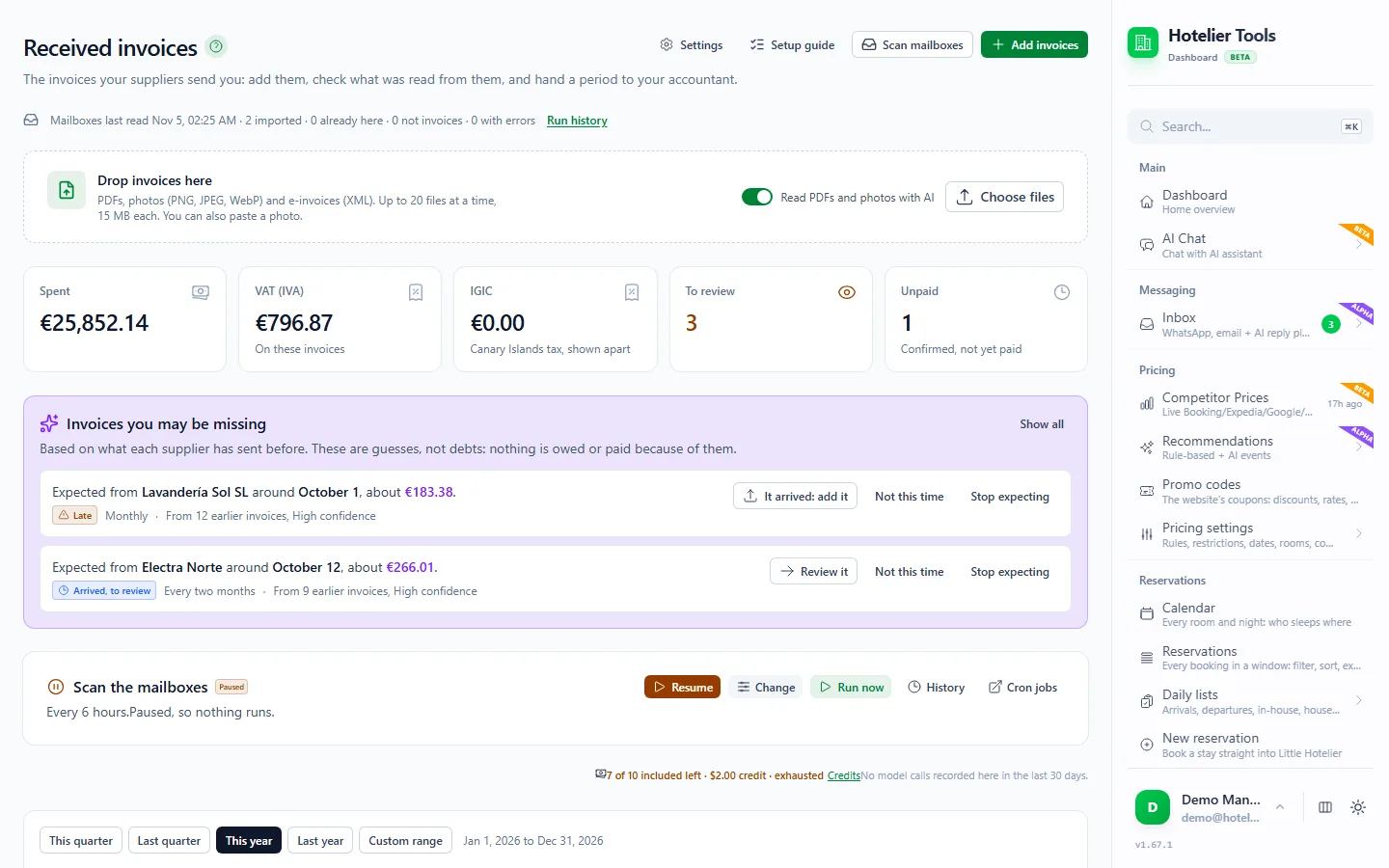
For suppliers that bill on a rhythm (monthly laundry, bimonthly electricity, a quarterly gestoría), Invoices you may be missing says "Expected from Lavandería Sol SL around 1 October" when the next one hasn't come. These are guesses, not debts. Not this time hides one period; Stop expecting hides the supplier.
Who can do what
Give your accountant their own login on Settings > Team & roles (/settings/team). The built-in accountant role can view, edit and have invoices read, but not scan mailboxes. Scanning business mail and spending AI credit are separate permissions you grant on purpose.
The assistant can help too: "Which supplier invoices am I missing for Q3?" or "How much input VAT so far this quarter?" are answered from the same data, and anything that changes an invoice waits for your approval.
Try it in the live demo
Open the same screen in the Hotelier Tools demo, filled with invented data. No sign-up, nothing to install.
Received invoices is part of the Invoicing feature. The dashboard is free for every hotel until billing starts on 10 January 2027.
See also: download all your Little Hotelier invoices, a hotel email address for invoices, sending the guest invoice at checkout.
Summary
- Send supplier invoices to one place: a private invoice address, your own mailbox scanned daily, or drag and drop.
- Keep them: in Spain at least four years for tax and six under the Código de Comercio, as original files, in order.
- E-invoices are read exactly; the AI reads PDFs and photos; a person confirms each one.
- A changed IBAN, a failed sender check or a fraud score blocks payment until someone checks with the supplier.
- Export each quarter as a ZIP of renamed originals and a register-style CSV for your accountant.
Frequently asked questions
How can I collect supplier invoices from email automatically?
Either give suppliers one address that only receives invoices, or let software read the mailbox they already write to. In Hotelier Tools you can do both: each property gets a private invoice address, and connected mailboxes can be scanned daily, read-only, for invoice attachments.
How long do I have to keep supplier invoices in Spain?
At least four years for tax purposes, the Ley General Tributaria's limitation period, as the Agencia Tributaria explains. The Código de Comercio asks businesses to keep their documentation for six years, so many accountants advise keeping everything six years.
Can I keep supplier invoices only as PDFs or scans?
In Spain, yes, as long as the method guarantees the authenticity of the origin, the integrity of the content and legibility, and the tax agency can access them without delay. Keep the original file you received, not a re-typed copy.
How do I spot a fake supplier invoice?
Be wary when the bank account differs from earlier invoices, the sender's domain changed, or the email fails its authenticity check. Hotelier Tools flags these and blocks confirming or paying until a person acknowledges the warning after calling the supplier on a number they already know.
Does the AI decide what goes into my books?
No. Every invoice starts as To review. E-invoices are read exactly and the AI reads PDFs and photos, but only a person can confirm an invoice or mark it as paid, and what a person corrects is never overwritten by a new reading.
Is Hotelier Tools part of Little Hotelier or my accounting software?
No. Hotelier Tools is independent and not affiliated with or endorsed by SiteMinder or Little Hotelier. Its received-invoice export is a generic CSV and ZIP for your accountant, not a certified tax register.