On this page
- Can Little Hotelier export all invoices natively?
- What the native export doesn't do
- How to download a whole quarter as one ZIP and CSV (the faster way)
- Checks before invoicing: missing tax IDs, early invoices and duplicates
- What happens to bookings that can't be invoiced?
- Which language will the invoices be in?
- What to send your accountant each quarter
- Summary
Yes. Little Hotelier can put every invoice that already exists into one ZIP: open Front Desk > Reports > Invoices, filter the quarter and press Download invoice PDFs. What it won't do is create the invoices nobody generated, or warn you about the ones that shouldn't be issued yet. For that, Hotelier Tools generates the missing invoices in one run, refuses the risky ones and gives you the quarter as one ZIP of PDFs plus a CSV summary.
Can Little Hotelier export all invoices natively?
Yes. As of October 2026, Little Hotelier's help centre describes three ways to get invoices out. Which one you need depends on what your accountant asks for.
| Method | What you get | The catch |
|---|---|---|
| Invoice report | A ZIP of invoice PDFs and a CSV list | Only invoices that already exist |
| Accounting report | A CSV built for Xero and QuickBooks import | Only invoices marked as final |
| One reservation at a time | One PDF (Print or Save as PDF) | Slow for a full quarter |
The Invoice report (PDFs in a ZIP)
- Go to My Apps > Front Desk > Reports and click Invoices.
- Choose the date range for your quarter. Optionally filter by Invoice status and Payment status, then click Apply.
- Click Download invoice PDFs, then Download zip.
- Confirm the multi-factor authentication prompt. The ZIP downloads.
Export on the same report gives you a CSV instead. Source: How to run an Invoice report.
The Accounting report (CSV for Xero or QuickBooks)
Go to My Apps > Front Desk > Reports > Accounting, choose Yesterday, Last 7 days or custom dates, and click Export. You get a CSV (or a ZIP for large exports) with contact, address, invoice number, dates, amounts, account and tax codes.
Two limits: only invoices marked as final are exported, and the file is for importing by hand. It is not a live sync. You set the account codes once in Front Desk > Setup > Accounting Integration. Sources: Accounting: export invoices marked as final and Accounting Integration: setup.
One by one
Open the reservation, click Print, choose Invoice and pick Save as PDF in the print window (help centre). If you do this often, the free Extra Invoice Print Button script puts a direct print link on the reservation.
What the native export doesn't do
The download is the easy part. The quarter usually goes wrong earlier:
- Missing invoices. The ZIP only holds invoices someone generated. The help centre describes creating them one reservation at a time (Invoices tab > Generate invoice), so a stay nobody clicked on is simply not there.
- Duplicates. Each generate request creates a new document in Little Hotelier, so regenerating a stay can leave two invoices where your accountant expects one.
- Early invoices. An invoice issued before the guest checks out goes stale as soon as an extra or a payment is added, and fixing it means a corrected invoice, a credit note or, in Spain, a rectification.
- Finalising. The accounting export needs each invoice marked as final, and the help centre describes doing that per reservation.
How to download a whole quarter as one ZIP and CSV (the faster way)
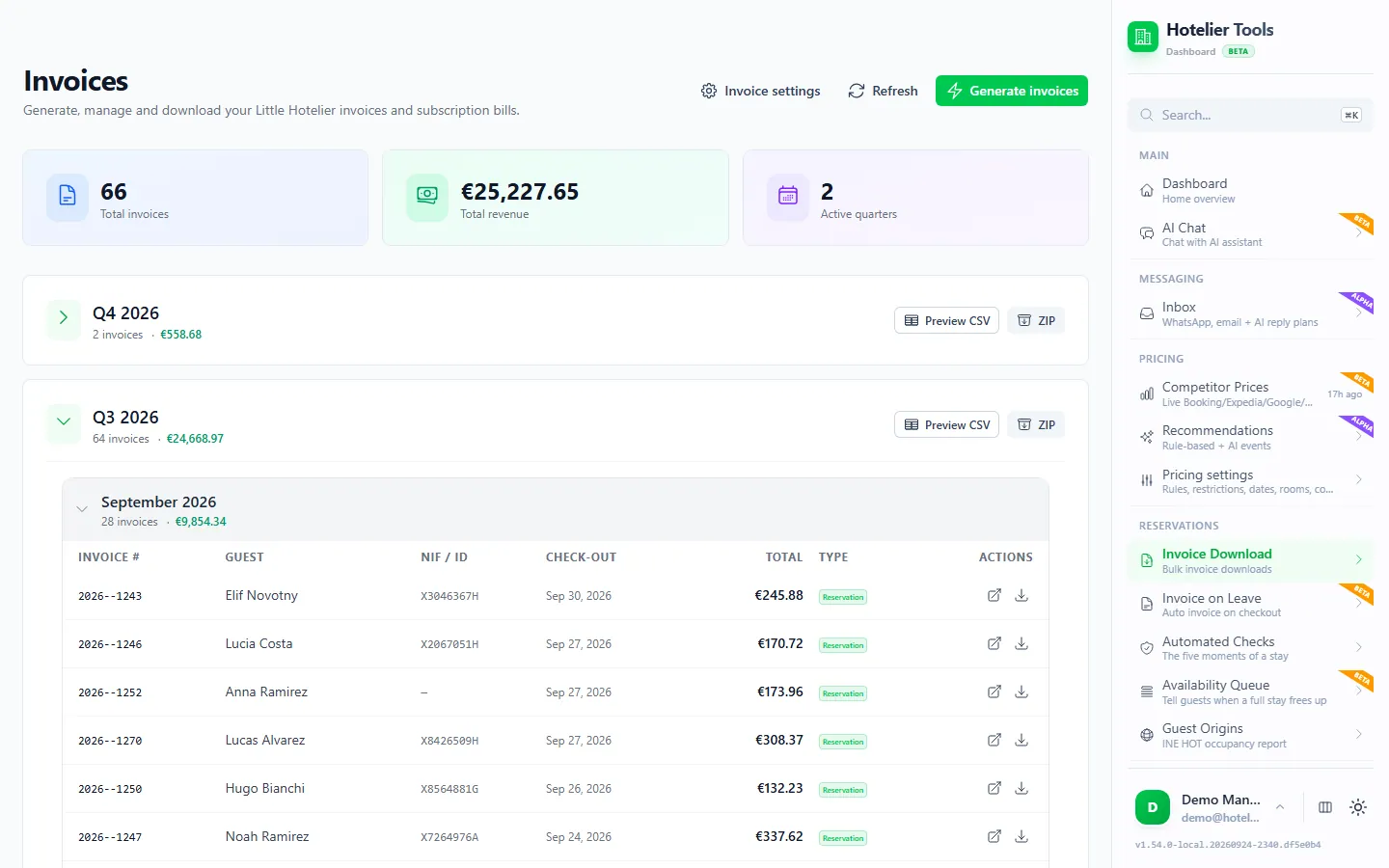
Hotelier Tools is a dashboard that connects to Little Hotelier with your own login. Its Invoice Download page creates the invoices for a date range in one run and hands you the result per quarter.
- Sign up at dashboard.hotelier.tools and connect Little Hotelier on Credentials. Your login is stored encrypted.
- In the menu, open Invoice Download (
/invoices). - Press Generate invoices and choose the dates, for example 1 July to 30 September.
- The app reads those reservations from Little Hotelier and creates invoices for the stays that qualify. Anything it can't invoice goes to Errors with the reason. Nothing is skipped silently.
- Your invoices appear grouped by quarter and month. On the quarter, press ZIP to download every PDF, or Preview CSV to check the summary first.
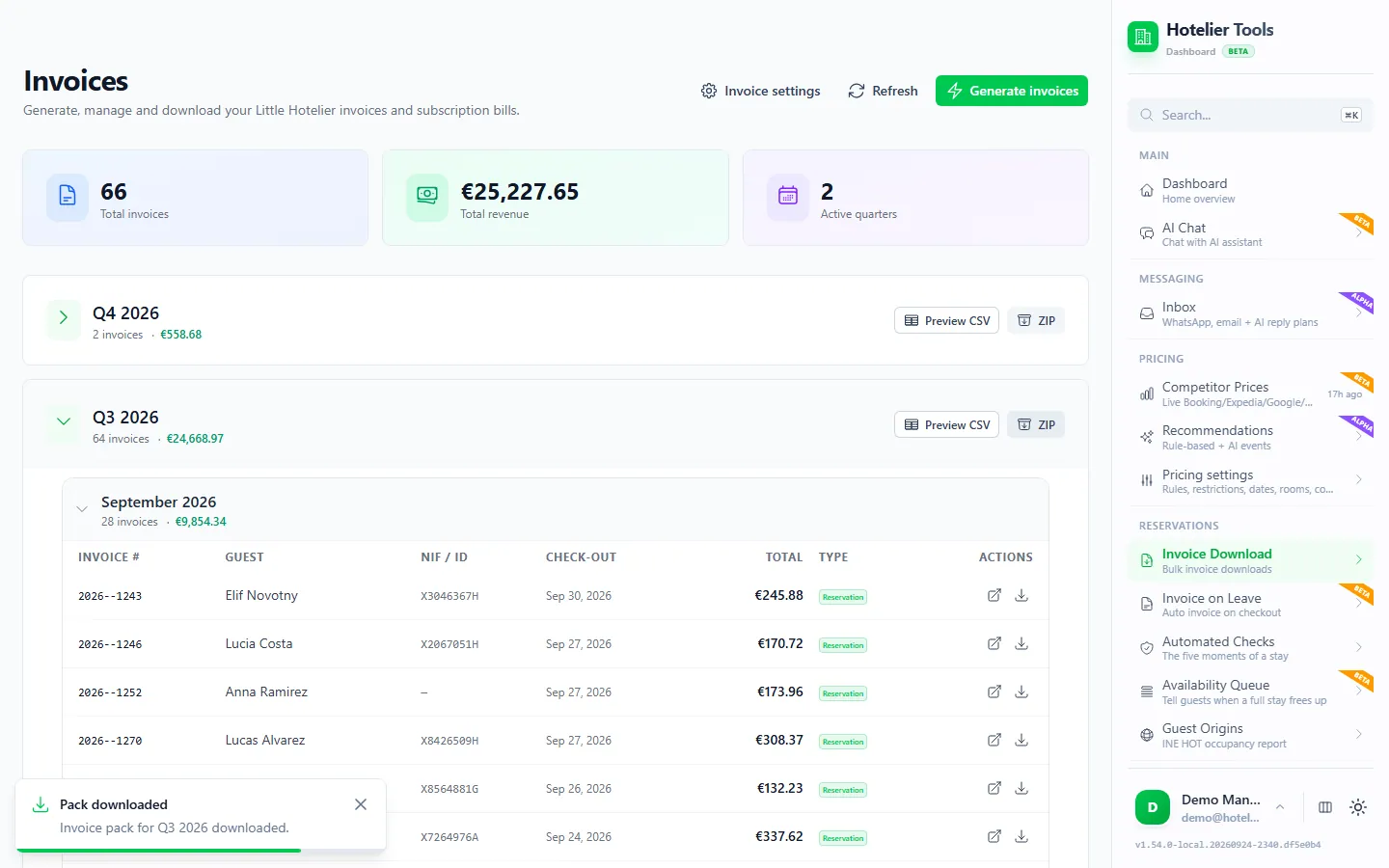
The invoices are Little Hotelier's own documents. Hotelier Tools asks Little Hotelier to generate each one, so your numbering, logo and layout from Customise invoices stay exactly as they are.
Checks before invoicing: missing tax IDs, early invoices and duplicates
Before asking Little Hotelier for an invoice, Hotelier Tools runs a preflight check. It refuses to invoice a stay when:
- the guest has not checked out yet, because the figures are not final
- it is a company invoice without a tax ID or fiscal address
- the tax ID is malformed
- the stay is already invoiced, which prevents duplicates
A private guest doesn't need fiscal details, so a missing ID document is only a warning for them.
This is the difference between a ZIP your accountant can trust and a ZIP they send back with questions.
What happens to bookings that can't be invoiced?
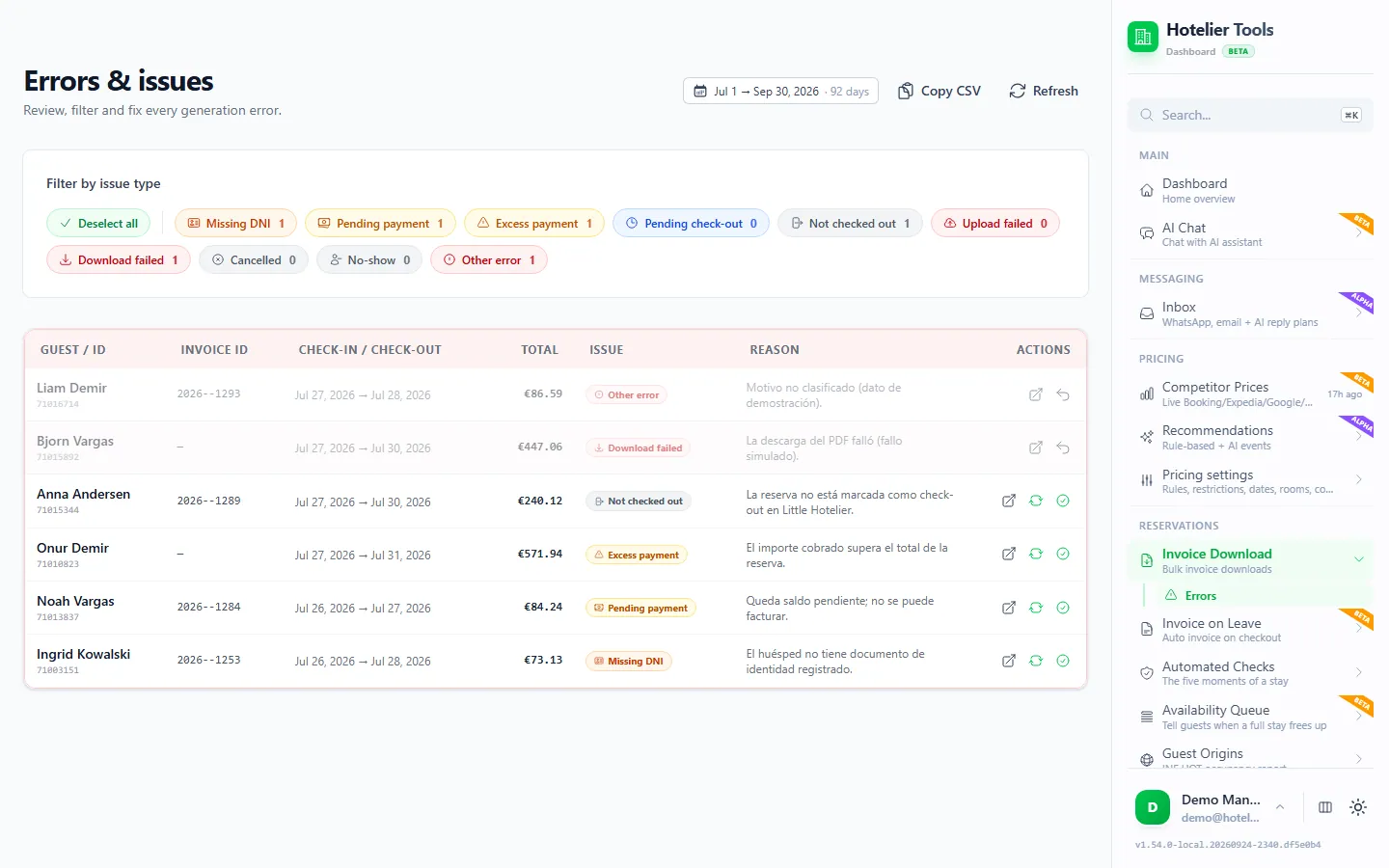
They land on Errors (/invoices/errors), one row per reservation with the reason.
- Pick the date range at the top.
- Filter by issue type: Missing DNI, Pending payment, Not checked out, Download failed and others.
- Fix the reservation in Little Hotelier: add the tax ID, record the payment or check the guest out.
- Back on Errors, check it again or mark it resolved. Copy CSV gives you the list for a colleague.
If a stay is held up by a rounding balance of a cent or two, the cent-fix option in Settings > Invoices can close those tiny balances.
Try it in the live demo
Open the same screen in the Hotelier Tools demo, filled with invented data. No sign-up, nothing to install.
Which language will the invoices be in?
You choose in Settings > Invoices (/settings/invoices):
- From the guest's country: each invoice uses the language of the country on the guest's address. A missing or unmatched country uses your fallback language.
- Always the same language: every invoice in one language, whoever the guest is.
Pick the Fallback language and press Save changes.
What to send your accountant each quarter
A short routine that avoids most follow-up emails:
- Run the quarter a few days after it ends, so late check-outs are closed.
- Clear Errors until only the stays that genuinely need no invoice are left.
- Download the ZIP and the CSV and send both.
- Scan the invoice numbers for gaps or repeats before you send.
- Mention cancelled invoices. In Little Hotelier, cancelling a finalised invoice moves it to Older invoices with the status Cancelled, and its data still appears in exports (help centre). Your accountant needs to know so revenue isn't counted twice.
In Spain this feeds your VAT return (modelo 303). If you use VeriFactu, Little Hotelier finalises invoices by submitting them to the AEAT itself (help centre). Hotelier Tools has no VeriFactu feature of its own, so keep that step in Little Hotelier. In any country with mandatory e-invoicing, treat the ZIP as copies for your records and check the rules with your accountant.
Developers can also fetch invoice PDFs one by one through the Hotelier Tools REST API. And if your accountant wants reservation data too, see how to export reservations to Excel.
Summary
- Little Hotelier's Invoice report zips the PDFs of invoices that already exist; the Accounting report exports finalised invoices as a CSV for Xero or QuickBooks.
- Neither creates missing invoices or stops duplicates and early invoices.
- Hotelier Tools generates a date range in one run, refuses risky invoices, lists every failure with its reason and gives you a ZIP and CSV per quarter.
- To stop the backlog at the source, send each invoice automatically at checkout. See everything the invoicing feature does on the Invoicing page.
Frequently asked questions
Can Little Hotelier download all my invoices as PDFs at once?
Yes, for invoices that already exist. Go to Front Desk > Reports > Invoices, filter the dates, press Download invoice PDFs and then Download zip. Little Hotelier asks you to confirm with multi-factor authentication first.
Does Little Hotelier sync invoices to Xero or QuickBooks automatically?
No. The Accounting report exports invoices marked as final to a CSV file designed for Xero and QuickBooks import, and you import that file yourself. Only finalised invoices are included.
Will Hotelier Tools change my invoice numbers or template?
No. Hotelier Tools asks Little Hotelier to generate each invoice, so it is Little Hotelier's own document, with your numbering, logo and layout from Customise invoices.
What happens to cancelled invoices in my export?
In Little Hotelier, a cancelled finalised invoice moves to Older invoices with the status Cancelled, and its data still appears in exports. Tell your accountant so revenue is not counted twice.
How much does Hotelier Tools cost?
It is free for every hotel until billing starts on 10 January 2027. Hotels that start before 31 December 2026 then pay 50 € per hotel per month through 2027. No card is needed to start.