On this page
Expedia guest messages live in Partner Central under Guest relations > Messages, where you search by guest name or reservation ID and reply in the thread. You can also answer from the Partner Central app, or from your own mailbox through each reservation's guest email alias. Templates and scheduled messages cover the routine questions. To see Expedia next to WhatsApp, Booking.com and email, the Hotelier Tools inbox can show Expedia conversations (beta), but replies always go out from Partner Central.
Expedia features below were checked against Expedia Group's Partner Central help as of November 2026.
Where are Expedia guest messages?
Open Partner Central and select Guest relations, then Messages (Partner Central help: About messages). From there you can:
- Search for a guest by name or reservation ID to send a new message.
- Filter the list to find an existing conversation.
- Reply in the thread, and attach check-in instructions or photos.
You and your guests get email notifications about new messages, and guests can start a conversation from their itinerary or their confirmation. Expedia calls the Message Center "the recommended option": it is linked to the booking, keeps an auditable history and doesn't expose the guest's contact details (Contact a guest).
Two things that surprise new partners:
- Some bookings have no Message Center. Many bookings from Expedia's business-to-business (B2B) partners, such as travel agencies, can't be messaged. Contact the B2B partner instead, or ask Expedia to relay an urgent message.
- Phone numbers are hidden. Expedia has temporarily disabled viewing and exporting traveler phone numbers in Partner Central, and API reservations get a generic number. The reason is phishing: scammers impersonate hotels on WhatsApp using leaked numbers (phishing notice). Your channel manager won't have the real number either.
On your phone: the Partner Central app
The Expedia Group Partner Central app lets you start conversations and respond to guests, with notifications for bookings, reviews and cancellations. Expedia says active app users respond 20% faster than non-active users (its own 2021 average, app page).
How to reply from your own email: the guest email alias
Every reservation has a guest email alias, a unique address that relays your email to the guest through Expedia (About the guest email alias). To copy it:
- From a reservation: select Reservations, find the booking, select the guest's name, then Copy email to clipboard.
- From Messages: select Guest relations > Messages, open the guest, select Show contact details, then Copy email to clipboard.
The rules that matter:
- The alias works for Expedia, Hotels.com, Travelocity, Orbitz and Wotif bookings. As of November 2026 it doesn't work for B2B bookings or Egencia.
- The sending address must belong to a validated Partner Central user. Mail from any other address is not delivered, so add your front-desk mailbox as a Partner Central user if you want to reply from it.
- The guest's reply arrives in your mailbox and in the Message Center.
- An email containing a credit card number is blocked. Expedia virtual card numbers are allowed.
- You can attach PDF or Word files, such as a pre-arrival form.
How fast should you answer Expedia guests?
Expedia's help asks you to "respond to every guest in a timely manner" and to "reply promptly to avoid delays, cancellations, or escalations". It publishes no fixed deadline for ordinary messages. In practice, treat the same day as the limit, and answer within minutes for anything about arrival. Late arrivals, door codes and parking are what guests ask on the day they travel.
Expedia also lists what not to do (Contact a guest):
- No marketing. No upselling or promotions through Expedia messages.
- No duplicate confirmations. The guest already has one from Expedia.
- No changing booking terms outside Expedia. Dates and prices are changed in Partner Central.
- Avoid external links and attachments when you can. Guests may see them as suspicious.
When something is agreed in person during the stay, Expedia recommends confirming it in writing in the Message Center. That message is your record if there is a dispute later.
How to set up templates and scheduled messages
In Guest relations > Messages, select Manage templates (Send scheduled messages):
- Select Create new template, give it a name and write the text.
- Under Insert custom information, add variable content such as the guest's name.
- Attach files if you need them, for example a map or check-in instructions.
- Turn on Send on a schedule and choose when it goes out, with no end date or for a date range.
- Select Save.
All scheduled messages are sent at 10 PM local time. A smart template can reply automatically to one topic; as of November 2026 the only one is a post-stay review request. Send bulk message sends one template to several guests at once.
A pre-arrival template you can adapt:
Hi [guest name], we're looking forward to your stay at [property name].

Check-in is from [time]. If you'll arrive after 22:00, reply here with your arrival time and we'll leave instructions.
Parking: [your parking info]. Breakfast: [times and price].

We will only contact you through this Expedia conversation, and we will never ask for card details by WhatsApp or text message.
The last line matters more now that scammers write to Expedia guests on WhatsApp. More on that in how to spot scam messages at a hotel.
The faster way: Expedia conversations in the Hotelier Tools inbox (beta)
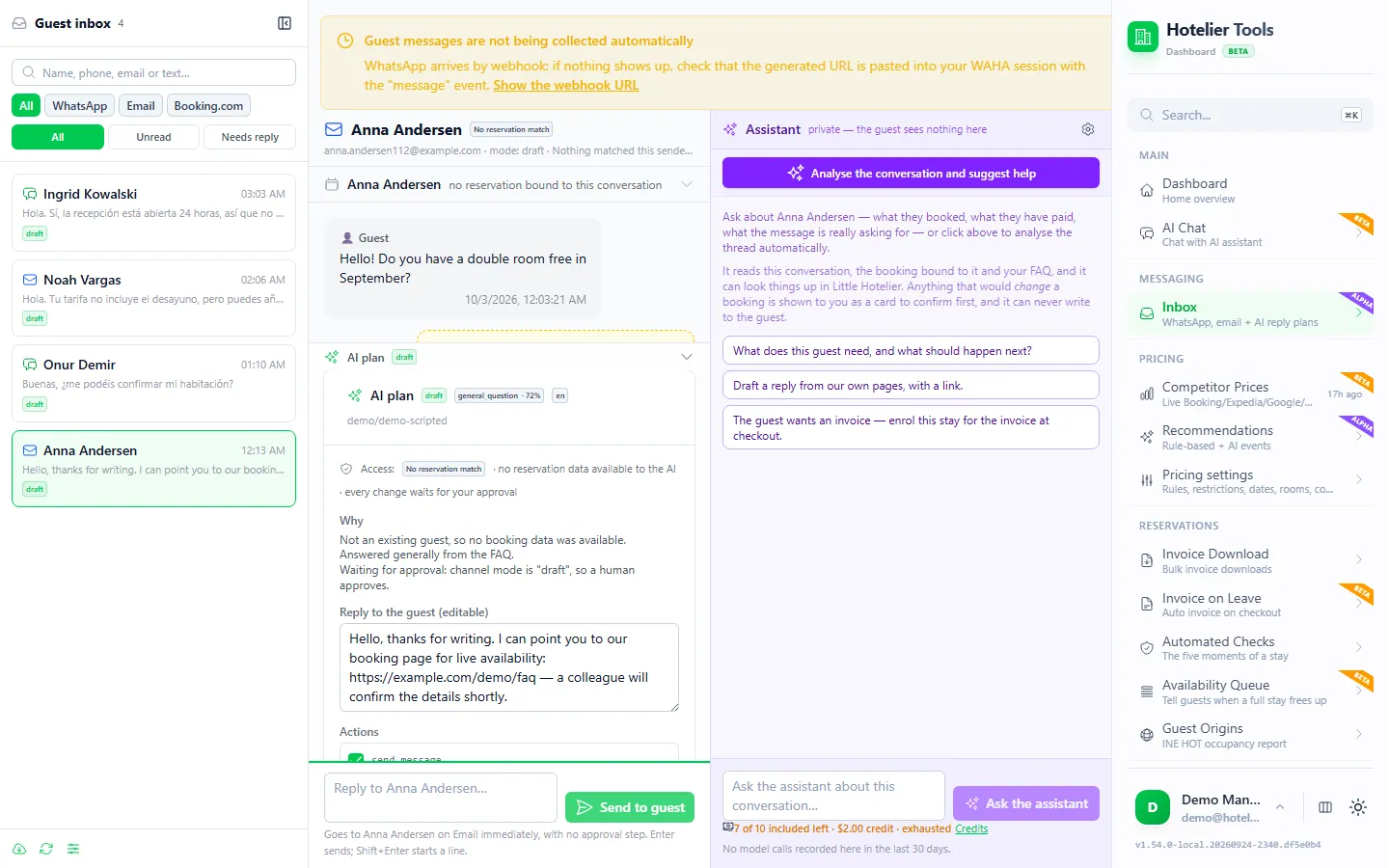
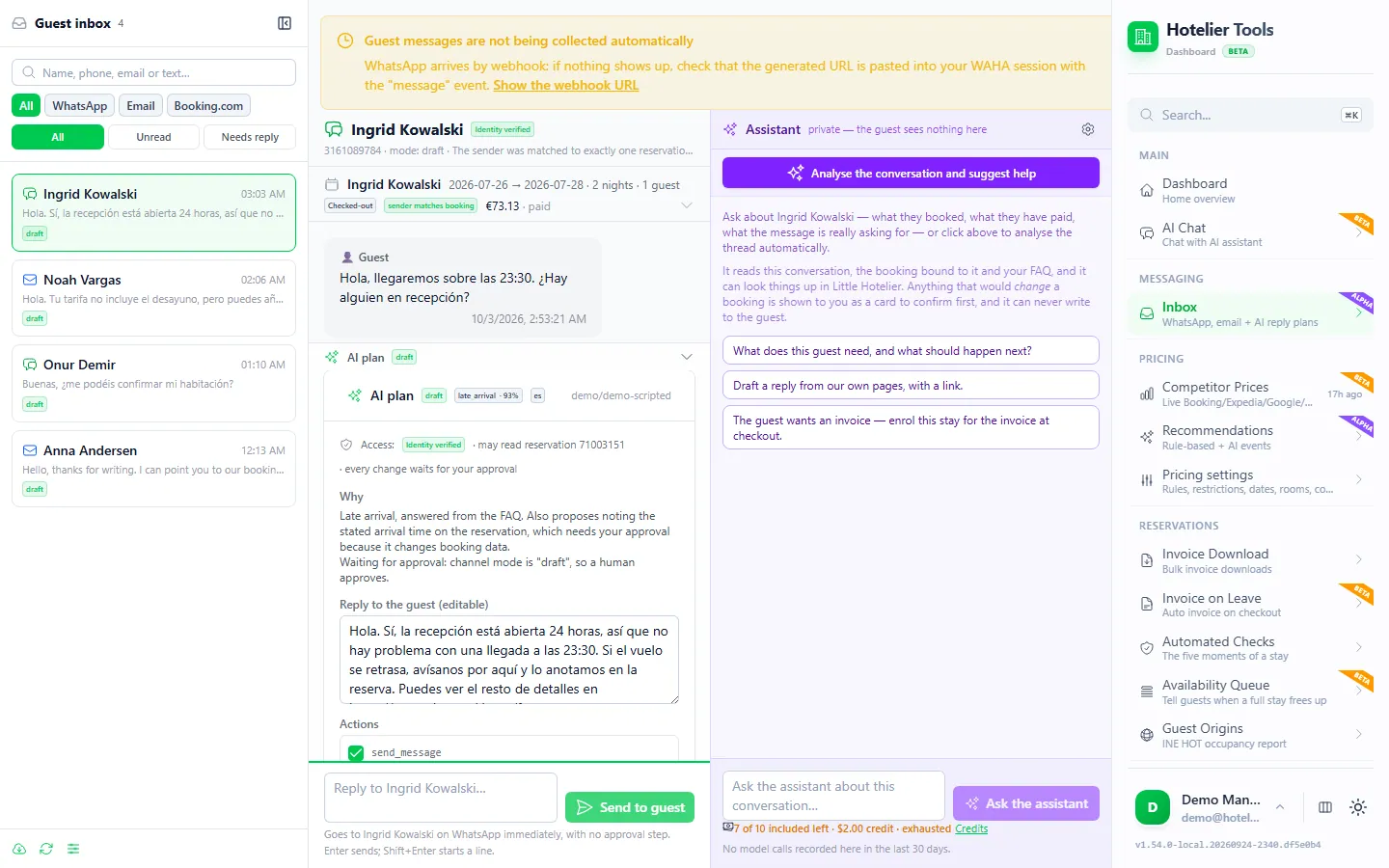
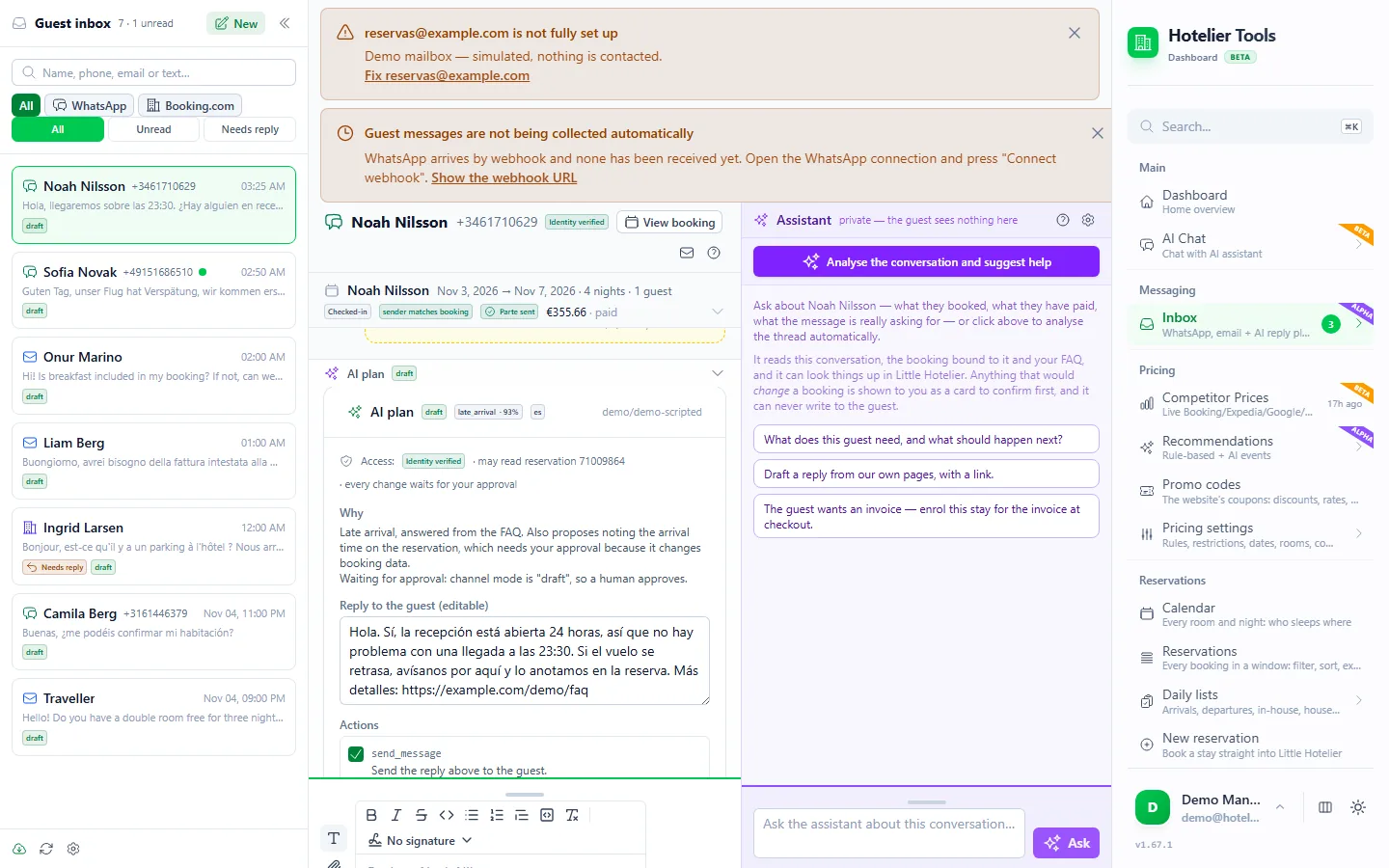
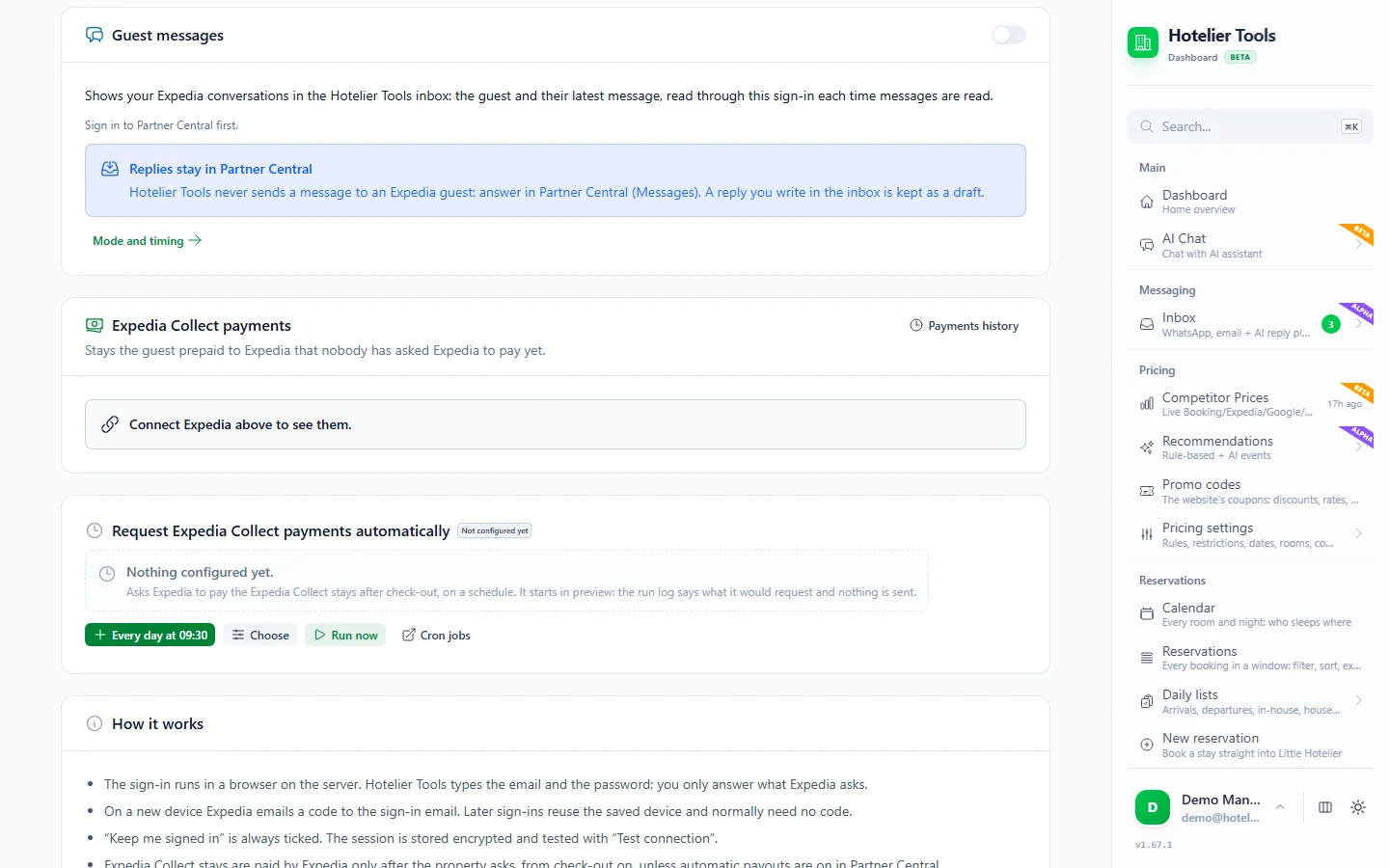
Hotelier Tools can show your Expedia conversations in its Inbox (/messaging), next to WhatsApp, Booking.com and email, each one beside its Little Hotelier booking. Replies are written in Partner Central. Here is how to set it up:
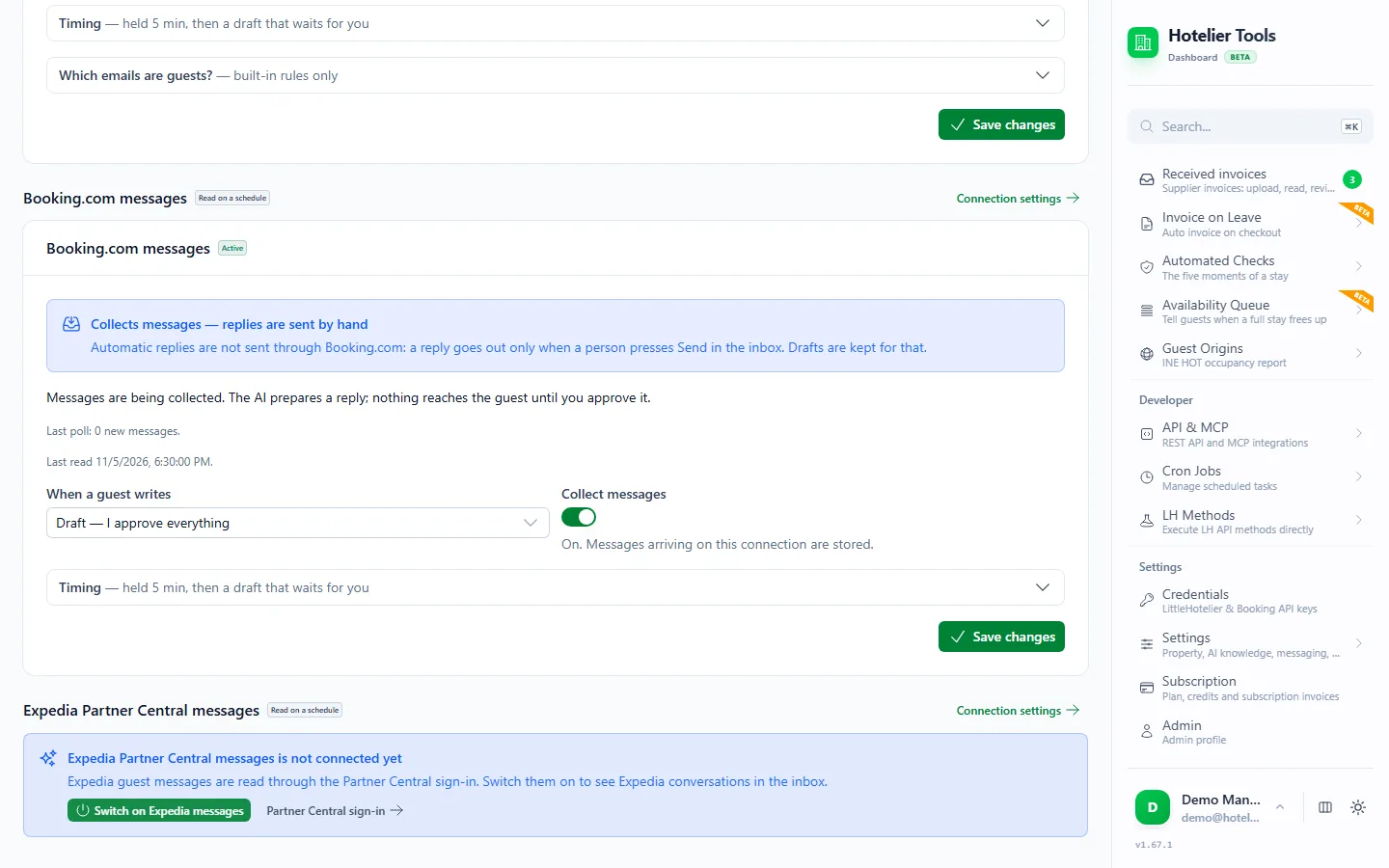
- Connect Partner Central in Credentials > Expedia Partner Central (
/credentials/expedia-extranet). Hotelier Tools signs in for you in a browser on the server; you answer what Expedia asks, such as the code it emails on a new device. The session is stored encrypted, and Keep Expedia signed in stops it from idling out. The setup is the same as for Expedia Collect payment requests. - In the same page's Guest messages card, turn on Read Expedia guest messages. Or open Channels (
/messaging/channels) and press Switch on Expedia messages. - Choose the mode on Channels. Expedia offers only two: Off (collect only), where messages are shown and nothing is analyzed, and Draft, where the AI prepares a reply for you to check. A new Expedia channel starts in collect-only mode.
- Open Inbox and filter by Expedia. Each conversation has a Conversation on Expedia link that opens the thread in Partner Central.
What the inbox reads, and what it never does
- The conversation list, not every message. For each thread it reads the guest, the stay and the latest message, as Partner Central's message list previews it. The whole thread stays in Partner Central.
- It never sends to an Expedia guest. Not automatically, and not when you press a button. What you type is kept as the conversation's draft (Save as a draft: Expedia replies are sent from Partner Central). Copy it into Partner Central or the app.
- Bookings are matched by confirmation code only. Little Hotelier stores an Expedia booking as
EXP-plus Expedia's confirmation code. A thread that names that code is linked to the booking and counts as verified. A guest name is never used as proof: a thread without a code stays unmatched, and the AI sees no booking details for it.
In Draft mode, the AI writes its suggestion from the verified booking and from what you taught it in FAQ & knowledge (/messaging/faq): your FAQ page, house notes and property card. A service you haven't listed is answered as "to confirm", never "yes". How those drafts work is in AI replies to guest messages.
Two more honest limits:
- It uses your own Partner Central session. Expedia's partner terms restrict automated access to Partner Central. The connectivity route Expedia supports is its Messaging API, available through connectivity providers.
- Expedia is read-only here. WhatsApp and email threads can be answered from the inbox. Expedia threads cannot.
Try it in the live demo
Open the same screen in the Hotelier Tools demo, filled with invented data. No sign-up, nothing to install.
Everything the inbox does is on the Guest inbox page. The dashboard is free for every hotel until billing starts on 10 January 2027.
See also: Booking.com guest messages without the extranet, WhatsApp with Little Hotelier, AI replies to guest messages.
Summary
- Expedia messages are in Partner Central under Guest relations > Messages, and in the Partner Central app.
- To answer from your own mailbox, copy the reservation's guest email alias and send from an address that is a validated Partner Central user.
- Guest phone numbers are hidden for now: keep contact inside Expedia's messaging, and tell guests you'll never ask for card details elsewhere.
- Templates with Send on a schedule cover check-in instructions; scheduled messages go out at 10 PM local time.
- The Hotelier Tools inbox can list Expedia conversations next to WhatsApp and Booking.com (beta, working since release 1.71 in November 2026), but every Expedia reply is sent from Partner Central.
Frequently asked questions
Where do I find Expedia guest messages?
In Expedia Group Partner Central, under Guest relations > Messages. You can search by guest name or reservation ID, or filter to find a conversation. You and the guest also get email notifications about new messages.
Can I answer an Expedia guest from my own email?
Yes. Each reservation has a guest email alias, a unique address you can copy from the reservation or from Messages. The email must be sent from an address linked to a validated Partner Central user, and the guest's replies show up in your mailbox and in Partner Central.
Why can't I see the guest's phone number on Expedia bookings?
Expedia has temporarily disabled viewing and exporting traveler phone numbers in Partner Central because of phishing aimed at travelers. Reservations received by API get a generic number. Expedia asks properties to use its own messaging instead.
Can I send scheduled messages to Expedia guests?
Yes. In Messages, open Manage templates, create a template, turn on Send on a schedule and choose when it goes out. Expedia sends scheduled messages at 10 PM local time.
Can Hotelier Tools reply to Expedia guests?
No. Hotelier Tools never sends a message to an Expedia guest. Its inbox lists Expedia conversations (beta, working since release 1.71 in November 2026). A reply you write there is kept as a draft for you to send in Partner Central.
Is Hotelier Tools part of Expedia or Little Hotelier?
No. Hotelier Tools is independent and not affiliated with or endorsed by Expedia Group, SiteMinder or Little Hotelier. It connects with your hotel's own Little Hotelier login and your own Partner Central login.