On this page
The safe way to use AI for guest messages is to let it draft, not decide. Give it the guest's booking and your own facts (FAQ, house rules, prices from your booking engine), let it prepare a reply in the guest's language, and have a person approve it before it goes out. In Hotelier Tools, WhatsApp, email, Booking.com and Expedia messages land in one inbox, each matched to its reservation, with an AI draft waiting for a click.
Third-party details below were checked as of November 2026.
What do hotel guests ask most?
In a small hotel, most messages are the same dozen questions:
- Check-in and check-out times, and whether early check-in is possible.
- Late arrival: "We'll get there around 23:30, is anyone at reception?"
- Parking, wifi, breakfast times and prices.
- Directions and how to get the keys.
- Changes and cancellations: dates, extra guests, refunds.
- Invoices, often with a company name and tax ID.
- Availability and prices from people who haven't booked yet.
The first group has one right answer that you already know. The last two need a person or live data: a cancellation is a commitment, and a price depends on dates, party size and what is left to sell. That split is what decides how much an AI may do on its own.
How fast do guests expect an answer?
- WhatsApp: guests often write while traveling and wait for an answer with the phone in hand. On the official WhatsApp Business Platform, a guest's message opens a 24-hour customer service window in which your replies are free (WhatsApp pricing).
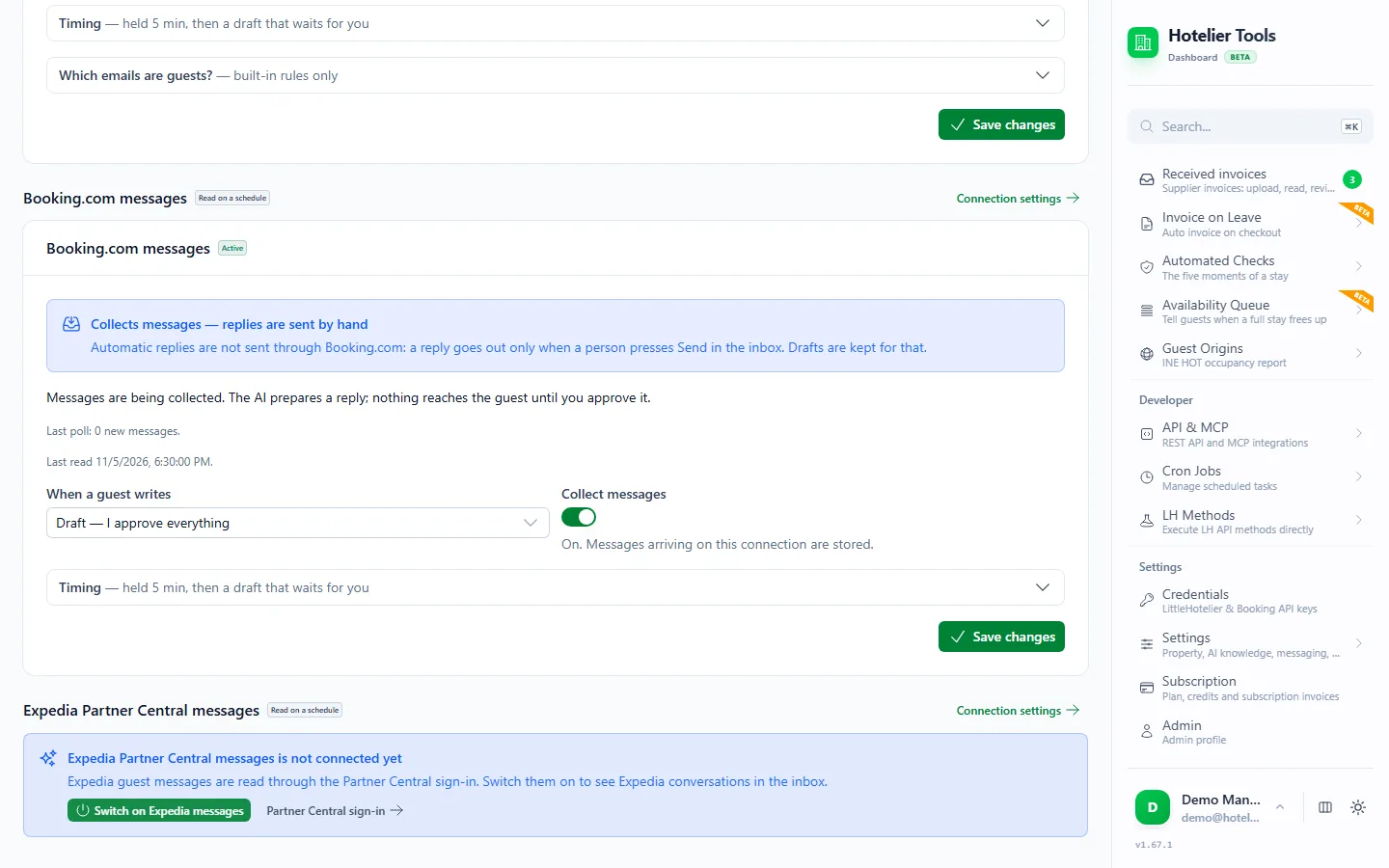
- Booking.com: Little Hotelier's help centre notes that Booking.com tracks an internal reply score based on how quickly you respond, and that marking a message No reply needed closes its 24-hour window (Messaging hub FAQ). More in managing Booking.com guest messages.
- Expedia: guests write through the Expedia app and you answer in Partner Central under Messages. See Expedia guest messages.
- Email: slower, but a guest asking for availability is probably asking other hotels too.
A draft waiting in the inbox cuts the time to reply without skipping the check.
Why the AI must never invent an answer
A wrong check-in time is annoying. A promised parking space you don't have, a price below your rate or another guest's booking details are expensive. Chatbots fill gaps with plausible text, so a guest-facing AI needs three limits:
- Closed sources. It answers only from what you gave it: your FAQ page, your notes, the booking. Anything else is "to confirm".
- One booking, and only for the right person. It sees a reservation only when the sender is proven to be that guest.
- No hands. It proposes; a person (or a narrow, capped rule) decides what reaches the guest or the booking.
A template set to start from
Whatever tool you use, write these once. They become your FAQ, your AI's facts and your quick replies:
CHECK-IN
Hi [name], check-in is from [time] and check-out is until [time]. If you arrive early you can leave your luggage with us.

LATE ARRIVAL
Thanks for letting us know, [name]. Reception is open until [time]. After that, [how to get the key]. We've noted your arrival time.

PARKING
We have [free / paid at X per night] parking [on site / at address]. [It can't be reserved / please tell us your plate].

BREAKFAST
Breakfast is served from [time] to [time] for [price] per person. [Included / not included] in your rate.

INVOICE
Of course. Please send the company name, tax ID and billing address and we'll issue the invoice at check-out.

CANCELLATION (needs a person)
Thanks, [name]. We've passed your request to our team and will confirm the conditions of your booking shortly.

We will never ask for your card details by WhatsApp or text message.
The faster way: one inbox where AI drafts and a person approves
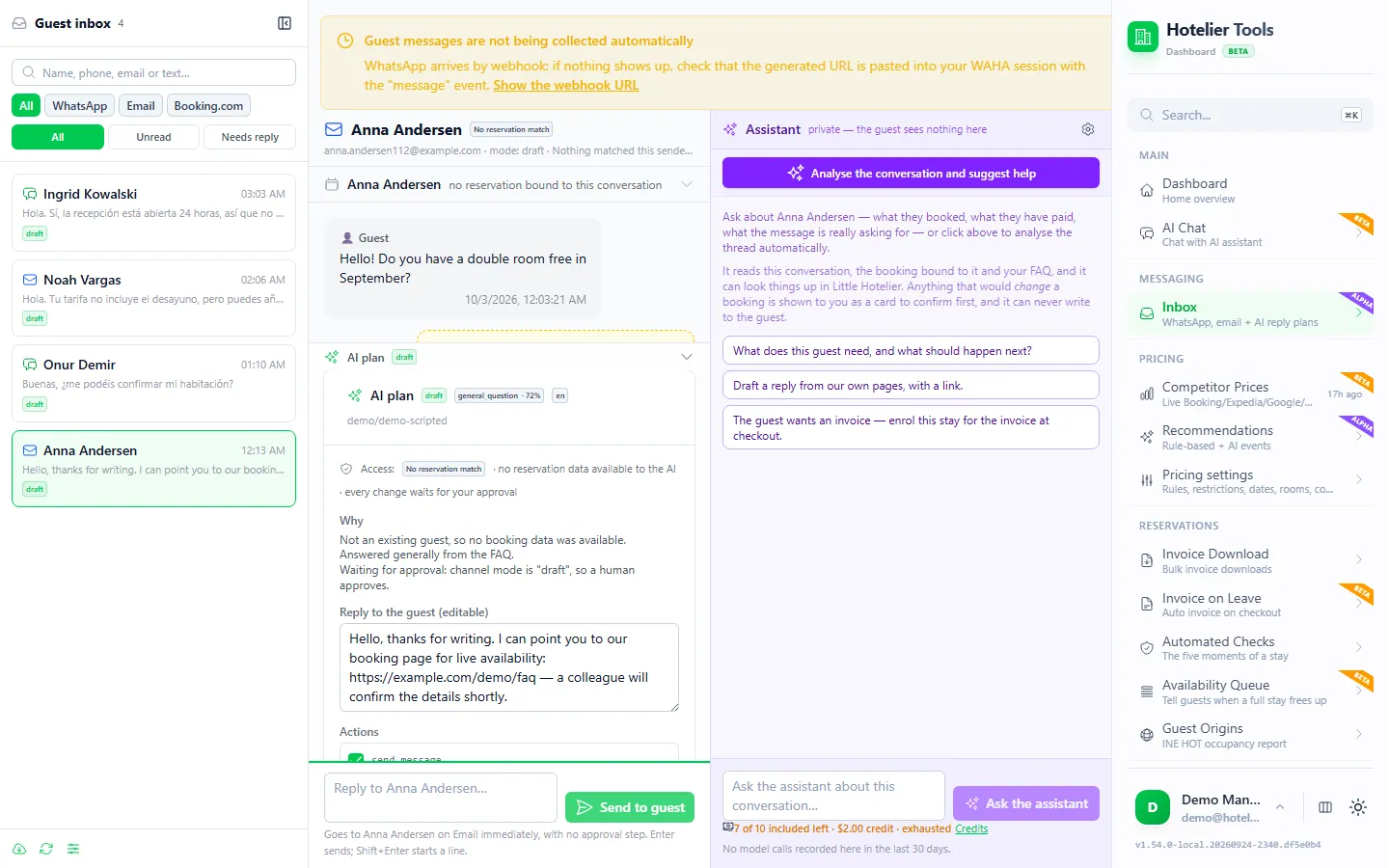
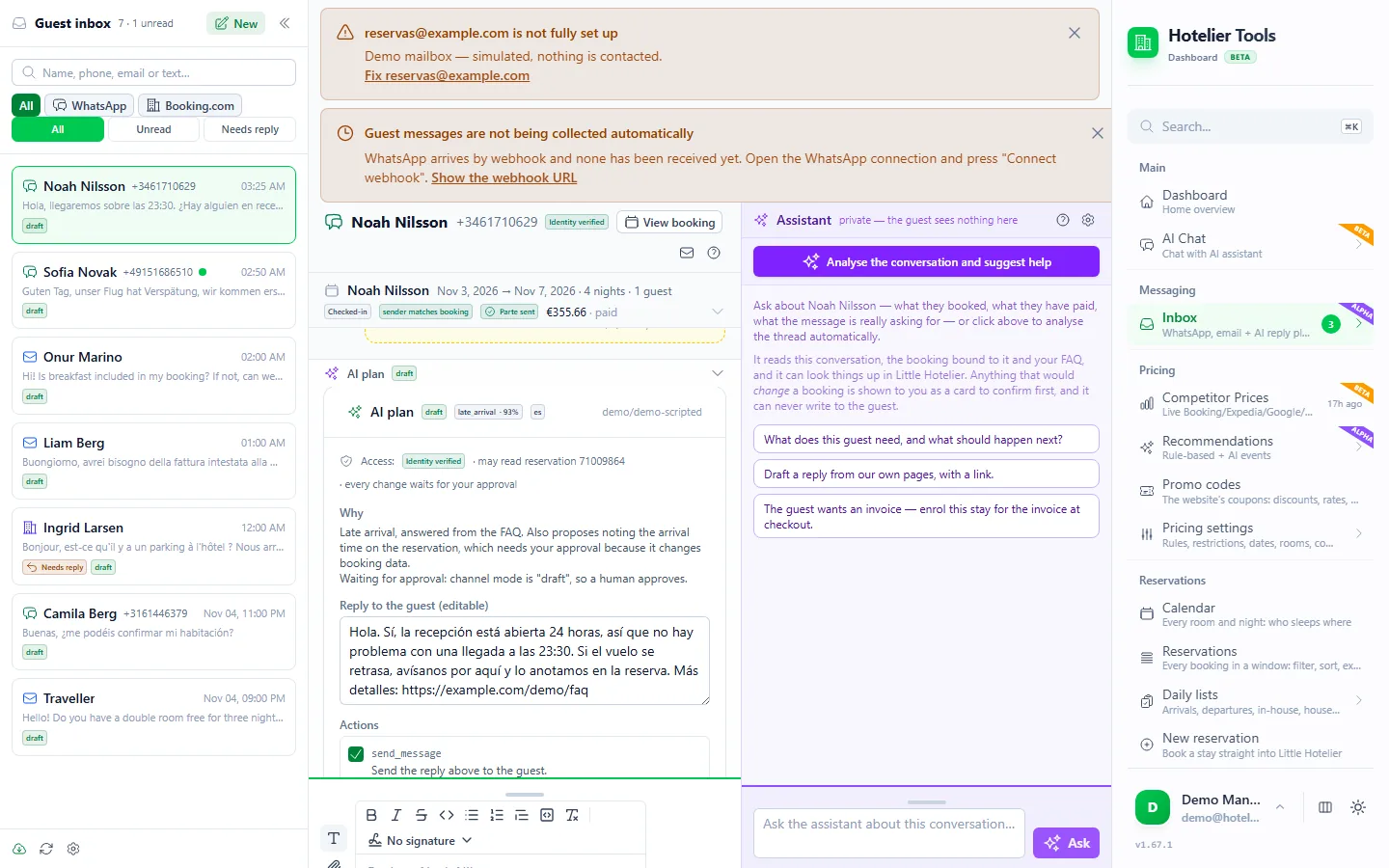
The Hotelier Tools Inbox (/messaging, alpha) collects guest messages from four places, matches each one to its reservation, and prepares a reply and a plan for you to approve.
Step 1: connect your channels
| Channel | Where | How it connects |
|---|---|---|
Credentials > WhatsApp (WAHA) (/credentials/messaging-whatsapp) | A WAHA server, its session and API key, and a webhook | |
Credentials > Guest mailbox (/credentials/messaging-email) | Google or Microsoft sign-in (OAuth), or Other (IMAP/SMTP) | |
| Booking.com | Credentials > Booking.com extranet (/credentials/booking-extranet) | Your own extranet login with its second factor |
| Expedia (beta) | Credentials > Expedia Partner Central (/credentials/expedia-extranet), then Switch on Expedia messages | Your own Partner Central login |
Expedia is the newest: since release 1.71 (November 2026) its threads arrive with the guest, the stay and the latest message, and replies are still sent from Partner Central (details).
Outlook and Microsoft 365 mailboxes need the Microsoft sign-in, because Microsoft refuses password logins over IMAP. A new mailbox starts in Off (collect only): drafting uses AI credits, so turning it on is your call.
What WAHA is, and its risks
WAHA (WhatsApp HTTP API) is a server you host that runs a WhatsApp Web session and lets other software read and send that number's messages over HTTP. It works like WhatsApp Web open on a computer: your phone and app keep working.
- On the WhatsApp page, enter the WAHA base URL, the Session name and the WAHA API key, and save.
- In the WhatsApp session panel, press Start session. When it shows a QR code, open WhatsApp on the hotel phone, go to Settings > Linked devices > Link a device and scan it.
- Press Connect webhook, so WAHA sends new messages to the inbox, then Test connection.
- Optionally, under Message history, choose how far back (7, 30 or 90 days, or Last year) and press Import history. Imported chats are context only: nothing is analyzed, answered or marked unread.
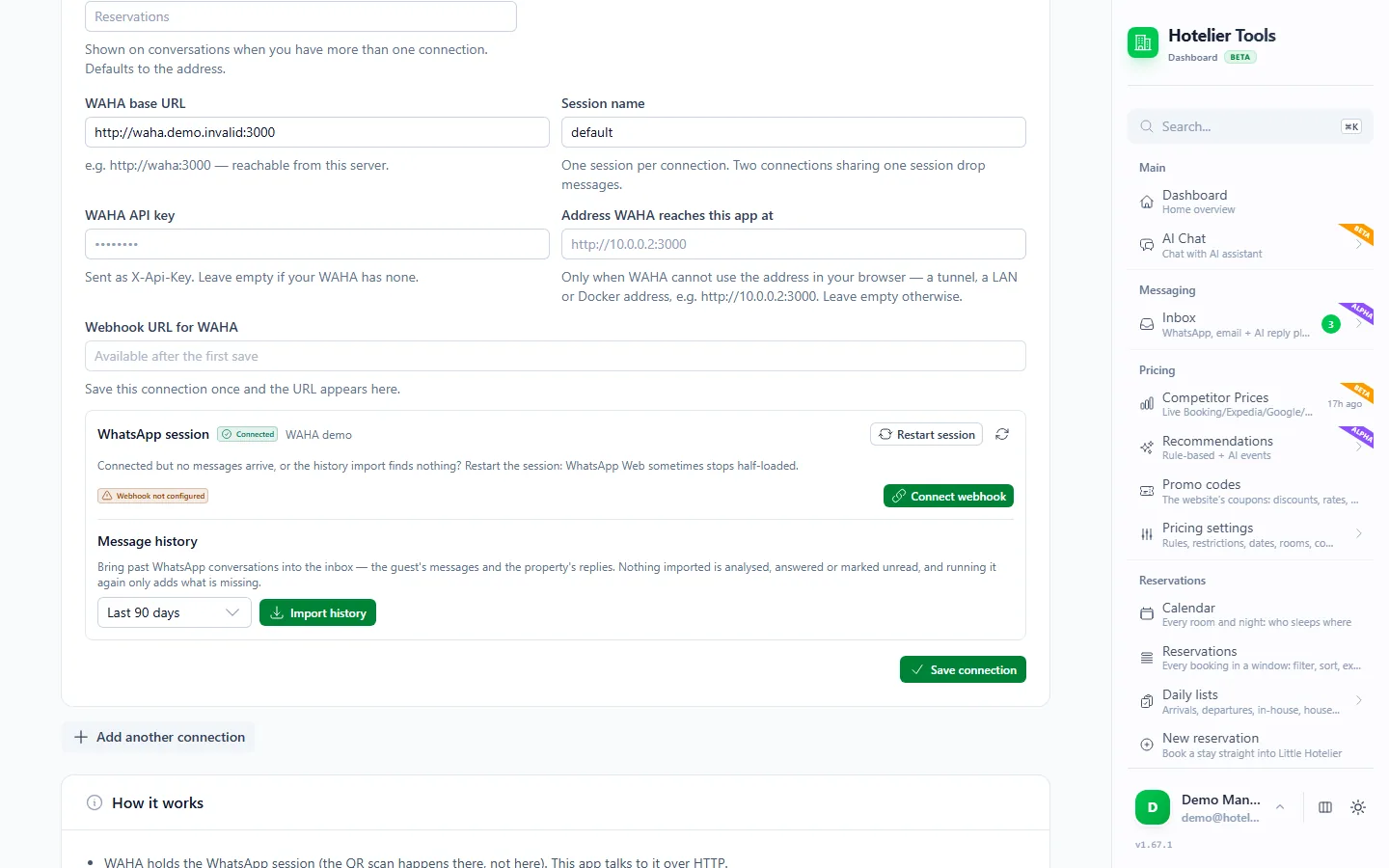
The risks, plainly:
- It isn't the official API. WAHA's documentation says "WhatsApp does not allow bots or unofficial clients on their platform, so this shouldn't be considered totally safe." A number could be blocked. Answer guests who write to you; never send bulk messages (How to avoid blocking).
- Lock WAHA down. The panel warns when WAHA answers without an API key: anyone who reaches it could read and send that number's messages.
- The webhook URL is a secret. Its token is what lets messages into your inbox. Group chats are ignored.
For Meta's official API, see Little Hotelier's Messaging hub in WhatsApp with Little Hotelier.
Step 2: how each reply is built
- The sender is matched to one reservation. The panel shows the result: Identity verified, Ambiguous — refused (more than one guest matched, so no booking is shown), No reservation match (the AI answers only from your FAQ) or Not checked. On WhatsApp the number must match the booking's phone on at least its last 8 digits; on email, the exact address. A Booking.com thread names its own reservation; an Expedia thread binds only by the
EXP-reference it contains. - It waits for you first. A WhatsApp message is analyzed after 5 minutes, an email after an hour. If someone replies in the meantime, the plan reads already answered and nothing is charged.
- The AI reads that one reservation, your FAQ & knowledge sources (
/messaging/faq), your house notes and your property card from Settings > Property & AI knowledge. - It returns a plan from a closed list: send a message, flag for staff, add a reservation note, or set the arrival time. It has no tools, can't cancel, change dates or touch payments, and every action applies only to the matched booking.
- A person decides. Edit the reply, then Approve (respect delay) or Confirm & send now. Untouched plans expire after 48 hours.
Before anything goes out, a check blocks a reply that contains another booking's reference, or any long number when the sender isn't verified.
For the full security model (what each AI agent may read and change, how senders are verified on every channel, and how a guest's message is kept from giving the AI orders), read how hotel AI agents work.
Step 3: choose how much the AI may do
On Channels (/messaging/channels), each connected account has its own mode:
| Mode | What happens |
|---|---|
| Off — collect only | Messages are collected and shown. Nothing is analyzed or sent. |
| Draft — I approve everything (default) | The AI prepares a reply and a plan; nothing happens until you approve it. |
| Automatic reply — no reservation changes | The AI sends after a delay, only for simple questions (check-in or check-out time, wifi, parking, late arrival, directions, facilities), for a verified guest and with enough confidence. |
| Autonomous — replies AND changes reservations | It also adds notes or sets the arrival time on a verified booking without approval. Review it several times a day. |
Per-channel limits: Booking.com conversations are never sent by the AI, whatever the mode; a person presses Send. Expedia offers only Off and Draft, and the reply is written in Partner Central. Automatic replies stop at 4 an hour, 12 a day, or 3 in a row without an answer from the guest, so an out-of-office loop can't run away.
Step 4: signatures, formatting and files per channel
Under Signatures (/messaging/signatures) you keep several named signatures (Reception, Management, English…), each written once per channel the way that channel shows it, and pick a default. Examples are filled from your property facts. Booking.com replies to a guest's booking conversation are signed in plain text; public Q&A answers never are.
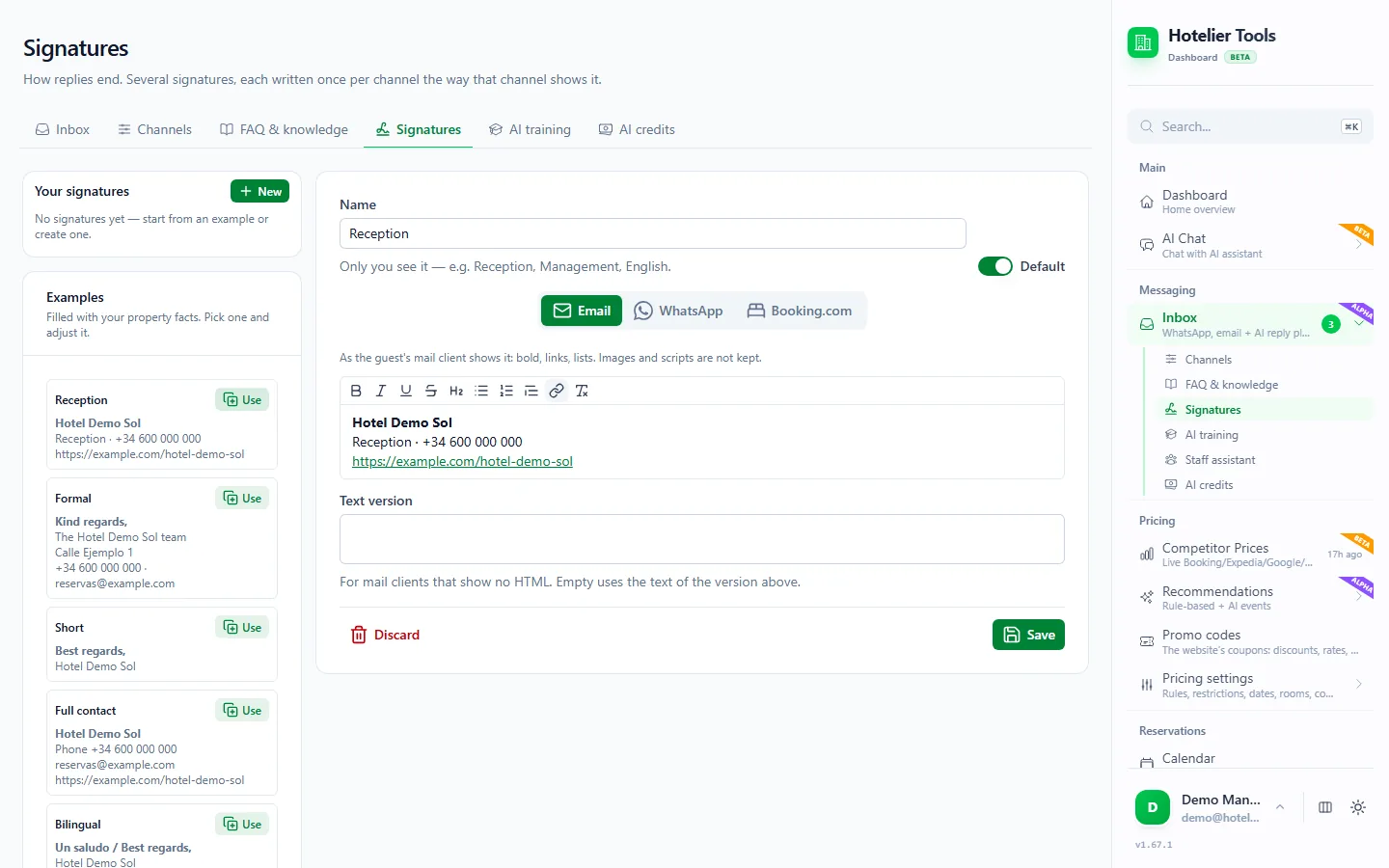
The AI writes one draft, and the inbox shapes it for the channel:
| Channel | Formatting | Files |
|---|---|---|
| Rich text: bold, links, lists, quotes | Yes, up to 18 MB together | |
WhatsApp's own *bold*, _italic_, lists | Up to 10 files of 16 MB each, plus voice notes recorded in the browser | |
| Booking.com | Plain text; a public Q&A answer stays under 320 characters | No |
On WhatsApp, photos, voice notes and documents guests send show in the thread. WhatsApp keeps media only for a while, so an old file can be gone.
Step 5: teach it your answers
- FAQ & knowledge (
/messaging/faq): add your FAQ page or plain text, and fill in house notes. The page says it plainly: the AI "answers from these sources and nothing else". - AI training (
/messaging/training): under Review recent, press Correct when the AI misread a message; it becomes an example. Add one-sentence Rules, and use the Test bench to check it still agrees (each test is a real analysis and uses credit). - Reply memory: no setup. Replies your team sent in the last year are paired with the question before them, and the closest ones are shown to the AI when a similar message arrives, with the other guest's name, dates, references and contacts removed. Type "6 € a night for a dog, paid on arrival" once, and the next guest who asks gets the same answer. House notes still win over an old reply.
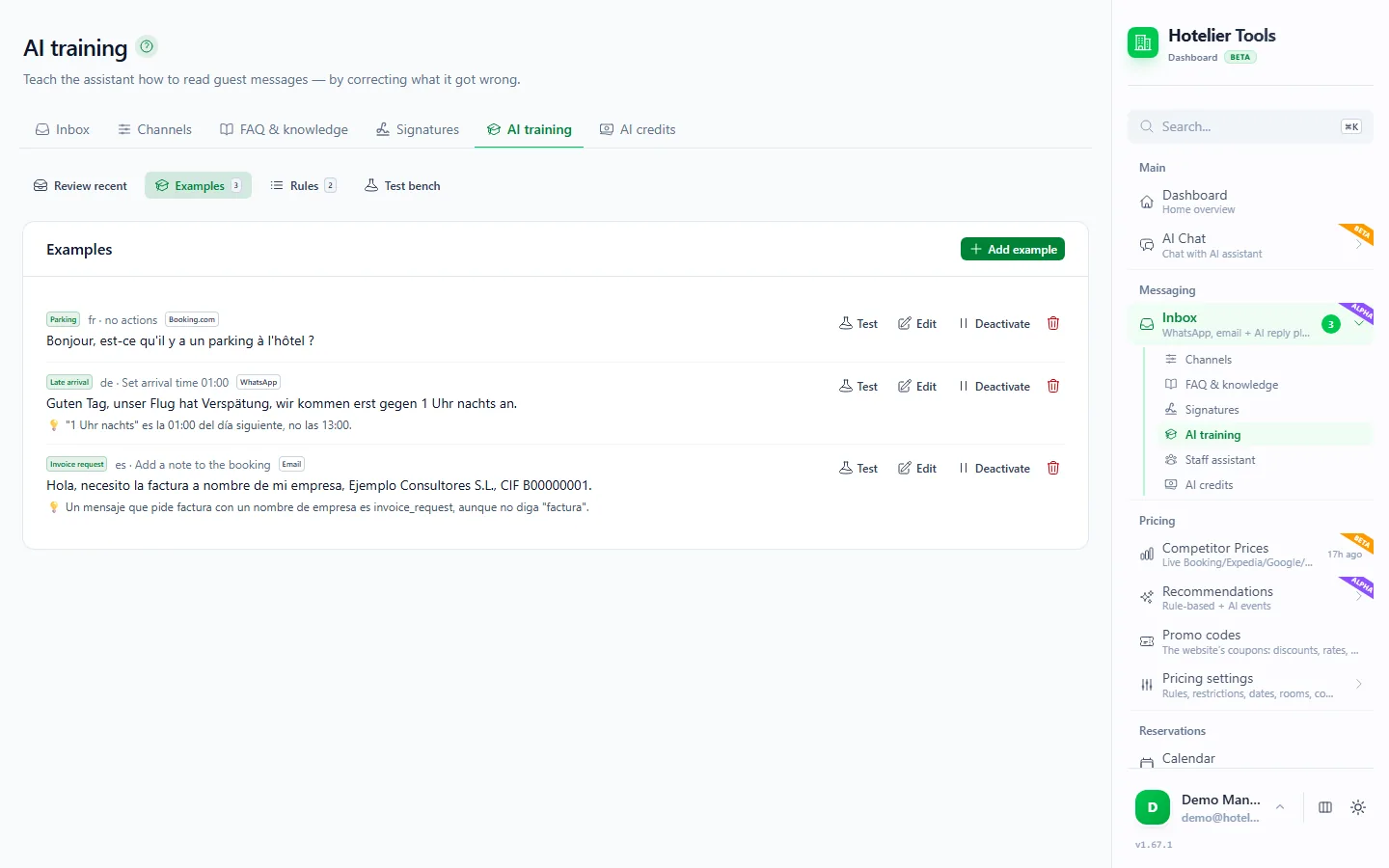
What else the inbox handles
- Prices come from your booking engine. The private assistant on the right quotes from your direct booking page for those dates and that party, with your promo code. A price no quote returned is flagged as unverified.
- Full nights: when a guest asks for a sold-out date and your waiting list is on, the assistant offers a card to add the guest to it.
- Invoice requests: Booking.com's two fixed invoice-request messages are read without AI and become a card that enrolls the stay for its invoice at checkout, plus a reply in the guest's language.
- AI credits (
/messaging/credits): one analysis is one guest message read, planned and drafted, charged at the model's real cost, from a monthly allowance first, then your balance. Pack prices there are still provisional.
Try it in the live demo
Open the same screen in the Hotelier Tools demo, filled with invented data. No sign-up, nothing to install.
Everything the inbox does is on the Guest inbox page. The dashboard is free for every hotel until billing starts on 10 January 2027.
See also: how to spot scam messages, the AI assistant for the front desk, WhatsApp with Little Hotelier.
Summary
- Write your answers to the dozen common questions once: they are your templates, your FAQ and your AI's facts.
- Let AI draft, and keep a person on cancellations, refunds, prices and complaints.
- The AI should see a booking only when the sender is matched to exactly one reservation, and answer "to confirm" for anything you haven't listed.
- In Hotelier Tools, WhatsApp (through WAHA), email, Booking.com and Expedia (beta) share one inbox, every channel starts in Draft, and Booking.com and Expedia are never sent by the AI.
- Signatures, formatting, training and reply memory make the drafts sound like your front desk.
Frequently asked questions
Can AI answer hotel guest messages on its own?
It can, but it shouldn't by default. A safe setup lets the AI draft a reply from your booking data and FAQ and has a person approve it. Hotelier Tools starts every channel in Draft mode; automatic sending is a separate choice per channel, limited to simple questions.
How does the AI know which booking a message is about?
It matches the sender to exactly one reservation: on WhatsApp the phone number must match on at least its last 8 digits, on email the address must match exactly. If two guests match, or nobody does, the AI sees no booking and answers only from your FAQ.
Will the AI invent prices or facilities?
It shouldn't, and the inbox is built so it can't hide it. The AI answers only from your FAQ sources, house notes and property card, writes "to confirm" for anything you haven't listed, and a price that no booking engine quote returned is flagged next to the draft.
Does the AI send replies on Booking.com or Expedia by itself?
No. On Booking.com the AI only drafts and a person presses Send. Expedia messages (beta) can only be collected or drafted, and the reply is written in Partner Central.
Do I need the official WhatsApp Business API?
Not for Hotelier Tools. It connects through WAHA, a self-hosted server that runs a WhatsApp Web session. That avoids Meta's approval process, but WhatsApp doesn't allow unofficial clients, so a number used this way could be blocked.
Is Hotelier Tools part of WhatsApp, Booking.com or Expedia?
No. Hotelier Tools is independent and not affiliated with or endorsed by WhatsApp, Meta, Booking.com, Expedia Group, SiteMinder or Little Hotelier. It connects with your hotel's own logins.