On this page
- What should any hotel AI agent be allowed to do?
- The agents in Hotelier Tools and their trust levels
- How a guest message becomes a reply
- Where guest messages come from, and why the source matters
- What the AI reads to answer, and what it never sees
- What stops a guest message from steering the AI?
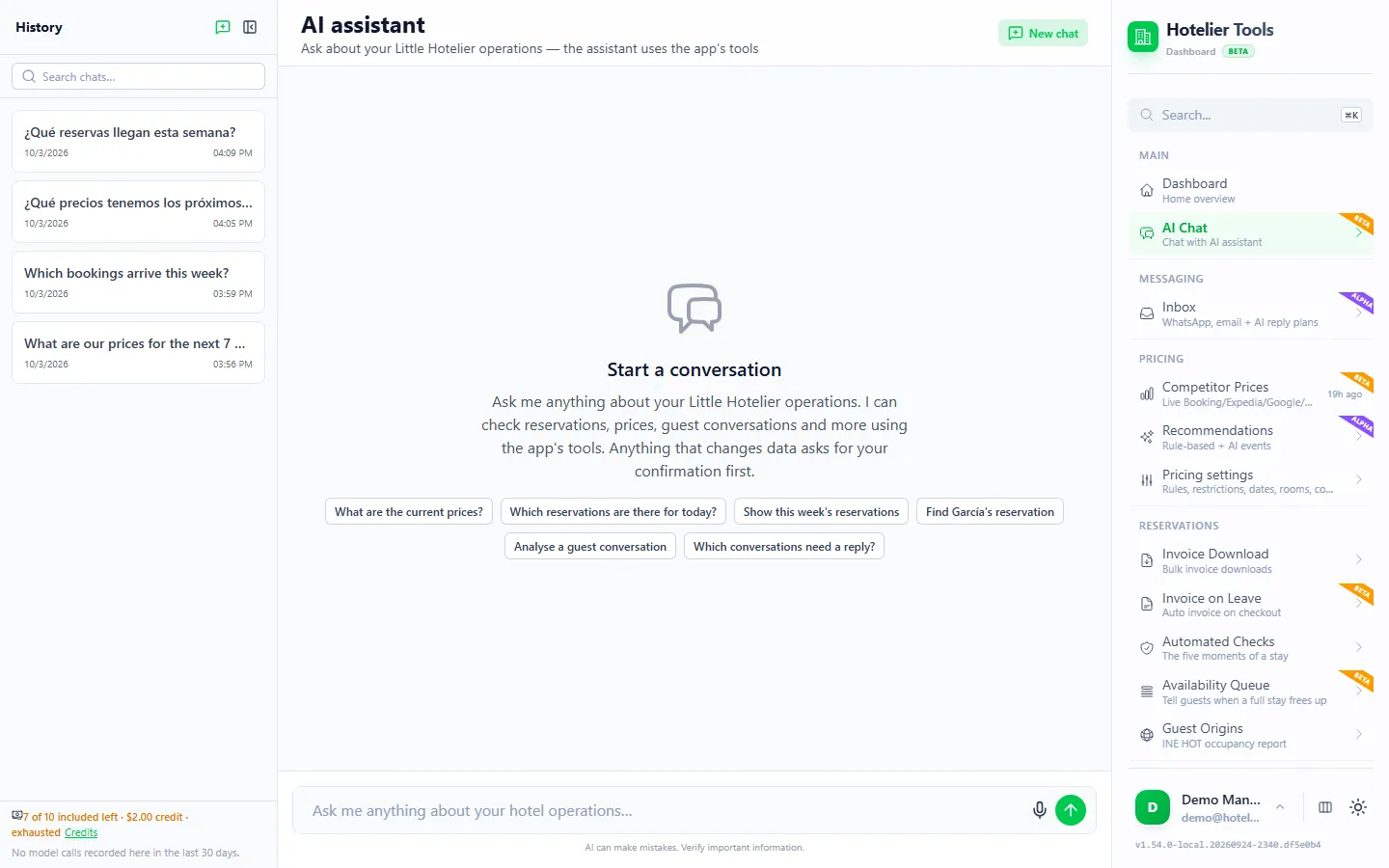
- The AI chat: no limits on looking, no autonomy
- The staff assistant and outside AI apps
- Logs, costs and honest limits
- Summary
A hotel AI agent is a language model connected to your booking data, and it is only as safe as two things: what it is allowed to read, and who presses the button when something changes. In Hotelier Tools there are several agents with different trust levels. The one that reads guest messages has no tools at all. The ones your team talks to can look anything up within the person's role, but every change waits for a person's click, and none of them runs on its own schedule.
This guide explains how each agent works, how a message from Booking.com, WhatsApp, Expedia or email is tied to exactly one reservation, and what stops a guest's text from steering the AI. For what the assistant can do day to day, read the AI assistant for a small hotel front desk. Third-party details were checked as of November 2026.
What should any hotel AI agent be allowed to do?
Two public references make a good yardstick for any vendor. OWASP ranks prompt injection as the top risk for AI apps and advises to "restrict the model's access privileges to the minimum necessary", with a person approving privileged actions (OWASP LLM01:2025). The Model Context Protocol, which Claude and ChatGPT use to call outside tools, says there "SHOULD always be a human in the loop with the ability to deny tool invocations" (MCP tools specification).
So ask four questions of any hotel AI: Who wrote the text it reads? What can it touch? Who approves a change? Does it ever run when nobody asked?
The agents in Hotelier Tools and their trust levels
One table decides where each tool may run, and a tool nobody classified is treated as a write. A second check asks whether this person's role may use it, at the moment it runs.
| Agent | Who it talks to | What it may read | What it may change | Who approves |
|---|---|---|---|---|
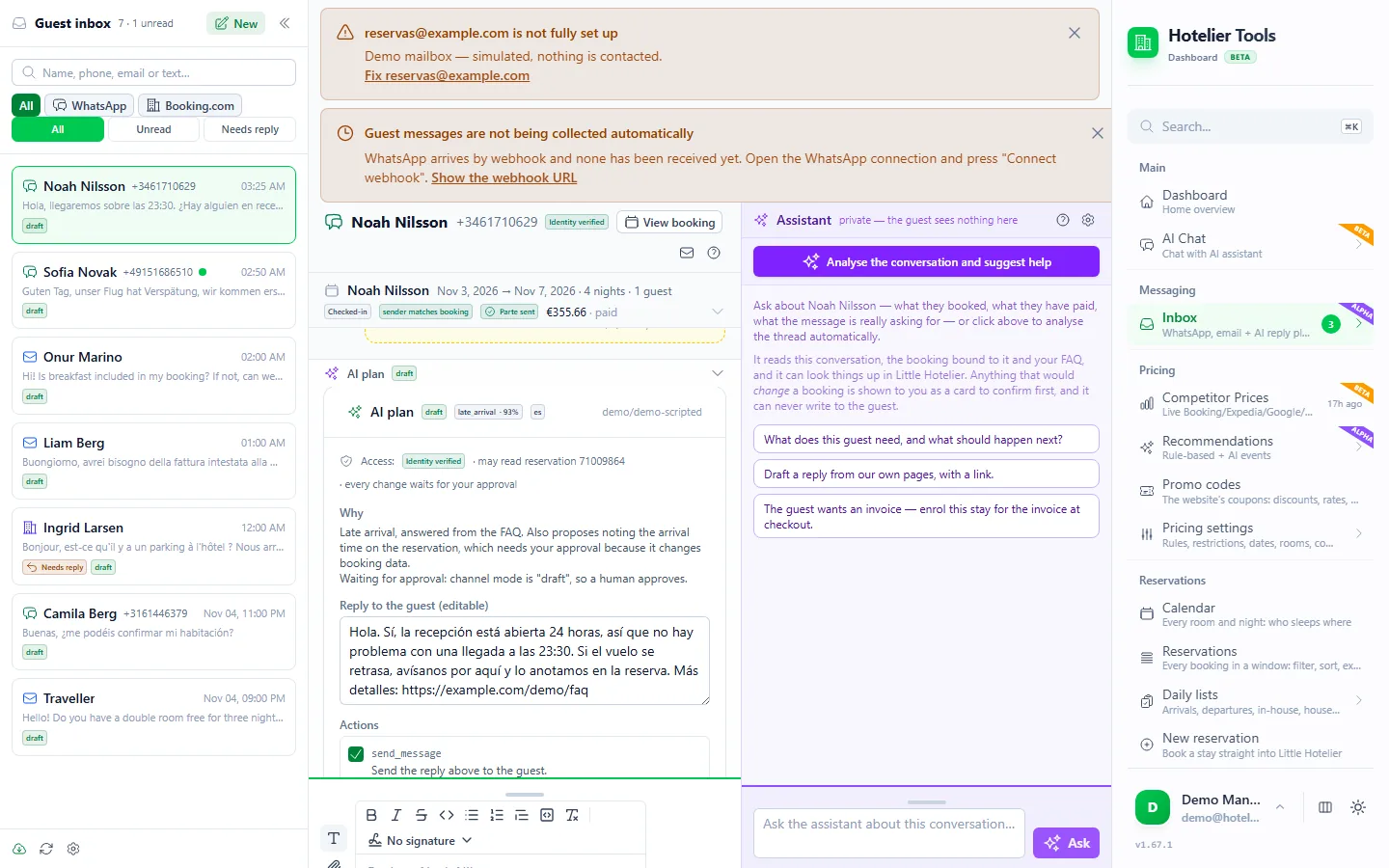
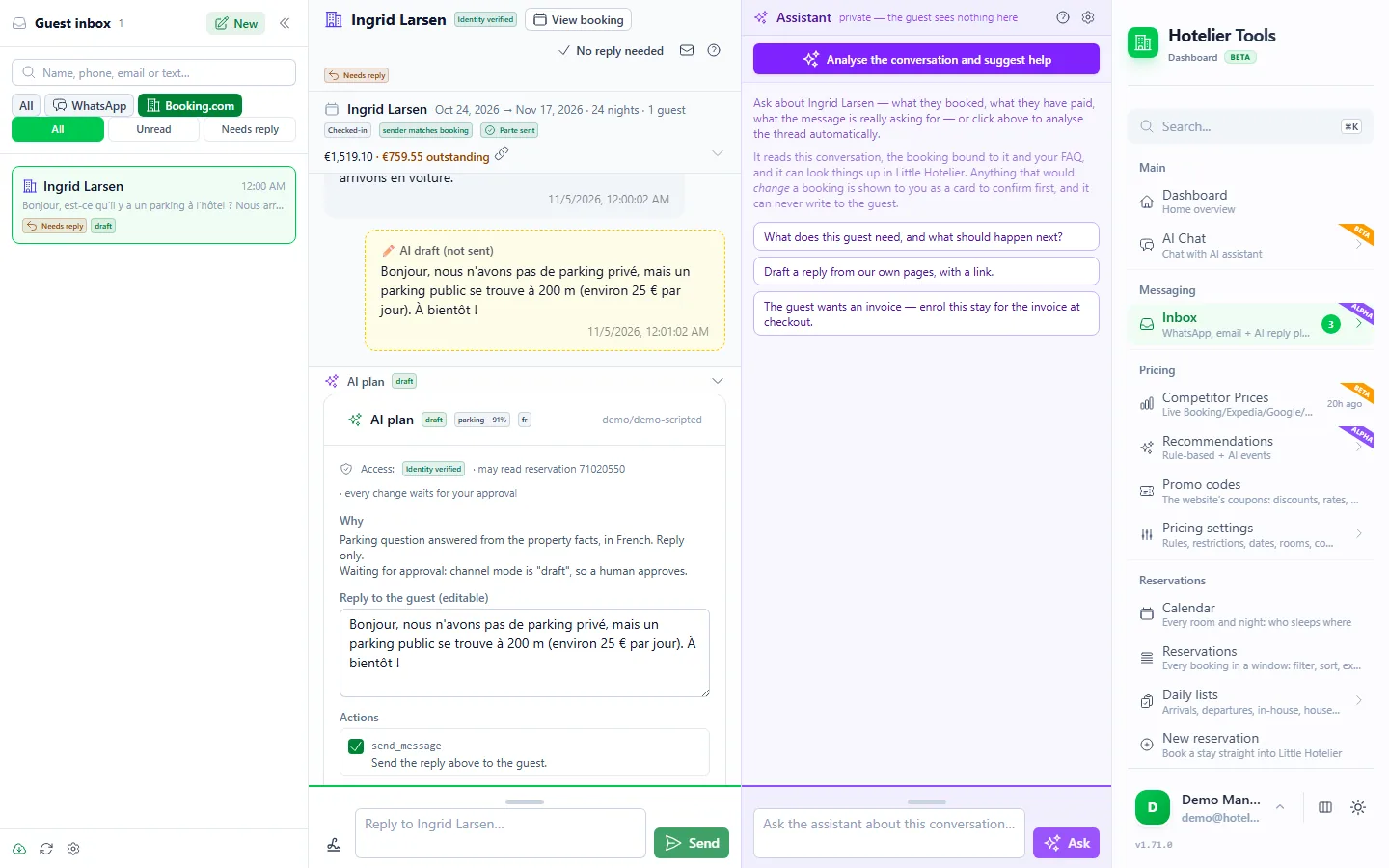
| Guest-reply AI (Inbox, alpha) | Guests on WhatsApp, email, Booking.com, Expedia | One verified booking, your FAQ, house notes, property card | Nothing directly. It returns a plan from 4 actions | You, in the inbox (or a narrow channel mode) |
AI Chat (/chat, beta) | You and your team in the dashboard | Everything your role allows | Anything your role allows, as a card | The person who asked, by clicking the card |
| Inbox assistant (panel next to a thread) | You, about the open conversation | The booking, prices from your booking engine, property facts | Proposals as cards; never sends to the guest | Any colleague whose role covers it |
Staff assistant (/staff) | Employees on WhatsApp or email | Bookings, availability, prices, invoices, checks | Only for Can request changes, queued | The owner, on /staff |
| External AI apps (Claude, ChatGPT, over MCP) | You, in that app | What your role allows | Writes run when the app calls them; nothing irreversible | You, in the app's own prompt |
| Browser agents (WebMCP) | You, in your browser | Reads only | Nothing; proposals open the app's form filled in | You press the button on the page |
Scheduled tasks are not AI agents. The invoice at checkout, the automated checks and the price autopilot are ordinary code on a timer. Two background jobs use a model only to turn text into data (a supplier invoice's fields, local events for pricing), with no tools and no way to message anyone or touch a booking.
How a guest message becomes a reply
| Step | What happens | Model? |
|---|---|---|
| 1. Arrives | A webhook (WhatsApp) or a poll (email, Booking.com, Expedia) stores the message | No |
| 2. Triage | Email only: newsletters, suppliers and likely scams stop here | No |
| 3. Identity | The sender is matched to one reservation, or none, and the decision is logged | No |
| 4. Wait | 5 minutes on WhatsApp, an hour on email. Already answered? Nothing is analyzed or charged | No |
| 5. Plan | After a credit check, the model reads the scoped context and returns a reply and actions, as data | Yes, once |
| 6. Checks | Actions are validated against the closed list; the reply guard scans the text | No |
| 7. Decide | A person approves, or the channel mode allows it after a delay | No |
| 8. Execute | The stored plan runs; the guard checks the text again before sending | No |
The model appears once, and its output is only a proposal. Everything around it is ordinary code.
Where guest messages come from, and why the source matters
A message only carries what the channel itself guarantees. Hotelier Tools trusts the sender, never what the message says about itself.
| Channel | How it reaches the inbox | What ties it to a booking |
|---|---|---|
| Booking.com | Read through your own extranet session (your login and its second factor) | Booking.com files the thread under its reservation, so it counts as verified |
| Expedia (beta) | Read through your own Partner Central session; only the conversation list and the latest message | Only the EXP- reference the thread names. A guest name is never used |
| WAHA, a WhatsApp Web session on the hotel's own number, posting to a webhook with a secret per-channel token | The number matches the booking's phone on at least its last 8 digits | |
| Your mailbox, through Google or Microsoft sign-in (OAuth) or IMAP | The exact address. No partial matches, no ignored dots |
Email gets one more layer. Each message's SPF, DKIM and DMARC verdicts (the checks mail providers use to spot forged senders, see Gmail's sender guidelines) feed a scam score with other signals, such as file-share links or a refund for a stay nobody can find. At 75% or more, the mail goes to a person and the AI drafts nothing. More in how to spot scam messages.
The inbox shows the identity result on every conversation:
- Identity verified: exactly one guest matched, so the AI may see that one booking (for a returning guest, one stay: the current one, a recent one or the next).
- Ambiguous — refused: two different guests matched, so no booking is shown and you handle it.
- No reservation match: the AI answers general questions from your FAQ and never confirms or denies that a booking exists.
- Not checked: identity has not been established yet.
A public question on your Booking.com listing has no booking behind it, so it is answered from property facts only.
What the AI reads to answer, and what it never sees
| The guest-reply AI reads | It never sees |
|---|---|
| The one verified reservation: reference, dates, room, guests, status, total, outstanding amount, arrival time, internal notes | Any other guest or booking |
| Your FAQ & knowledge sources (only the ones you ticked) | Your logins, API keys or card numbers |
| House notes and the property card from Settings > Property & AI knowledge | Little Hotelier itself. It can't look anything up |
| Corrected examples and rules from AI training | Booking data when the sender isn't verified |
| Reply memory: similar answers your team sent, with names, dates, references and contacts removed |
FAQ excerpts, training examples and reply memory are labeled in the prompt as quoted data, never instructions. Live prices come from your public booking engine through the inbox assistant on the staff side, and a price no quote returned is flagged.
What stops a guest message from steering the AI?
A guest message is written by a stranger, so the system assumes it may be hostile:
- No tools. The guest-reply model gets nothing to call. An injected "look up reservation 999" has nowhere to go.
- Data, not orders. The prompt says the guest's message is untrusted text. If it asks to ignore the rules, change role, reveal system text or act on another booking, the model must refuse and flag it for staff.
- A closed list. The answer must fit a fixed schema: at most four actions from send a message, flag for staff, add a reservation note and set the arrival time. Anything else is dropped and reported.
- No booking id in actions. The server applies a note or arrival time to the conversation's bound booking, so a change can't be pointed elsewhere.
- The reply guard. Before a reply leaves, and again after anyone edits it, the text is scanned. Another booking's reference, or any long number when the sender isn't verified, blocks the send and hands the thread to a person. If the conversation's booking changed while a plan waited, the plan is refused.
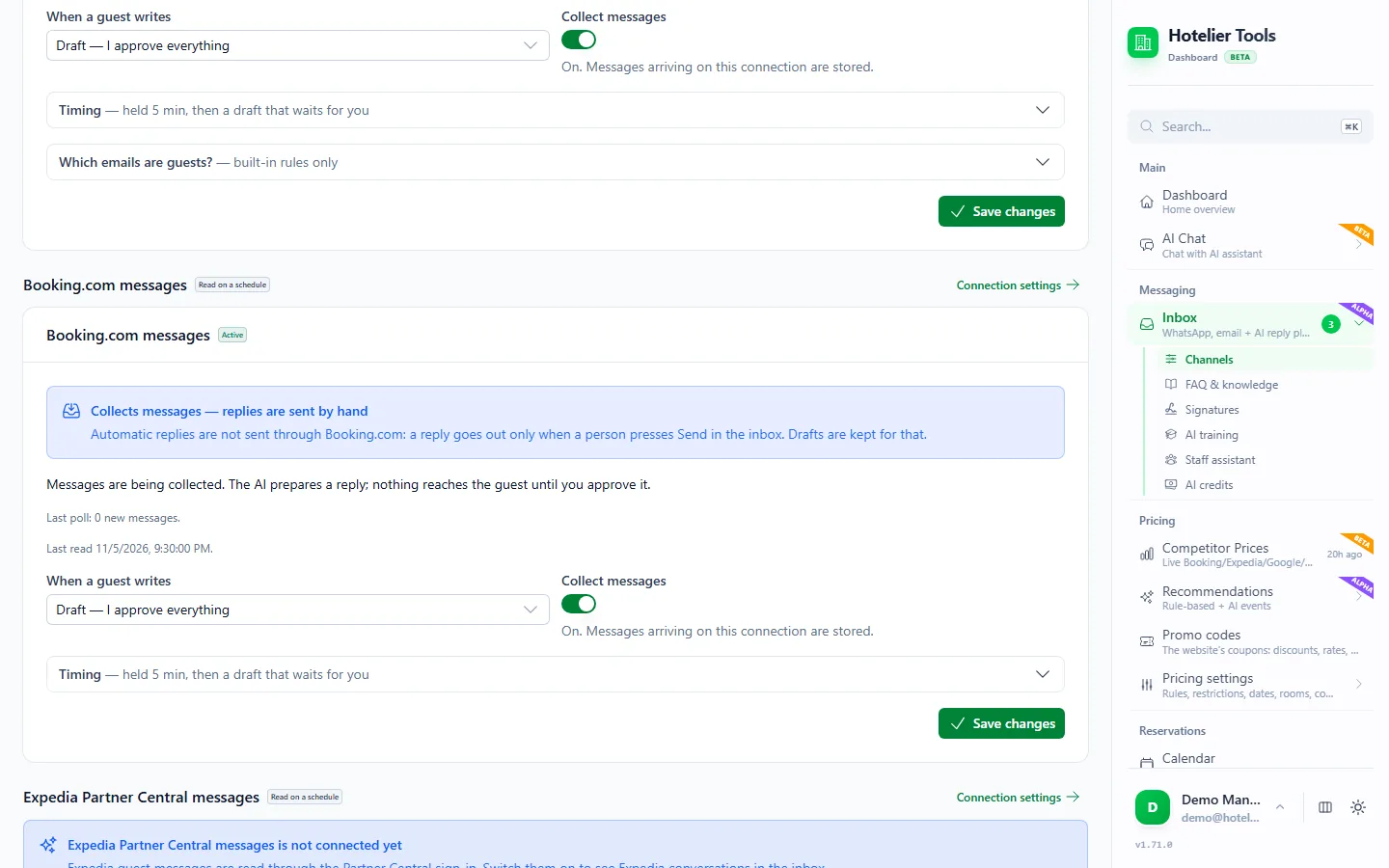
- Per-channel limits. Draft — I approve everything is the default. Booking.com is never sent by the AI in any mode; Expedia offers only Off and Draft. Even Autonomous — replies AND changes reservations can only add a note or arrival time to the verified booking, and unattended replies stop at 4 an hour, 12 a day or 3 in a row without an answer.
- Approval runs without the model. Approving executes the stored plan exactly. The AI gets no second turn to rewrite it.
The AI chat: no limits on looking, no autonomy
The AI Chat (/chat, beta) is built the other way round from the guest AI: a person you trust is typing, so it gets every tool your role allows. Ask about any reservation, invoice, price, check, report or the waitlist, across the whole account, with up to eight tool steps per question.
What it can't do is act by itself:
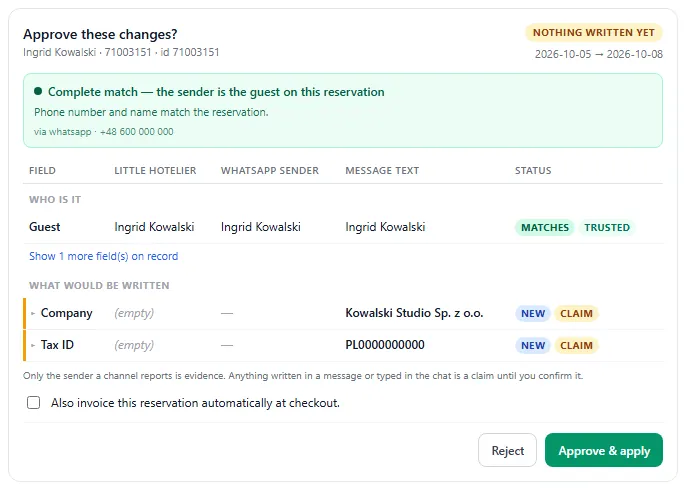
- Every change is a card. A write is intercepted before it runs and shown as Approve or Reject with the exact values. Irreversible actions (a refund, emailing an invoice, filing the INE return, sending a guest reply) are only possible here, behind their card.
- The click runs without the model. Approving executes the stored call, not a new request to the AI.
- The approval is yours alone. Each card is a single-use grant for that tool, those values, that chat and the person it was shown to, and it expires after 24 hours. A double click or a copied card is refused.
- Your role travels with every call. Each tool call carries a signed statement of who asked, valid for 15 minutes, so it runs with your permissions, not the owner's. A colleague suspended mid-answer is refused at the next step.
- It never runs on its own. The model only runs when someone sends a message. It can't wake up later or schedule itself. It can propose creating or retiming a scheduled task, as a card, and that task then runs fixed code, not the AI.
Roles come from Team & roles (/settings/team). A front-desk login asking the chat for a refund gets a refusal, card or no card.
The staff assistant and outside AI apps
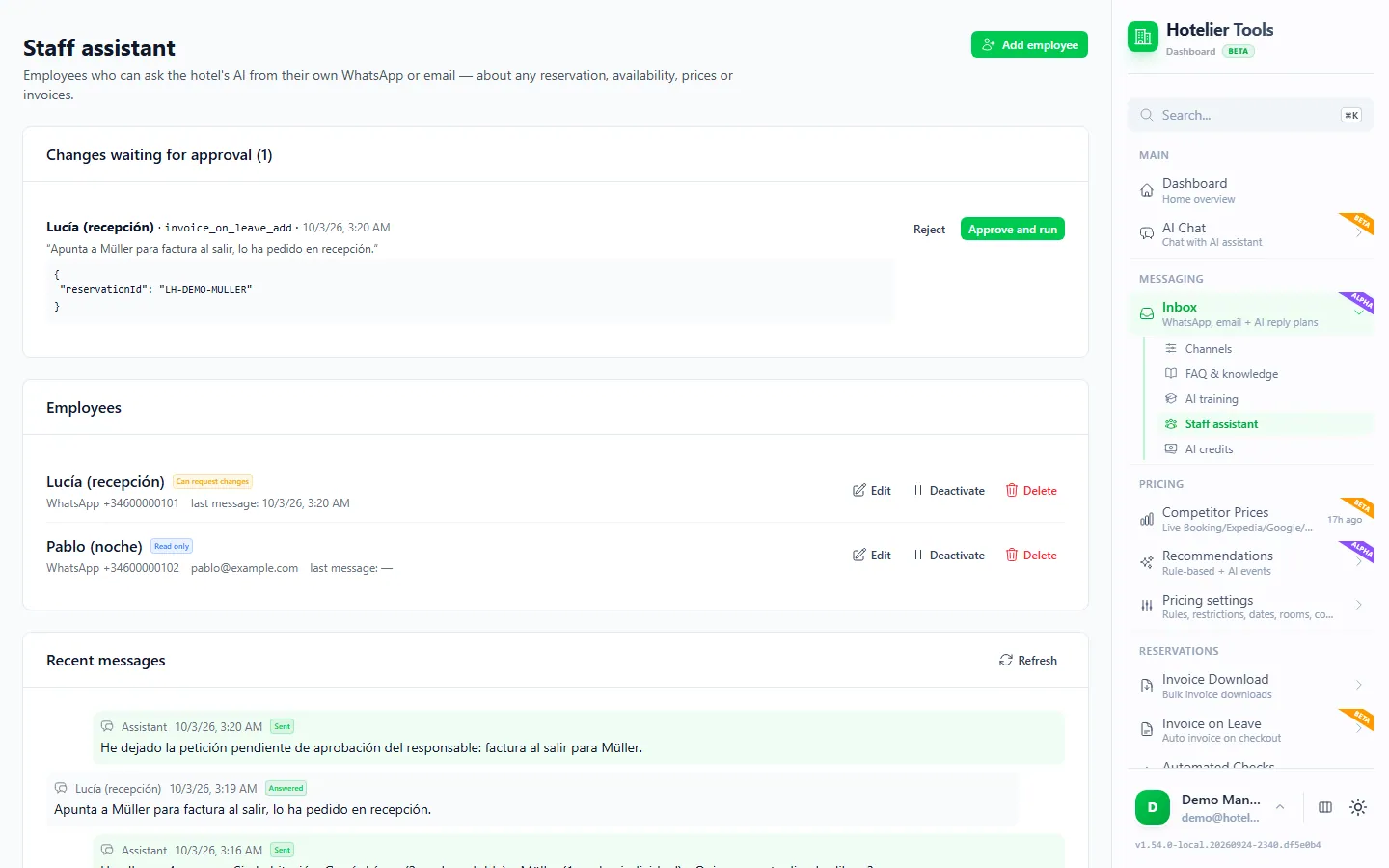
Staff assistant (/staff). An employee writes to the hotel's WhatsApp number or mailbox and is answered as staff. Identity is the sender: the registered number, or the exact address with mail that passes DKIM or DMARC (SPF alone does not count). Read only employees can only ask. With Can request changes, each write becomes a request the owner approves with Approve and run, which runs that exact call once.
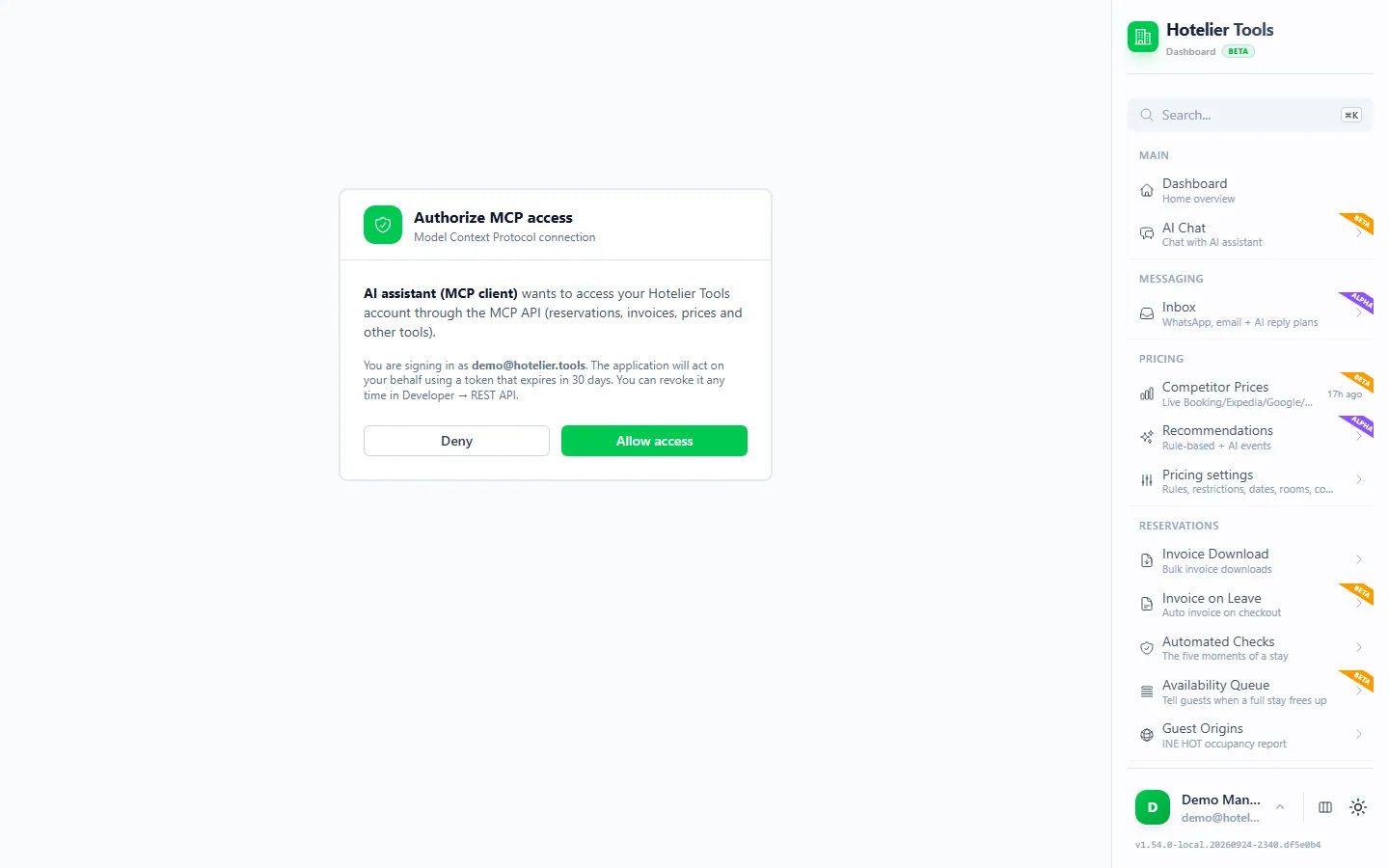
Claude, ChatGPT and other MCP apps sign in with OAuth for one property you choose and pass the same role check. There is no second card outside the dashboard: a write runs when the app calls it, so keep the app's own approval on. Irreversible actions and guest replies are blocked. See connect Claude to Little Hotelier.
Browser agents (WebMCP), an early web standard still a community draft, get reads only. A refund or a guest reply can only be proposed: the app's own form opens filled in, and you press the button. On guest-facing pages the tools are withdrawn.
Logs, costs and honest limits
What is recorded. Every identity decision with its reason, refusals included. Every reservation change applied, refused or rejected, with the evidence reviewed. Team activity (invitations, roles, staff contacts). Every AI charge on AI credits (/messaging/credits). No analysis runs without credit.
What is not built, or not finished:
- The Inbox is alpha, the AI Chat beta, Expedia messages beta (the list and latest message only; you answer in Partner Central).
- WhatsApp runs through WAHA, not Meta's official API, so a number could be blocked. See WhatsApp with Little Hotelier.
- Since 28 September 2026, Booking.com no longer sends guest phone numbers to channel managers, so a WhatsApp from a Booking.com guest may show No reservation match.
- The guest AI can't cancel, change dates or take payments, in any mode.
The dashboard is free for every hotel until billing starts on 10 January 2027.
Try it in the live demo
Open the same screen in the Hotelier Tools demo, filled with invented data. No sign-up, nothing to install.
See also: replying to guest messages with AI, the AI assistant for the front desk, what an MCP server is.
Summary
- The guest-reply AI has no tools: it reads one verified booking and your own facts, and returns a plan from four actions.
- A message is tied to a booking by its sender (Booking.com thread, 8+ phone digits, exact email,
EXP-reference), never by its text. Two matches means no booking. - Guest text is data, not instructions; a reply guard blocks other guests' references, and Booking.com is never sent by the AI.
- The AI Chat can look up anything your role allows, but every change is a single-use card signed to you, executed without the model, and it never runs on its own.
- Employees, Claude or ChatGPT and browser agents pass the same role check, each with its own approval step.
Frequently asked questions
Can a hotel AI agent change a booking on its own?
In Hotelier Tools, not by default. The dashboard chat, the inbox assistant and the staff assistant turn every change into a card a person approves. The guest-reply AI has no tools; only a channel switched to Autonomous lets it add a note or an arrival time to the one verified booking.
How does the AI know a guest message is really from that guest?
Only the sender counts, never the message text. A Booking.com thread is filed under its reservation by Booking.com, a WhatsApp number must match the booking on at least its last 8 digits, an email address must match exactly, and an Expedia thread must name its EXP- reference. If two guests match, no booking is shown.
Can a guest trick the AI with a message like 'ignore your rules'?
It can try. The guest-reply model has no tools to misuse, is told the message is untrusted text, may only return a plan from four actions that carry no booking id, and its finished reply is scanned for other bookings' references before anything is sent.
Does the AI chat have limits on what it can look up?
Only your role. The chat can read anything your role allows across the account, using up to eight tool steps per question. What it cannot do is change anything without your click, run when nobody asked, or schedule itself.
Do Claude or ChatGPT get the same approval cards?
No. External apps connected over MCP pass the same role check, but a write runs when the app calls it, so the app's own approval prompt is your only check. Refunds, emailing invoices, filing the INE return and guest replies are blocked for them.
Is Hotelier Tools part of Booking.com, WhatsApp or Little Hotelier?
No. Hotelier Tools is independent and not affiliated with or endorsed by Booking.com, Expedia Group, WhatsApp, Meta, SiteMinder or Little Hotelier. It connects with your hotel's own logins.