On this page
Little Hotelier prints two morning lists on its own: the Check-in report (arrivals and departures for a date range) and the Housekeeping report (every room's cleaning status). A good morning sheet adds the room, the party, the arrival time, the balance to collect and what each room needs. Hotelier Tools' Daily lists read one day from Little Hotelier and print arrivals, departures, in-house guests and housekeeping, each sorted for its job, in one click.
Little Hotelier features below were checked against its help centres as of November 2026.
What can Little Hotelier print for the morning?
Little Hotelier has two versions. Accounts created since May 2025 (or upgraded) use the newer platform; older accounts use the classic version. The reports are close, but the menus differ.
The Check-in report (arrivals and departures)
- Platform: Reports > Operational > Check-in. It covers check-ins and check-outs for a date range, the expected arrivals and departures, and printing registration forms (Getting started with reports).
- Classic: My Apps > Front Desk > Reports > Check In, with a date range of up to 365 days (Run and export reports in Front Desk).
Run it for today, then press Print at the bottom of the report, or Export for a CSV. Exports ask for a trusted device, which needs multi-factor authentication. For a guest-by-guest check-in sheet, open a booking and use Print > Registration form.
The Housekeeping report
On the platform, open Reservations > Housekeeping (How to manage housekeeping):
- Choose Today, Tomorrow or Select dates.
- Filter by Room status or Cleaning status if you need to.
- Mark rooms Cleaned, Uncleaned or Skip cleaning, and add Room notes.
- Press Print report for a paper copy.
Housekeepers can have their own user with Front desk access to update rooms live. The report works in a phone's browser, but it is not in the Little Hotelier mobile app.
In-house guests
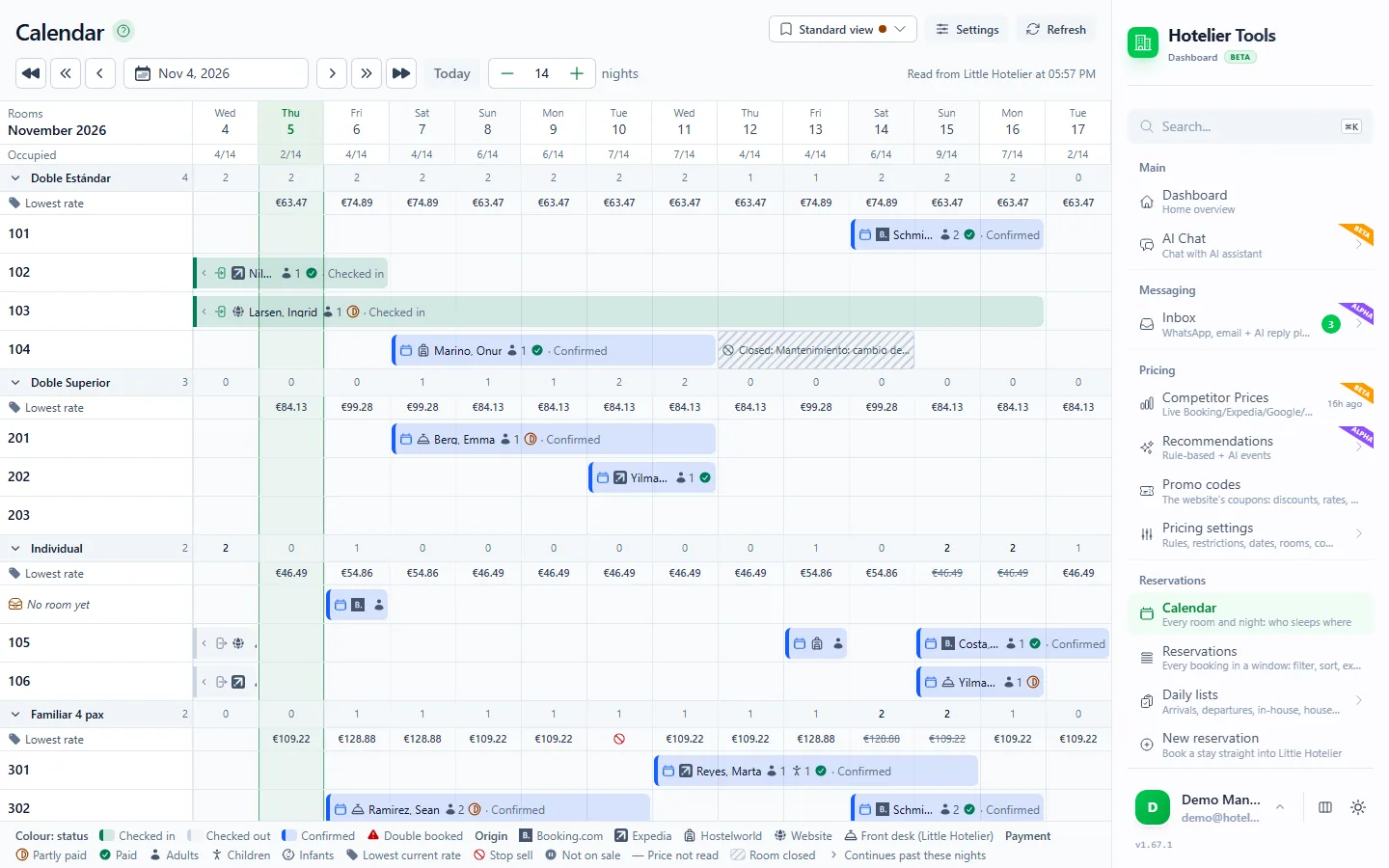
We found no dedicated in-house list in the help centres. The calendar shows who is staying (green bars are checked in), and the platform's Guests report covers guests who have stayed, not who is in the house tonight.
What should a good morning list contain?
Whatever tool you use, check your lists against this. Each list answers a different question, so each needs a different order.
| List | Sort by | Columns that save a phone call |
|---|---|---|
| Arrivals | Guest name (how you look someone up at the desk) | Room, guests, nights, channel, arrival time, balance due, online check-in, notes |
| Departures | Room | Guest, stay, balance due, invoiced or not |
| In-house | Room | Guest, which night of the stay, paid or not |
| Housekeeping | Priority | Room, room type, what to do, who leaves and who arrives, a box to tick, space for notes |
Three flags matter more than any column:
- No room assigned. A booking in Little Hotelier's Unallocated row will not appear on a housekeeping list by room. Assign it before housekeeping starts.
- Balance due. Collect on arrival, or before the guest leaves, not after.
- Same-day turnover. A room where one guest leaves and another arrives goes first.
Put the date and the time of printing at the top. A sheet found on a trolley at noon should say whether it is this morning's.
The faster way: Daily lists in Hotelier Tools
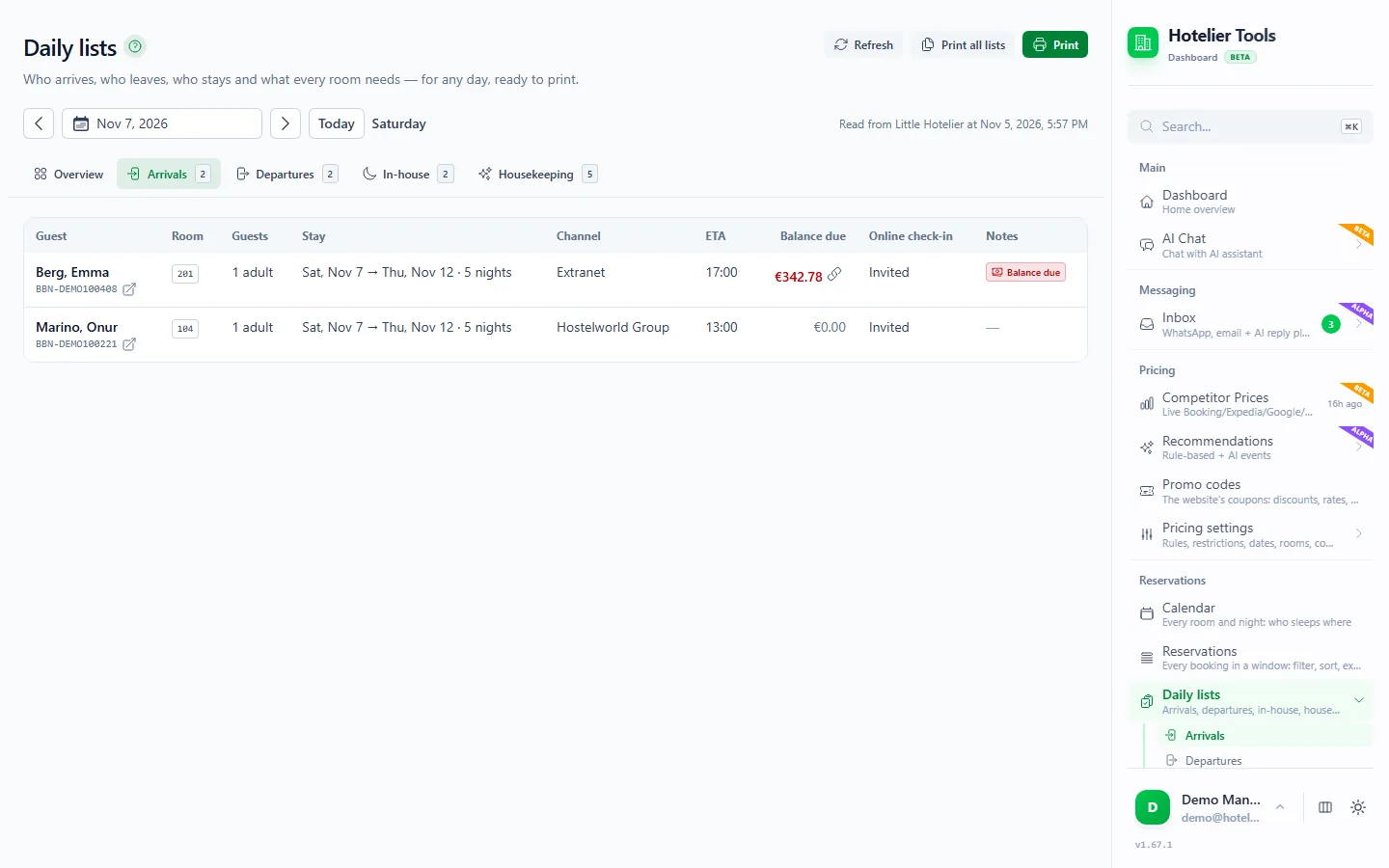
Daily lists (/daily) read one day from Little Hotelier and lay it out as four lists, ready to print. One read serves all four, so switching tabs is instant. It only reads: nothing changes in Little Hotelier.
- Open Reservations > Daily lists. The day starts as today where your property is, not where a server is.
- Use the arrows or the date picker to move day by day (up to a year either way). The date stays in the address, so a bookmark or a link opens the same day.
- Pick a tab: Overview, Arrivals (
/daily/arrivals), Departures (/daily/departures), In-house (/daily/in-house) or Housekeeping (/daily/housekeeping). - Press Print for the list on screen, or Print all lists for every list, each on its own page.
- Press Refresh to read Little Hotelier again. Otherwise the day is kept for a few minutes.
What each list shows
| Tab | Sorted by | Columns |
|---|---|---|
| Arrivals | Guest | Room, Guests, Stay, Channel, ETA, Balance due, Online check-in, Notes |
| Departures | Room | Guest, Stay, Balance due, Invoice (Invoiced with its number, or Not invoiced), Notes |
| In-house | Room | Guest, Stay, Night ("Night 3 of 5"), Payment (Paid, Partly paid, Unpaid), Notes |
| Housekeeping | Priority | Room, Room type, To do, Guests; on paper also Done and a notes column |
The Notes column carries the flags: No room assigned, Balance due, Not checked in, and Asked for free cancellation when a Booking.com guest asked for one (only for people who can read the inbox).
The Overview tab counts arrivals, departures, guests staying on and rooms to do, and lists what Needs a person: a turnover, an arrival with no room, a balance to collect on arrival or before leaving, a guest still not checked in, a possible no-show.
The housekeeping list, in the order to work it
Every room appears once, sorted: Turnover first, then Departure clean, Get ready for arrival, Stayover service and Vacant. Each row says who is Leaving (and whether they already left or are still in the room), who is Arriving with their ETA, and who is Staying and until when. On paper, each room ends in a box to tick and space for handwritten notes.
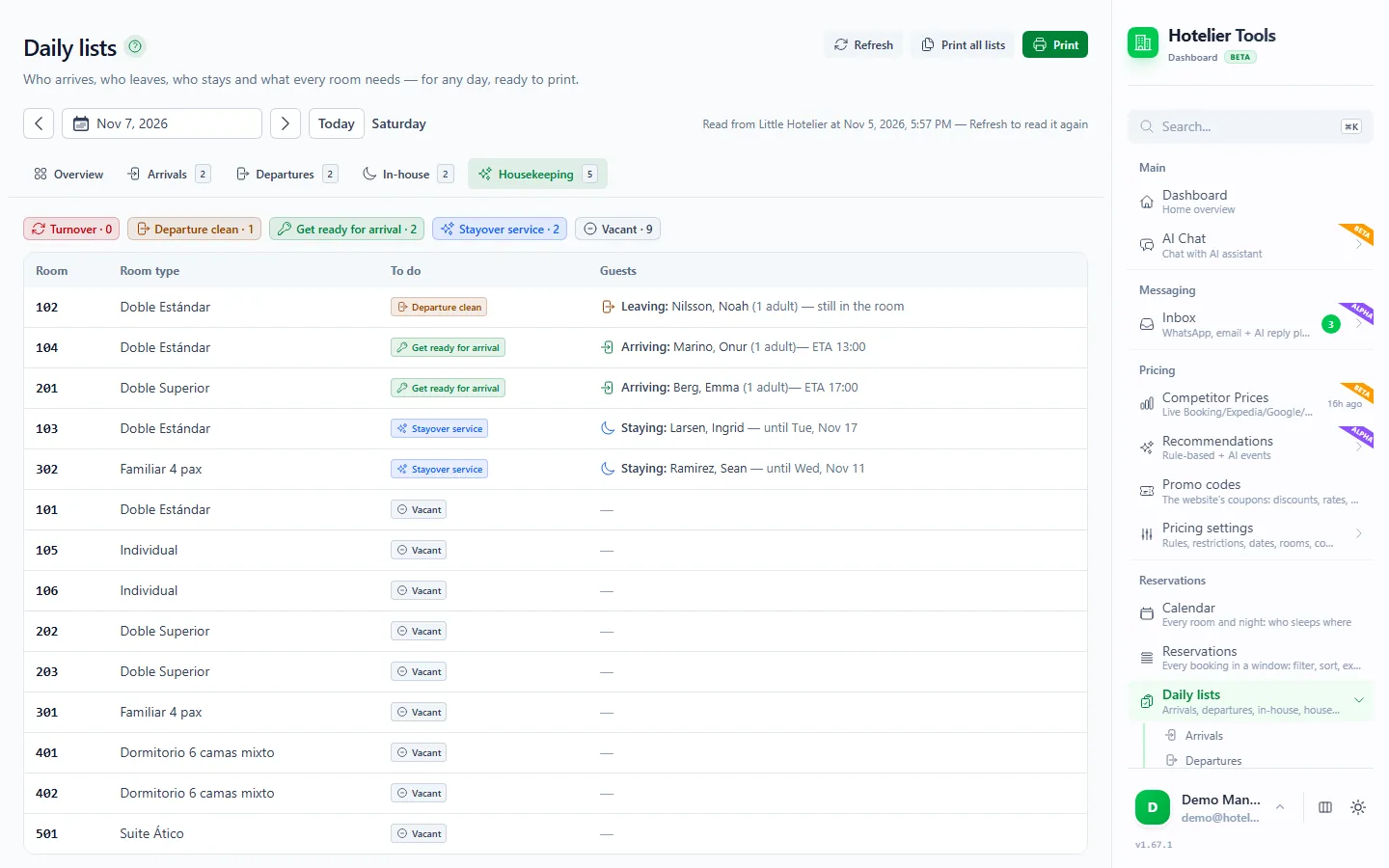
A booking with no room assigned can't sit on a room row. The list says how many there are, so you assign them in Little Hotelier before the team starts.
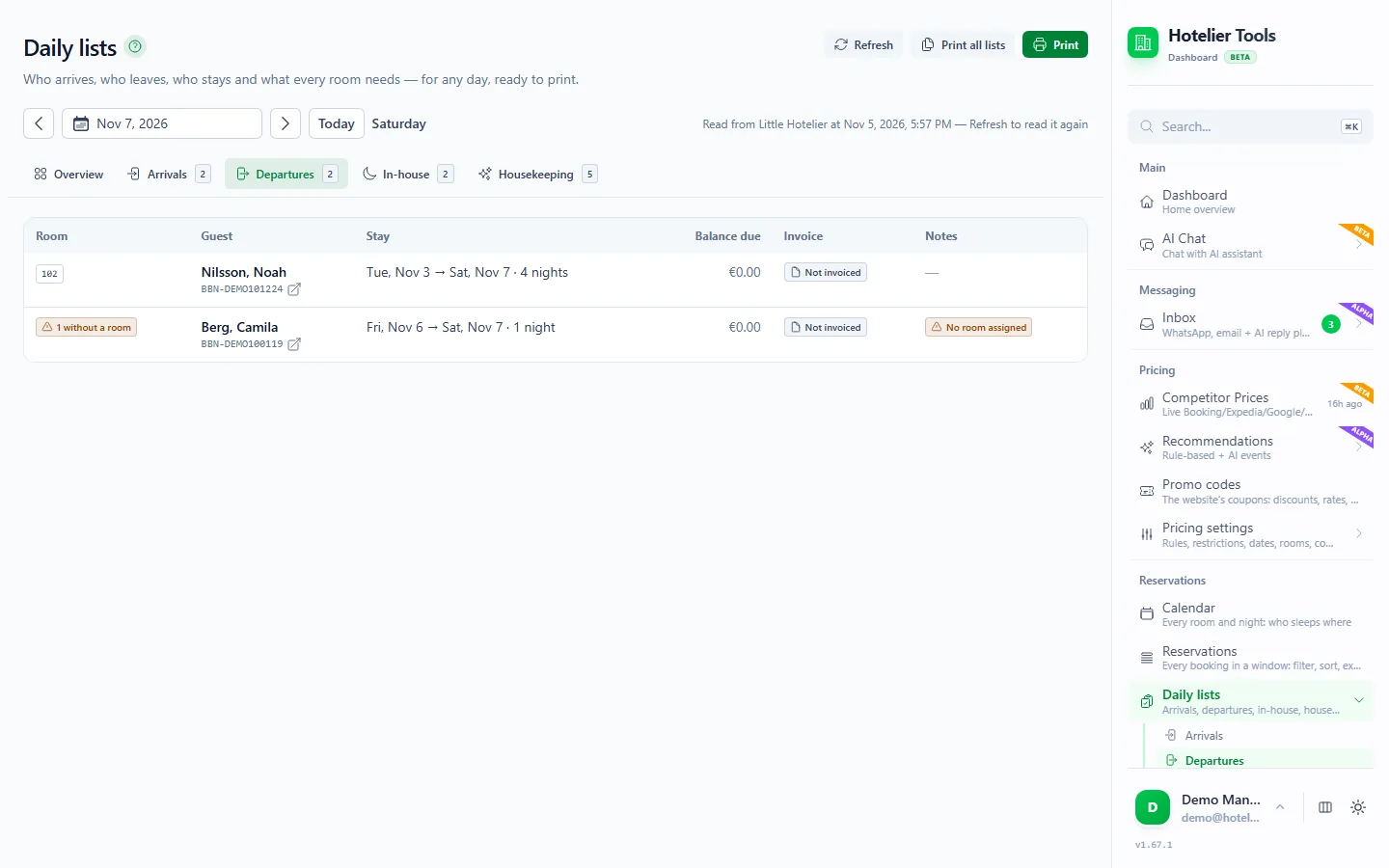
Departures with the invoice in view
The departures list shows, per room, the balance still due and whether the stay is already invoiced. It is the list to work from at check-out time.
Send the online check-in link from the arrivals list
If you use the Hotelier Tools guest register (alpha) for online check-in, the Online check-in column shows each arrival's stage: Not sent, Invited, Received or Filed. Next to Not sent, an envelope button emails the check-in link:
- Click the envelope (Email the check-in link).
- Confirm Email the online check-in link? The link goes to the booking's own email address, never one typed here. A link sent earlier stops working.
The button appears only for people allowed to manage check-ins, and never on paper. In the same way, a Payment link button sits next to a balance due for people who may take payments. See payment links in Little Hotelier and, for Spain, SES.Hospedajes and Little Hotelier.
On a phone
Below tablet width, each list turns into cards: the guest or room as the heading, the room or task in the corner, and one labeled line per detail. Housekeepers can open /daily/housekeeping in their phone's browser, and a link with ?date= opens the same day for everyone.
Two tasks that keep the lists honest
Daily lists show what Little Hotelier says. Two scheduled tasks on Automated checks (/automated-checks) make sure that is right.
Check guests out (recommended every day at 15:05). Nothing checks guests out until you create it. Each run closes today's departures and any from the last 30 days still marked checked in, so a failed or missed run catches up on its own. A stay with no ID number, a balance due or a zero total is left for a person and reported by email every day. Confirmed bookings whose arrival day is over are reported as possible no-shows, never changed. Without it, yesterday's guests stay "in the house" and the invoice at check-out never goes out.
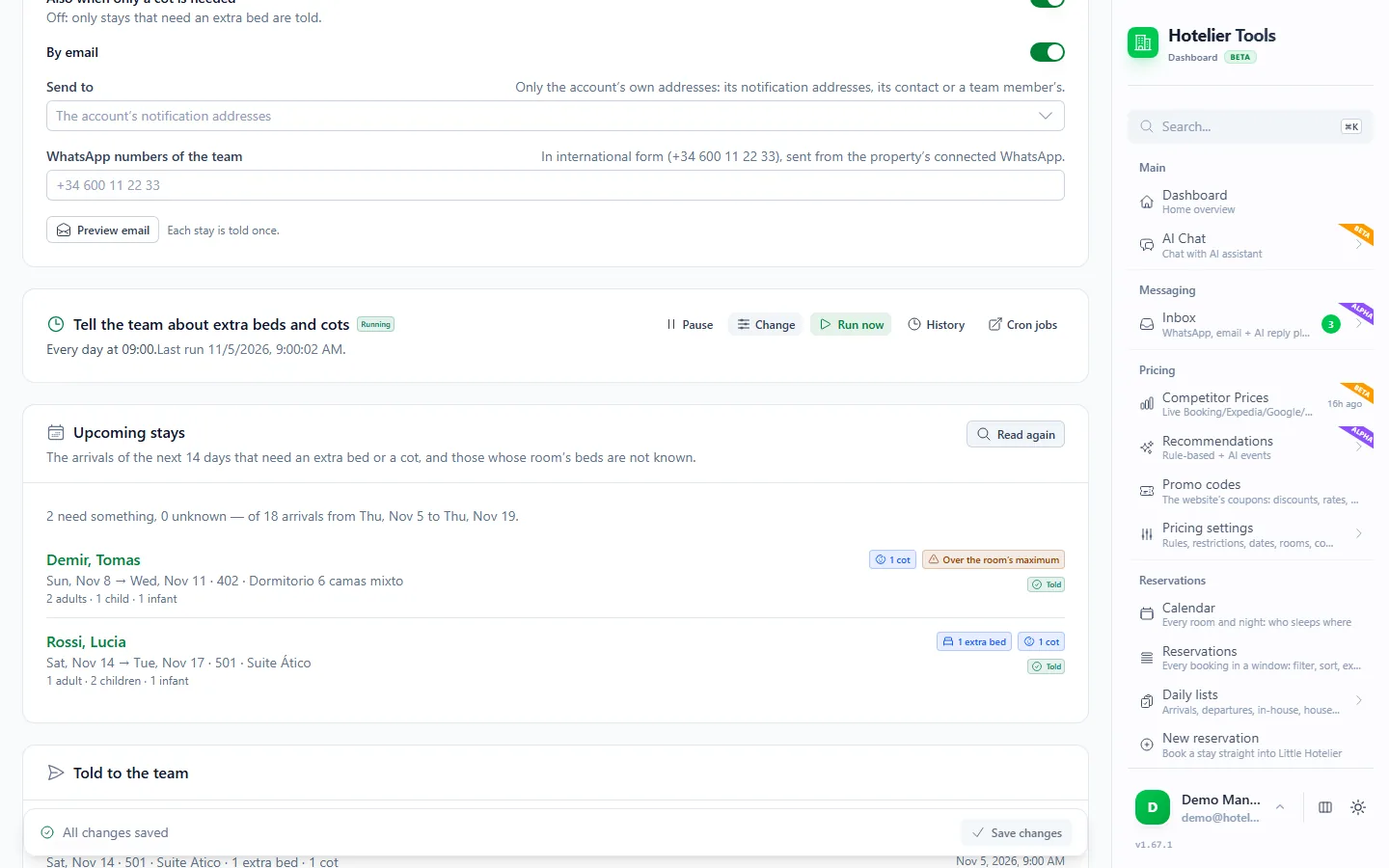
Extra beds and cots (/automated-checks/extra-beds). Little Hotelier has no beds field. This page compares each arrival's party with the room's beds: the guests its rate includes in Little Hotelier, or the number you type for a room type. It counts infants as cots by default. Look at the next 14 days lists the stays that need an extra bed or a cot, and Tell the team about extra beds and cots (recommended daily at 09:00) emails or WhatsApps the team, once per stay. Badges also appear on the reservation calendar. Nothing is written to Little Hotelier, and a room whose beds are unknown is shown as unknown, never guessed.
Try it in the live demo
Open the same screen in the Hotelier Tools demo, filled with invented data. No sign-up, nothing to install.
Honest limits
- Read-only. You can't change a status or assign a room from the daily lists. Do it in Little Hotelier, or on the reservation page in Hotelier Tools (the reservation calendar guide shows how).
- No cleaning status. The housekeeping list says what each room needs from the bookings. It doesn't store Cleaned or Uncleaned: tick the paper, or keep using Little Hotelier's Housekeeping report for that.
- Online check-in needs the guest register, which is alpha.
The dashboard is free for every hotel until billing starts on 10 January 2027. Everything else it does is on the dashboard page.
See also: the daily front-desk checklist, exporting reservations to Excel, Little Hotelier tips.
Summary
- In Little Hotelier: print the Check-in report for arrivals and departures, and Reservations > Housekeeping > Print report for the rooms.
- A good list sorts arrivals by guest, departures and in-house by room, and housekeeping by priority, with turnovers first.
- Flag three things: no room assigned, balance due, same-day turnover.
- Faster: Hotelier Tools Daily lists print all four lists for any day, email the online check-in link from the arrivals list and work as cards on a phone.
- Keep them right: schedule Check guests out, and let Extra beds and cots tell the team what to set up.
Frequently asked questions
Does Little Hotelier have an arrivals report?
Yes, the Check-in report. On the newer platform it is under Reports, Operational, Check-in, and on the classic version under My Apps, Front Desk, Reports, Check In. It lists check-ins and check-outs for a date range, and you can print it or export it as CSV.
How do I print a housekeeping list in Little Hotelier?
Open Reservations, then Housekeeping, choose Today, Tomorrow or Select dates, and press Print report. Staff without a Little Hotelier user can work from a copy someone with Front desk access prints. The report is not in the mobile app.
What should a hotel arrivals list include?
The guest's name, the room, how many guests, the nights, the channel, the expected arrival time and the balance still to collect. Flag any booking with no room assigned, an unpaid balance or a missing online check-in, so the desk sees it before the guest walks in.
In what order should housekeeping clean the rooms?
Same-day turnovers first, where one guest leaves and another arrives in the same room. Then the other departures, rooms to get ready for an arrival, stayover service, and empty rooms last. Hotelier Tools sorts its housekeeping list in that order.
Can I see the daily lists on my phone?
Yes. In Hotelier Tools each daily list turns into one card per guest or room on a phone screen, and a link with the date opens the same day. On paper or a wide screen it is a table.
Is Hotelier Tools part of Little Hotelier?
No. Hotelier Tools is independent and not affiliated with or endorsed by SiteMinder or Little Hotelier. It reads your reservations with your hotel's own Little Hotelier login.