On this page
When a guest asks for dates you can't sell today (full, closed, or not priced yet), write the request down with the exact nights, rooms and contact, and look at that list every time something changes. The faster way is a queue that checks Little Hotelier for you: Hotelier Tools' Availability queue checks every request on a schedule and sends the guest one message, with a booking link, the first time every night they asked for is bookable.
Why do availability requests get lost?
Because the request lives in one place and the answer appears somewhere else, weeks later. The usual cases:
- The email or WhatsApp is buried. "Do you have a double for the first week of August?" arrives in March. By the time rooms free up, the message is 400 emails down, and nobody remembers who asked.
- The dates have no rates yet. You haven't loaded next summer's prices, so the booking engine shows nothing and the guest writes to you instead. You say "we'll let you know", and then you load the rates on a busy afternoon.
- The dates are sold out. A cancellation frees a room on Tuesday at 10:00. The guest who asked in January never hears about it, and an OTA resells it.
- An agency wants several rooms. Three doubles and a family room for Easter weekend. You have two doubles. Is that a no, or a phone call?
- Part of the request becomes possible. Two of the three nights free up, or one of the two rooms. Nobody checks every night of every request by hand.
Each of these is a direct booking you already had in your inbox.
How do you track availability requests by hand?
A simple log works if someone keeps it. One row per request:
| What to record | Why |
|---|---|
| Date asked, and how (email, WhatsApp, phone) | So you can find the original message |
| Name, email and phone with country code | So you can reply on the channel they used |
| First night and departure day | A stay needs every night, not just the first |
| Rooms and room types, per type for groups | "3 doubles + 1 family" is not "4 rooms" |
| Why you couldn't sell it | Full, closed, or no rates yet: each one tells you when to look again |
| Status and date | Waiting, offered, booked, given up |
When to look:
- Every time you load or open rates. In Little Hotelier you set rates and close or open dates in Front Desk > Inventory, one by one or with Bulk Update (Little Hotelier help centre, as of November 2026). Filter your log by the dates you just opened.
- Every time a cancellation arrives for dates in the log.
- Once a week, to close requests whose dates have passed.
How to answer: give the guest a direct booking link for their exact dates, say plainly that nothing is held, and set a deadline if you're offering it to several people. If you work in Gmail, a label such as "Availability requests" keeps the original emails together (Gmail Help).
The weak spot is still people: someone has to check every night of every row against the inventory, and remember to do it.
The faster way: Hotelier Tools' availability queue
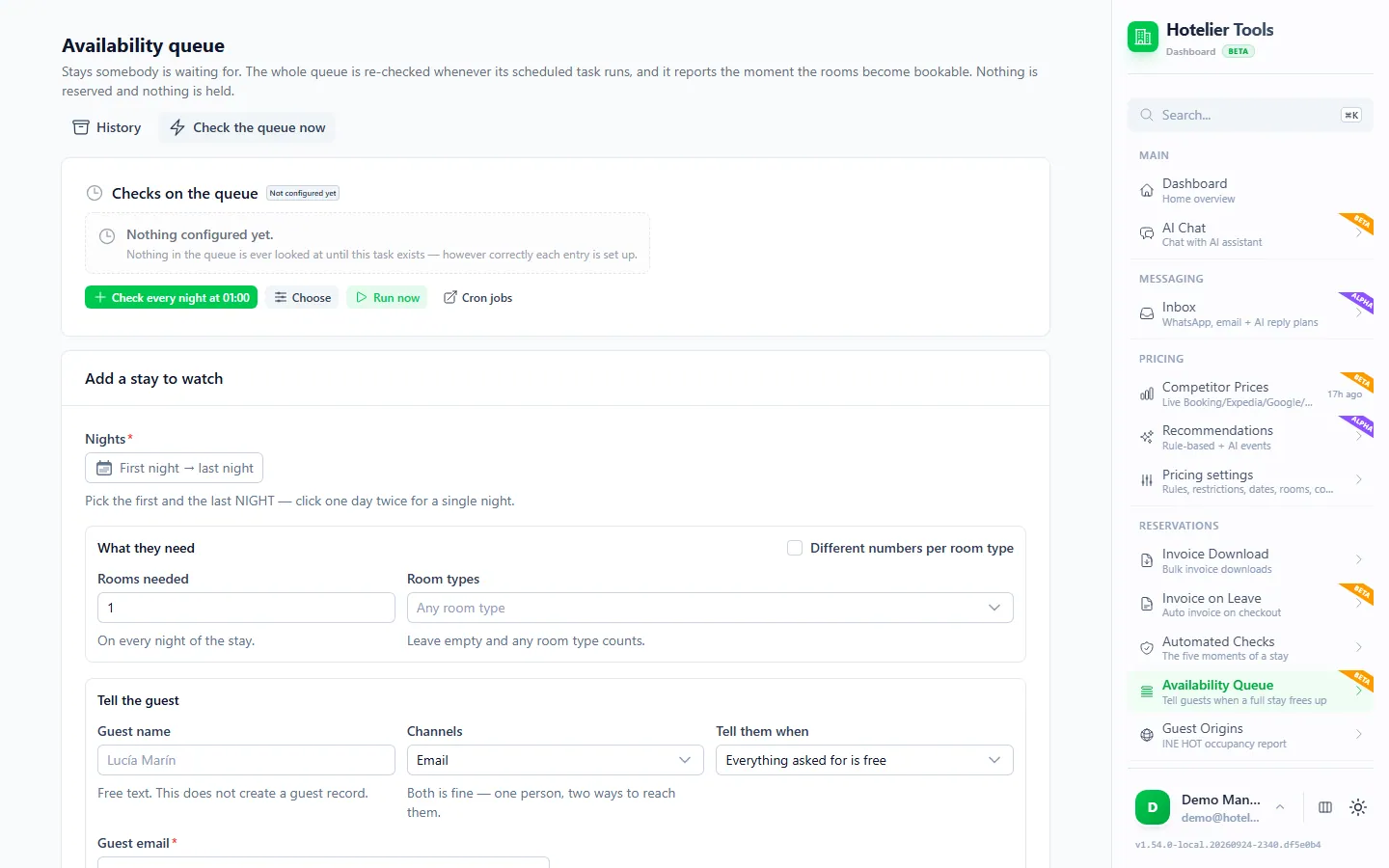
The Availability queue (/availability-watch, beta) keeps the list and does the checking. You add a stay once. A scheduled task reads Little Hotelier for the whole queue, and when the rooms are bookable on every night, the guest and/or you hear about it by email or WhatsApp. Nothing is reserved or held, and the message says so.
- Open Availability queue and fill Add a stay to watch: the nights, Rooms needed and Room types. For an agency, tick Different numbers per room type.
- Under Tell the guest and Tell the property, choose the channels and when each one hears from it.
- Click Add to the queue.
- Check the Checks on the queue card. Accounts with a Little Hotelier login normally get this task already, every night at 01:00. If it says Not configured yet, press Check every night at 01:00, or Choose another schedule (every 20 minutes at most).
The step-by-step for sold-out dates and cancellations is in the companion guide, how to run a waitlist for sold-out dates. This guide covers how the queue decides, and the newer ways requests get into it.
How does the queue decide a stay is free?
- The fewest free night wins. A room type with four free on Friday and none on Saturday can't sell a Friday-to-Sunday stay. The queue takes the lowest count across the nights, which is the number you can actually sell.
- Closed means not bookable. A night on stop sell (Close Channels in Little Hotelier), closed to arrival on the arrival day, or missing from the inventory counts as zero, even if the room count says otherwise. "No data" never reads as "free".
- So unpriced dates work too. If you keep next season closed until the rates are in, a guest asking for August waits in the queue. The first check after you load rates and open those dates finds the rooms free, and the guest hears about it without you looking anything up.
- One check for the whole queue. Every waiting request is checked on every run, so two guests waiting for the same night hear about the same cancellation at the same time. Little Hotelier is read once per arrival date, not once per request.
- It says it once. When a request is announced as available, it closes. Availability flickers, and a guest shouldn't get a message every 30 minutes about the same room.
- A stay that has started is retired without sending anything.
Who hears what: available, partial or expiring
Each check ends in one of three situations, and the guest and the property subscribe to them separately:
| Situation | Label in the form | Who hears it by default |
|---|---|---|
| Available: every room asked for is bookable on every night | Everything asked for is free | The guest and the property. The request closes. |
| Partial: something came free, but fewer rooms than asked | Some rooms came free, but not all | The property only. It's a phone call, not an automatic email. |
| Expiring: the stay starts within 48 hours and nothing was found | About to expire with nothing found | The property only. Your last chance to offer an alternative. |
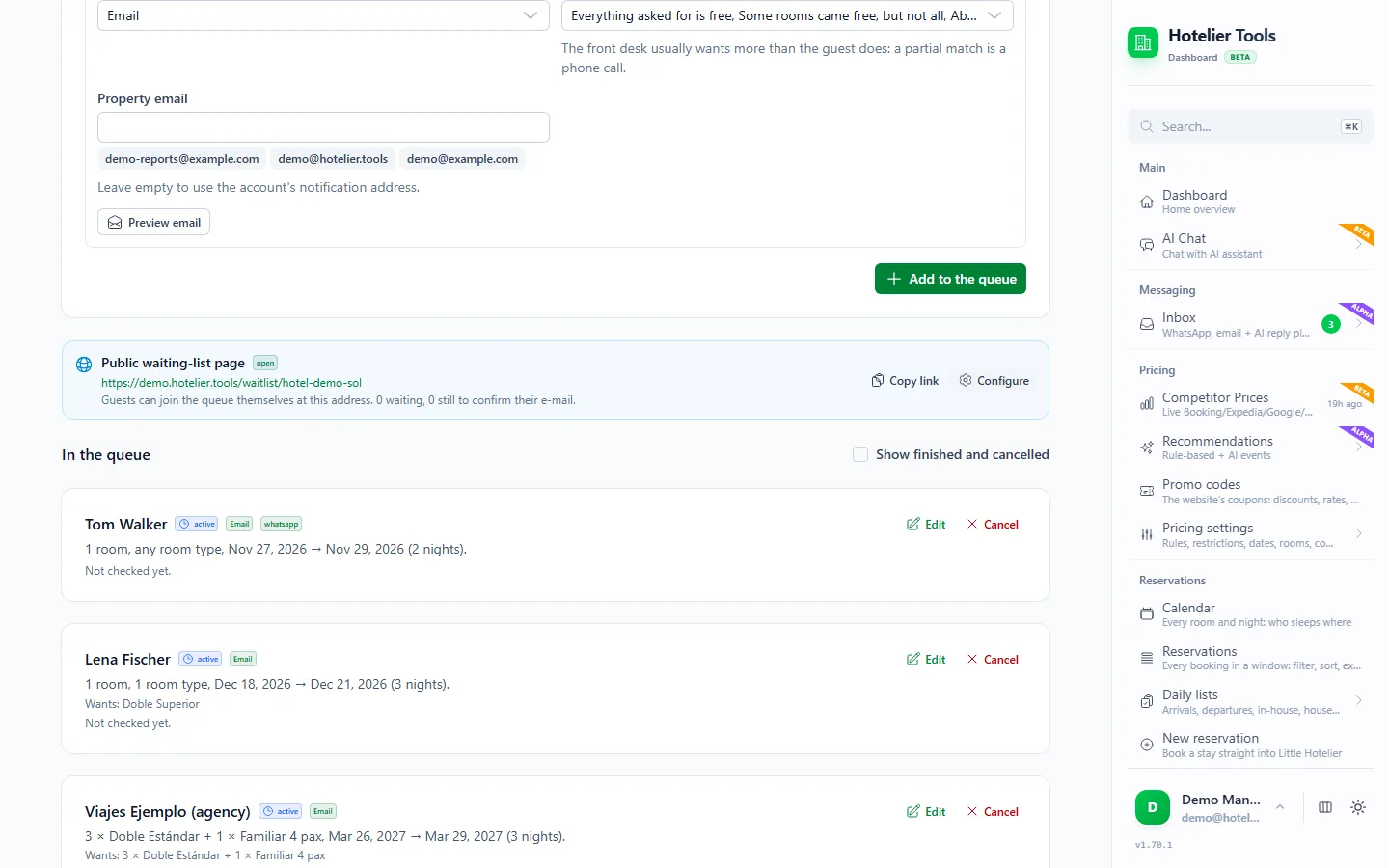
A partial match that doesn't change is reported once, not on every run, and the request keeps waiting for the full set of rooms. This is the agency case: "2 of the 3 doubles are free" reaches the front desk, the agency doesn't get an email it can't act on.
Email or WhatsApp, for the guest and for you
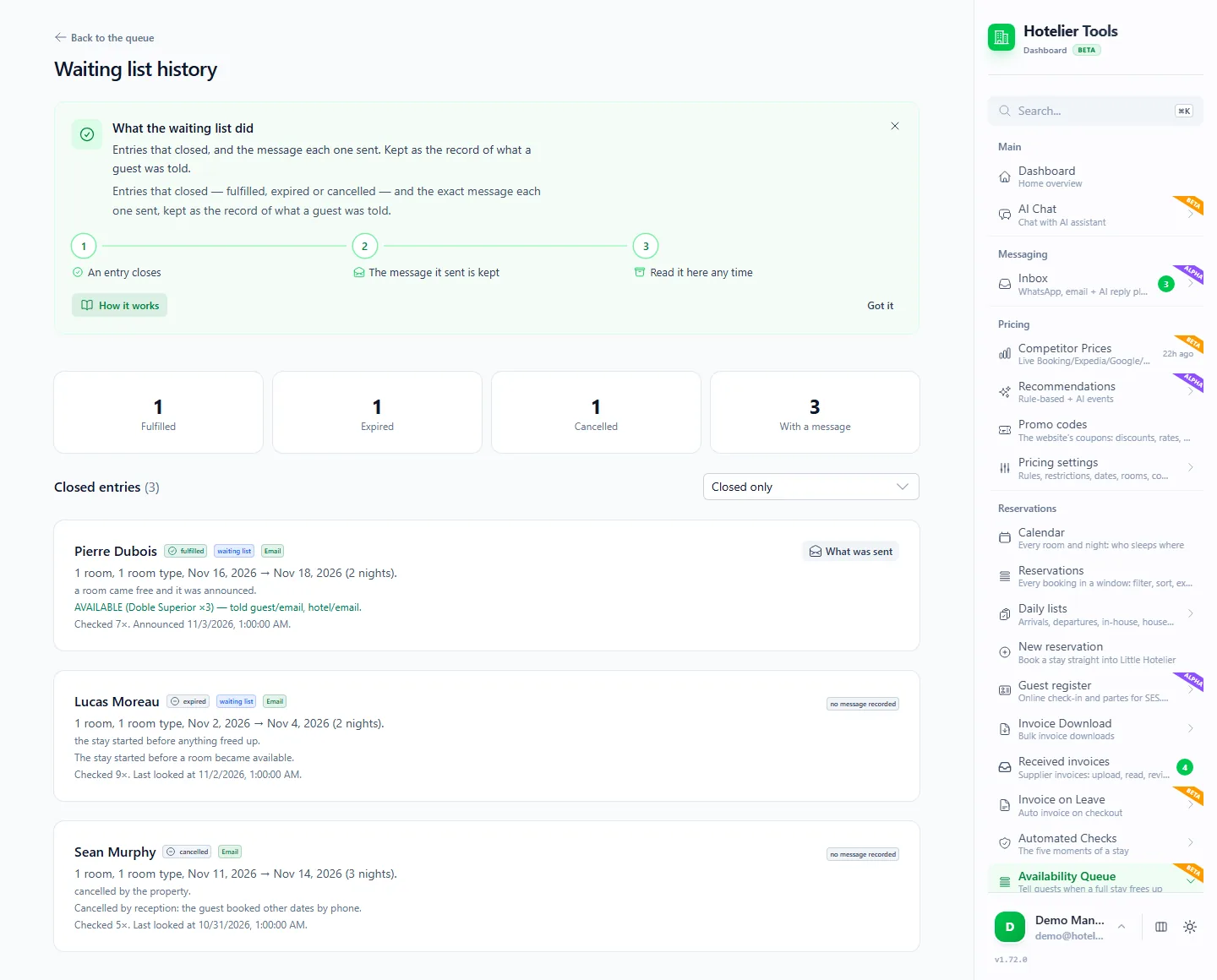
The guest can be told by email, WhatsApp or both, and the property on its own channels. WhatsApp messages go out from your connected number (WhatsApp with Little Hotelier); a phone number must include its country code, and Hotelier Tools never guesses one. Leave Property email empty to use your account's notification address. The guest's email is written in the language you pick under Guest's language, and on an available message it carries a direct booking link with the dates and number of rooms already filled in. History (/availability-watch/history) keeps the exact message each request sent.
Requests that arrive in the inbox
The AI assistants (AI Chat, beta, and the inbox assistant, alpha) know when your property uses the queue. When a guest asks for dates and the booking engine finds nothing to sell, the assistant offers the waiting list in the same reply instead of stopping at "no availability". It first checks whether that person is already waiting, by email or phone, and never queues them twice for the same dates. The request appears as a card you confirm, with the guest, the stay, the rooms and who will be told. If only some rooms are bookable, it quotes those and offers the queue for the rest. More in AI replies to guest messages.
Let guests ask on your website: the public waiting-list page
The Public waiting-list page (/availability-watch/public) lets guests add themselves. It's off until you switch on Page open, and Ask guests to confirm their email (double opt-in) is on by default: a request only joins the queue after the guest presses a button in a confirmation email.
Bookable now: book it, don't wait for it. When a guest picks a stay, the page checks your public booking engine (never Little Hotelier) for those dates and that party. If rooms are free, it shows the prices with your direct promo code applied and a Book now button, and it doesn't take that stay onto the waiting list. If only other room types or fewer rooms are free, it shows those and still lets the guest join for the rest. If the engine can't be read, it says so and the guest can still join.
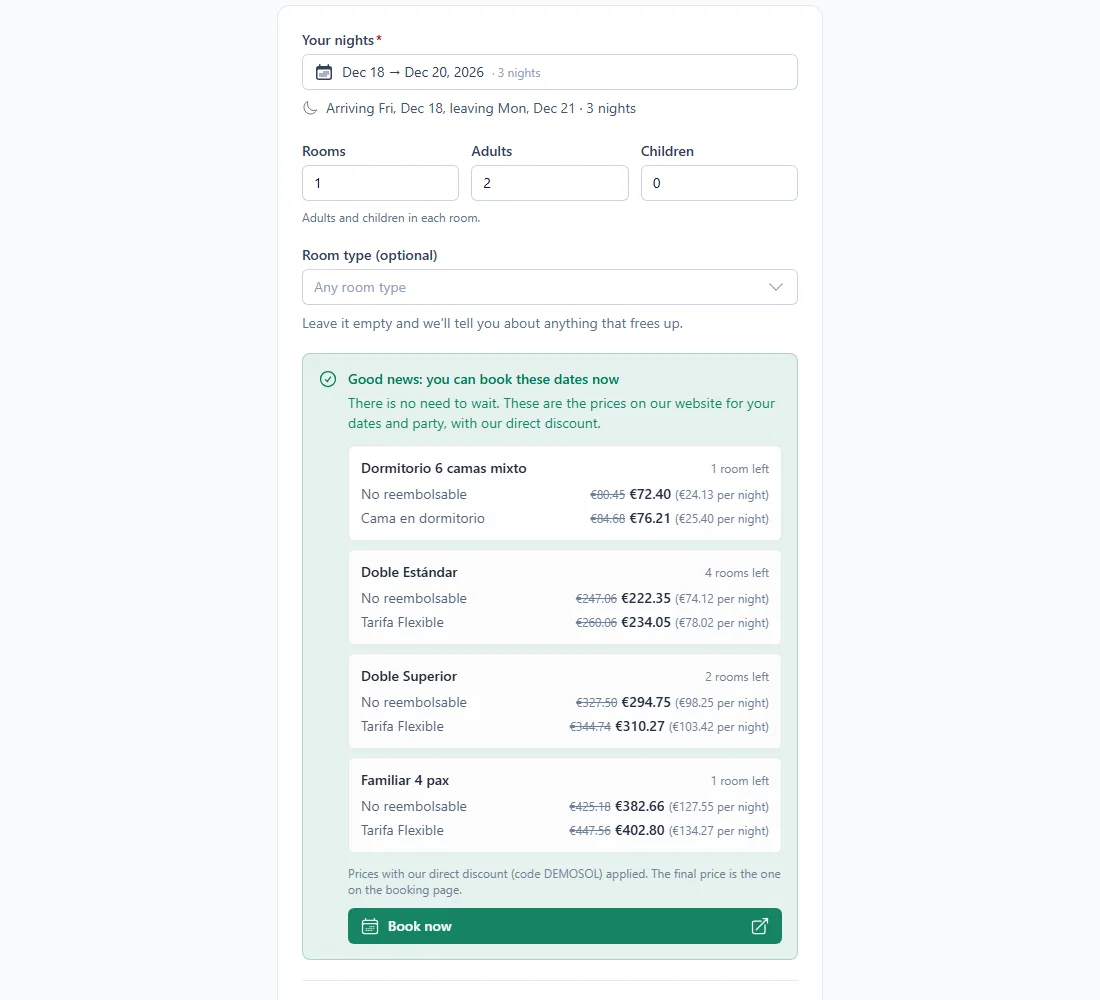
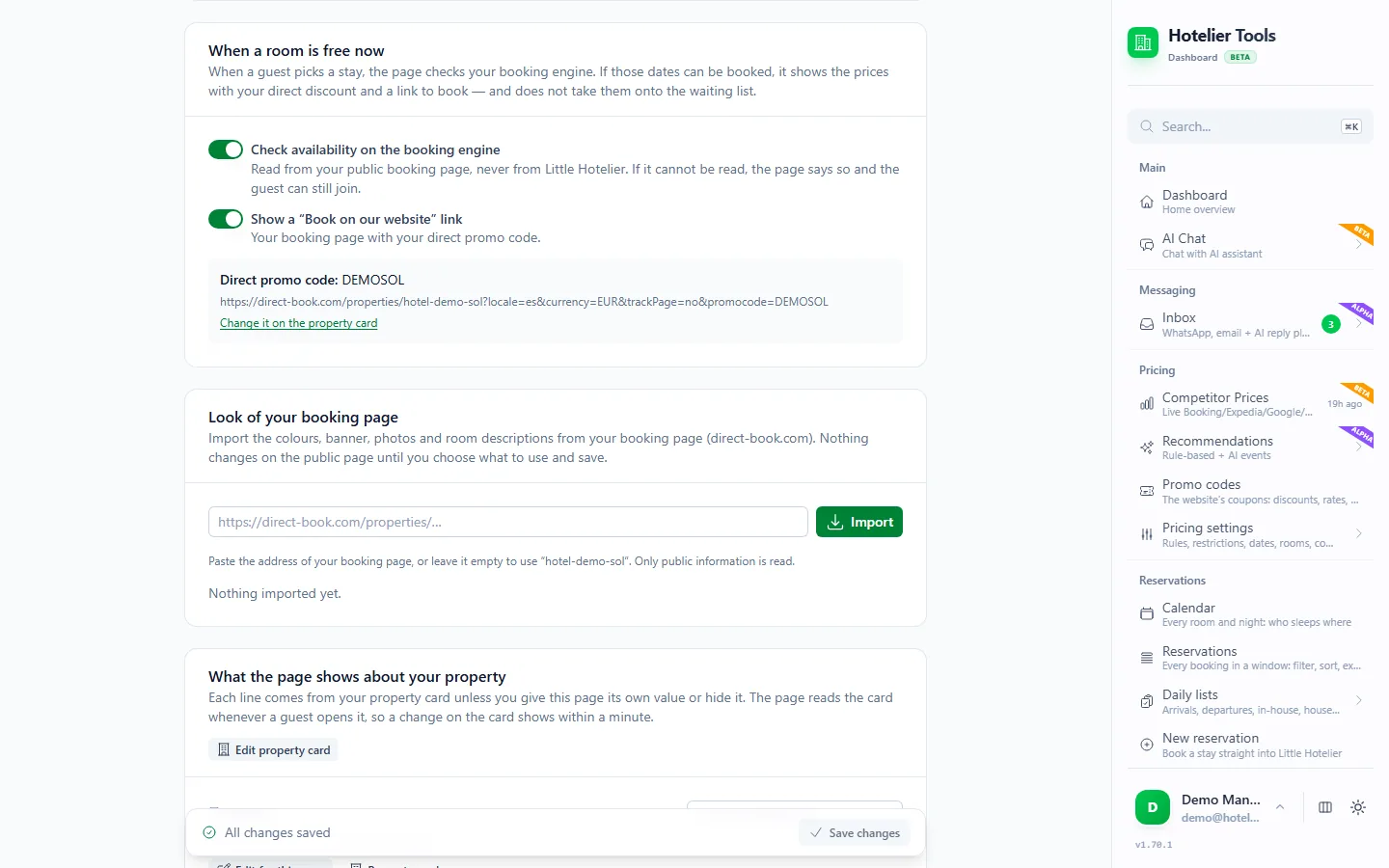
You switch this check off under When a room is free now, along with the Book on our website link. The rest of the settings shape what guests see:
- Look of your booking page: paste your direct-book.com address and Import its colors, banner, property photos and room descriptions. Nothing is shown until you tick what to use.
- What the page shows about your property: name, address, phone, email and website, each From the property card, an Own value for this page, or Do not show. Sign-in addresses are never shown to guests.
- Map links and more ways to reach you: Google Maps and Apple Maps links built from your address, up to three other map links, WhatsApp, and up to three extra email addresses (for groups, for example).
- Arrival and departure warnings: the page warns, never refuses, when a guest picks a day you usually close to arrival or departure.
Share a pre-filled link, or embed the form
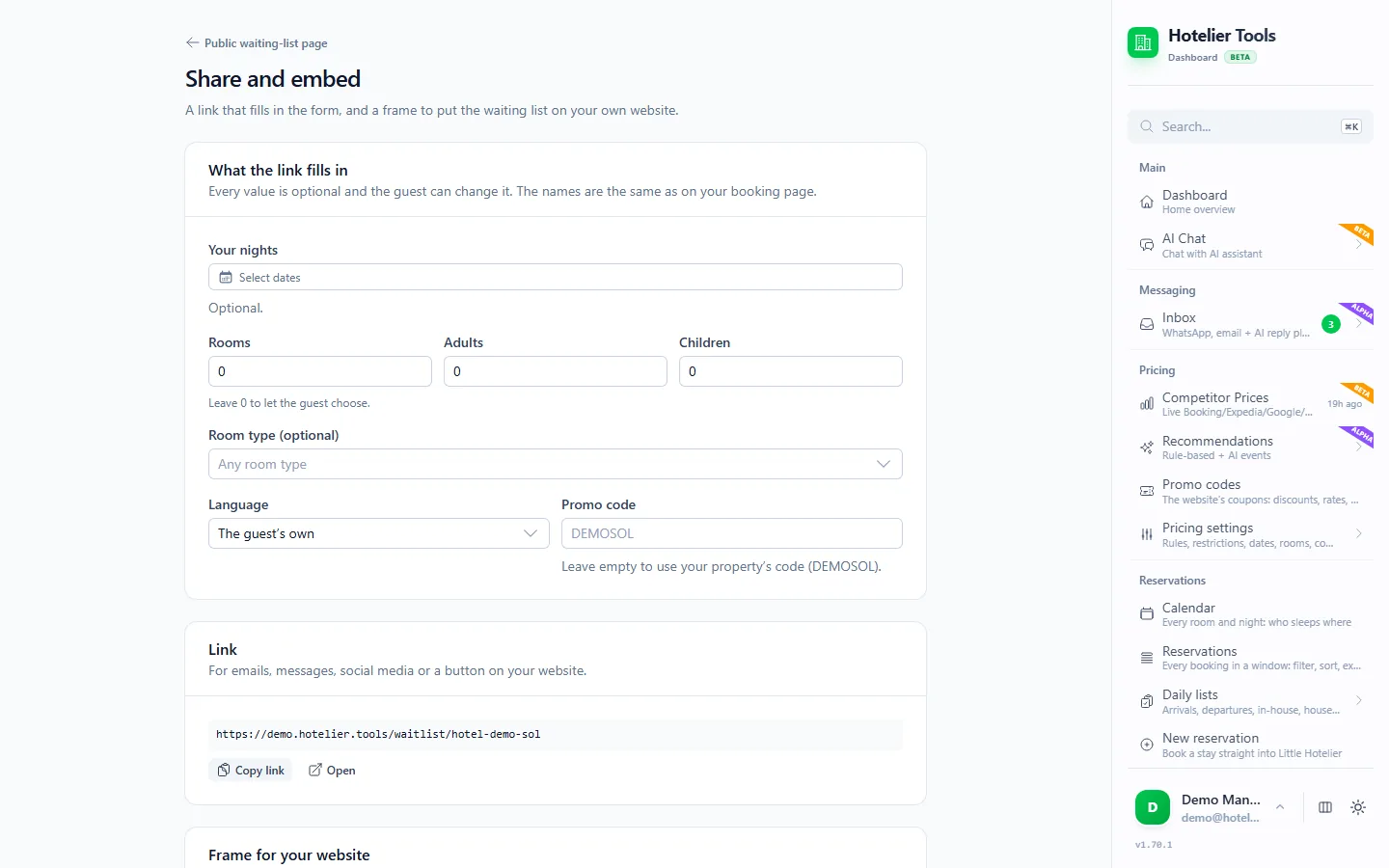
Share and embed (/availability-watch/embed) builds two things to copy. A Link that fills in the form, using the same parameter names as your booking page (checkInDate, checkOutDate, items[0][adults], promocode, locale), so you can reply to an enquiry with a link that already has the guest's dates. And a Frame for your website: an <iframe> at full width or 480, 640 or 800 px, with a preview. Only this public page can be framed by other sites; the rest of the dashboard can't.
The queue feeds your pricing
People waiting for a night are demand. In Hotelier Tools' dynamic pricing (alpha), each party waiting raises that night's price recommendation by 3%, up to 12% per night, only for the room types they asked for, counting the same guest once. Change or switch it off in the pricing rules (/pricing/settings/rules): Raise per guest on the waiting list and Never raise for the waiting list more than. See dynamic pricing for small hotels.
For developers: MCP and REST
The MCP tools (availability_watch_list, _add, _update, _cancel, _check_now, _schedule, _set_schedule, plus list_room_types) and the REST API (/api/v1/availability-watch) do the same, with the same duplicate check. Checking the queue sends real messages, so AI Chat asks you to confirm it. See the Little Hotelier API guide and connecting Claude to Little Hotelier.
What the queue doesn't do
- It doesn't hold or reserve anything. The room goes to whoever books first, on any channel.
- It doesn't create bookings or change anything in Little Hotelier.
- It's only as fast as its schedule. In busy season, check every 20 to 30 minutes instead of nightly.
- It sees what Little Hotelier shows. If the inventory read returns rates but no room counts, the page says Little Hotelier is not returning room counts instead of reporting the dates as full.
- Rates aren't part of the check. The queue reads room counts and closures, so keep dates without prices closed if you don't want them announced.
Try it in the live demo
Open the same screen in the Hotelier Tools demo, filled with invented data. No sign-up, nothing to install.
Everything the queue does is on the Waitlist page. The dashboard is free for every hotel until billing starts on 10 January 2027.
See also: CTA, CTD, minimum stay and stop sell, a hotel email address for guests, promo codes in Little Hotelier.
Summary
- Requests get lost because the question arrives long before the answer: buried messages, unpriced dates, sold-out nights, group requests, partial matches.
- By hand: log nights, rooms per type, contact and the reason you couldn't sell, and check it whenever you load rates or get a cancellation.
- Hotelier Tools' Availability queue checks every night of every request on one schedule, counts closed or missing nights as full, and tells the guest once, with a booking link.
- Partial and expiring go to the property by default; available goes to both.
- Guests can join from a public page that first offers to sell the dates if they are bookable now. Nothing is ever held.
Frequently asked questions
What should I do when a guest asks for dates I haven't priced yet?
Write the request down with the exact nights, rooms and contact, tell the guest you'll write as soon as the dates open, and check the list each time you load new rates. A tool like Hotelier Tools' availability queue does the checking for you and writes to the guest the first time the rooms are bookable.
Does an availability request hold a room for the guest?
No. Nothing is reserved or blocked. When the rooms free up, the guest gets a message with a booking link, and the room goes to whoever books first. Say so clearly in every reply.
How does the queue know a stay is really free?
It reads Little Hotelier's inventory for every night of the stay and takes the lowest count. A night on stop sell, closed to arrival on the arrival day, or missing from the inventory counts as zero, so 'no data' never reads as 'free'.
What if only some of the rooms an agency asked for become free?
That is a 'partial' match. By default only the property hears about it, once, so you can call the agency and offer what is free. The request stays in the queue until all the rooms are free.
Will a guest get the same message twice?
No. A request announces 'available' once and then closes. Hotelier Tools also refuses to queue the same person twice for the same dates, whether they were added from the dashboard, an assistant, the API or the public page.
Is Hotelier Tools part of Little Hotelier?
No. Hotelier Tools is an independent tool, not affiliated with or endorsed by SiteMinder or Little Hotelier. It reads availability with your hotel's own Little Hotelier login and never creates or changes a booking from the queue.